Skip to Content

iOS 16: How to Silence Notifications From Specific Apps When in a Focus Mode

by

In iOS 16, Apple has made several improvements to Focus Mode, a feature that aims to help reduce distractions and let you zone in on a single thing. Part of the way Focus does this is by filtering notifications based on what you're doing, and in iOS 16, Apple has added even more control in this area.
iOS 16 Focus Feature
In ‌iOS 15‌, you could only choose the allowed apps and allowed people that could break through an active Focus. But in iOS 16, Apple has also added options to silence notifications from select apps and select people in your contacts, which wasn't possible previously.

Whether you're setting up a new Focus or changing the filter options on an existing focus you've already created, you can easily set which apps you want to silence notifications from. The following steps show you how it's done.

  1. Open the Settings app on your iPhone or iPad.
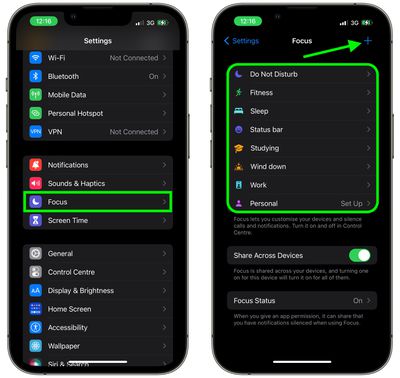
  2. Tap Focus.
  3. Choose an existing Focus profile, or tap the + button in the top-right corner of the screen to create a new one.
    focus

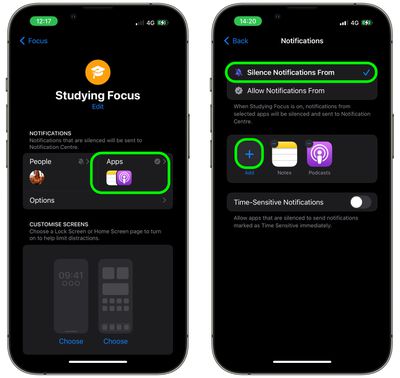
  4. If you're creating a new Focus profile, give it a name and icon, then tap the Apps section. If you selected an existing Focus, tap the Apps section on the next screen.
  5. Make sure Silence Notifications From is checked at the top, then tap the + button and select the apps that you want to silence notifications from.
  6. Tap Done when you're finished.
    focus

That's all there is to it. Note that on the same Notifications screen, you can also optionally allow time-sensitive notifications from apps you've silenced notifications for.

Although your Focus status can be synced across all your devices, bear in mind that silence lists will not be supported on other devices unless they have been updated to iOS 16.

Popular Stories

MacBook Neo Feature Pastel 1

First MacBook Neo Benchmarks Are In: Here's How It Compares to the M1 MacBook Air

Thursday March 5, 2026 4:07 pm PST by
Benchmarks for the new MacBook Neo surfaced today, and unsurprisingly, CPU performance is almost identical to the iPhone 16 Pro. The MacBook Neo uses the same 6-core A18 Pro chip that was first introduced in the iPhone 16 Pro, but it has one fewer GPU core. The MacBook Neo earned a single-core score of 3461 and a multi-core score of 8668, along with a Metal score of 31286. Here's how the...
MacBook Neo Feature Pastel 1

Apple Announces $599 'MacBook Neo' With A18 Pro Chip

Wednesday March 4, 2026 6:15 am PST by
Apple today announced the "MacBook Neo," an all-new kind of low-cost Mac featuring the A18 Pro chip for $599. The MacBook Neo is the first Mac to be powered by an iPhone chip; the A18 Pro debuted in 2024's iPhone 16 Pro models. Apple says it is up to 50% faster for everyday tasks than the bestselling PC with the latest shipping Intel Core Ultra 5, up to 3x faster for on-device AI workloads,...
Multicolored Low Cost A18 Pro MacBook Feature

Apple Accidentally Leaks 'MacBook Neo'

Tuesday March 3, 2026 7:00 am PST by
Apple appears to have prematurely revealed the name of its rumored lower-cost MacBook model, which is expected to be announced this Wednesday. A regulatory document for a "MacBook Neo" (Model A3404) has appeared on Apple's website. Unfortunately, there are no further details or images available yet. While the PDF file does not contain the "MacBook Neo" name, it briefly appeared in a link...