BluetoothIconXBluetooth is what your Mac uses to connect to wireless devices like keyboards, mice, trackpads, speakers, and other peripherals. Generally, it's a reliable technology. At some point however, the chances are you'll run into difficulty establishing a Bluetooth connection with one or more of your devices.

Most problems can be fixed by unpairing and repairing the Bluetooth device, changing its batteries, rebooting your Mac, or performing an SMC reset. But if none of these methods work, you can always try resetting your Mac's Bluetooth module. Here's how to do it in macOS using the hidden Bluetooth Debug menu.

How to Reset Your Mac's Bluetooth Module

Before proceeding, bear in mind that if your setup relies exclusively on Bluetooth for communicating with your keyboard and mouse, then you're going to temporarily lose connection to them using the following methods, so you might want to have a backup wired input device option just in case.

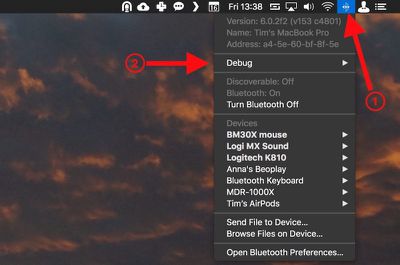
  1. Holding the Shift + Option (Alt) keys on your Mac's keyboard, click the Bluetooth symbol in the top-right corner of the macOS menu bar. (If you don't see it there, you need to check Show Bluetooth in menu bar in System Preferences -> Bluetooth.)
    macos bluetooth debug menu bar

  2. Locate the revealed Debug submenu and hover your mouse cursor over it.

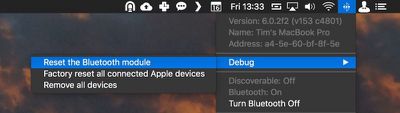
  3. Click Reset the Bluetooth module.
    macos reset Bluetooth module

  4. Now, restart your Mac.

You'll notice a couple of other potentially useful options in the Debug submenu. Factory reset all connected Apple devices does exactly what it says – forces any Apple-branded Bluetooth accessories back to the default settings they came with out of the box. It's a reliable fallback option if you've tried everything else to fix a connection issue, including resetting the Bluetooth module.

Lastly, the Remove all devices option might prove useful if you're moving your Bluetooth mouse and keyboard to another Mac, for example. However, you can also remove devices on an individual basis from the macOS menu bar, as long as you hold down Shift + Option (Alt) before you click the Bluetooth symbol.
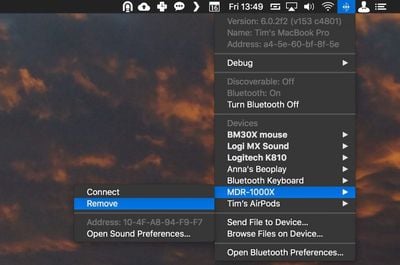
remove Bluetooth device macOS
Removing devices in this manner means you're not also banishing a whole bunch of other established Bluetooth connections like speakers and so on that you might want to keep.


Top Rated Comments

ignatius345 Avatar
101 months ago
Enjoying all these hints lately a lot more than "news" about iOS games or rumored emoji changes.

Kind of reminds me of that great OS X Hints site (now defunct), if anybody remembers that. http://hints.macworld.com
Score: 7 Votes (Like | Disagree)
zoemacuser Avatar
101 months ago
get some AirPods. They work great
Not sure how that’d help with my car system, Bluetooth speaker from Bose, etc.
Score: 3 Votes (Like | Disagree)
Rychiar Avatar
101 months ago
I find Bluetooth frustrating with my iPhone. My headset never auto-connects and I have to manually do it in settings. We should've come further than this.
get some AirPods. They work great
Score: 2 Votes (Like | Disagree)
Traverse Avatar
101 months ago
This is actually very useful. I’ve had problems with BT every so often
Score: 2 Votes (Like | Disagree)
Nimrad Avatar
101 months ago
I find Bluetooth frustrating with my iPhone. My headset never auto-connects and I have to manually do it in settings. We should've come further than this.
Score: 1 Votes (Like | Disagree)
Benz63amg Avatar
70 months ago

Thanks for this article; resetting the bluetooth module solved my year-old problem!
What problem was it?
Score: 1 Votes (Like | Disagree)

Popular Stories

iPhone Top Left Hole Punch Face ID Feature Purple

iPhone 18 Pro Features Leaked in New Report, Including Under-Screen Face ID

Tuesday December 16, 2025 8:44 am PST by
Next year's iPhone 18 Pro and iPhone 18 Pro Max will be equipped with under-screen Face ID, and the front camera will be moved to the top-left corner of the screen, according to a new report from The Information's Wayne Ma and Qianer Liu. As a result of these changes, the report said the iPhone 18 Pro models will not have a pill-shaped Dynamic Island cutout at the top of the screen....
Apple Logo Top Half

Early iOS 26 Software Leak Uncovers Dozens of Upcoming Apple Features

Monday December 15, 2025 3:05 pm PST by
Software from an iPhone prototype running an early build of iOS 26 leaked last week, giving us a glimpse at future Apple devices and iOS features. We recapped device codenames in our prior article, and now we have a list of some of the most notable feature flags that were found in the software code. In some cases, it's obvious what the feature flags are referring to, while some are more...
iOS 26

iOS 26.3 Beta 1 Features: What's New So Far

Monday December 15, 2025 4:23 pm PST by
Apple is testing iOS 26.3, the next version of iOS 26 that will launch around January. Since iOS 26.3's testing is happening over the holidays, it is a smaller update with fewer features than we've seen in prior betas. We've rounded up what's new so far, and we'll add to our list with subsequent betas if we come across any other features. Transfer to Android Apple is making it simpler...
apple beta 26 lineup

Apple Leak Confirms Work on Foldable iPhone, AirTag 2, and Dozens More Devices

Monday December 15, 2025 2:05 pm PST by
Last week, details about unreleased Apple devices and future iOS features were shared by Macworld. This week, we learned where the information came from, plus we have more findings from the leak. As it turns out, an Apple prototype device running an early build of iOS 26 was sold, and the person who bought it shared the software. The OS has a version number of 23A5234w, and the first...
apple music chatgpt

ChatGPT's Apple Music Integration Is Now Live

Wednesday December 17, 2025 3:50 pm PST by
There's now a dedicated Apple Music app for ChatGPT, which allows ChatGPT to make music recommendations and build playlists. Apple Music can be added to ChatGPT through the Settings section in the Mac app, website, or iOS app. Apple Music is listed under the apps option, and connecting to it requires signing in with your Apple Account for authorization purposes. ChatGPT can be used to...
apple iphone air battery pack

Apple Aims to Boost Popularity of iPhone Air 2 in Two Ways

Tuesday December 16, 2025 11:06 am PST by
We have been covering iPhone 18 Pro, iPhone 17e, and iPhone Fold details from The Information's report about future iPhone models, and next up is the iPhone Air 2. The report says that Apple aims to make the iPhone Air 2 more attractive in two ways. First, Apple is apparently considering adding a second rear camera to the device, which would resolve a key limitation. The current iPhone...
maxresdefault

Apple Developing iMac Pro With M5 Max Chip

Tuesday December 16, 2025 7:30 am PST by
Apple is developing a high-end iMac featuring the M5 Max chip, according to information from leaked internal software. Subscribe to the MacRumors YouTube channel for more videos. The finding comes from leaked kernel debug kit files used by Apple engineers. These kernel debug kit files enumerate unreleased Apple hardware by internal identifiers, such as codenames and platform names, and they...
Apple Foldable Thumb

Leak Reveals Foldable iPhone Details

Monday December 15, 2025 9:09 am PST by
The first foldable iPhone will feature a series of design and hardware firsts for Apple, according to details shared by the Weibo leaker known as Digital Chat Station. According to a new post, via machine translation, Apple is developing what the leaker describes as a "wide foldable" device, a term used to refer to a horizontally oriented, book-style foldable with a large internal display....
apple beta 26 lineup

Apple's 2026 and 2027 Product Roadmap: Foldable iPhone, iPhone 18 Pro, M5 Macs, and More

Tuesday December 16, 2025 4:42 pm PST by
There has been a whirlwind of rumors over the last few days, sourced from leaked internal software designed for the iPhone and the Mac, and news sites like The Information. Below, we have a quick recap of everything we've heard this week, which serves as a guide to Apple's product plans in 2026 and beyond. We've organized the info by likely release date, though there are some products that...