iOS 16: How to Pin Tabs in Safari on iPhone and iPad - MacRumors
Skip to Content

iOS 16: How to Pin Tabs in Safari on iPhone and iPad

by

In iOS 16 and iPadOS 16, Apple's Safari browser has inherited a handy feature from Safari on Mac – the ability to pin tabs. Keep reading to learn how it works on iPhone and iPad.
iOS 16 Safari Guide Feature
Safari's pinned tabs feature lets you better organize your tabs, especially if find you have too many open at the same time. It's particularly useful if you have certain websites that you tend to visit frequently throughout the day.

That's because when you pin a tab in iOS 16, you no longer need to go searching through all of your open tabs for it, because it gets moved right to the top of the open tabs screen, like so.
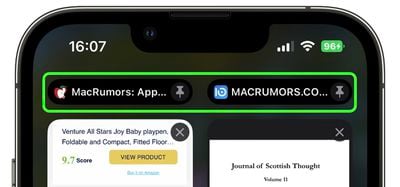
safari
The other neat thing about pinned tabs is that they stay in place, even when you open a new Safari window or quit and reopen Safari. And when you click a link to another website from a pinned tab, the other website opens in a new tab, ensuring your pinned tab always shows the website you pinned.

Pinning a tab that you want to come back to is easy. If you have the tab open and selected in Safari, simply long press the URL bar and select Pin Tab from the popover menu.
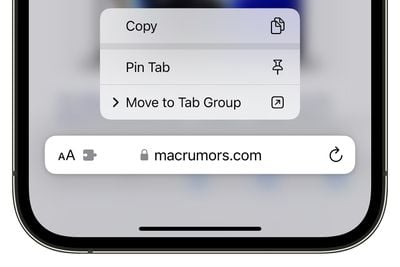
pin tab ios 16 tab groups
If you're viewing Safari's open tabs browser screen, find the open tab that you want to pin and long press on it, then select Pin Tab from the popover menu.
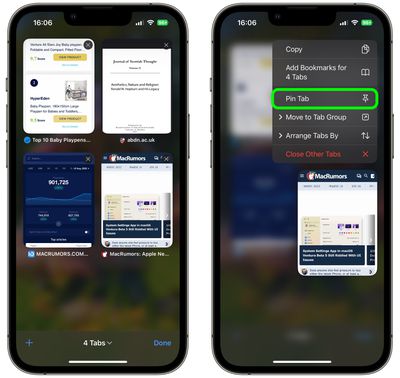
safari
Not only can you pin multiple tabs in Safari in iOS 16, you can also pin tabs that are part of Tab Groups so that they are open all the time. To pin a tab to a Tab Group in ‌iOS 16‌, open up the Tab Group, then long press on the URL bar and tap the Pin Tab option.

Tag: Safari

Popular Stories

Apple Event Logo

Apple Just Released a New Accessory

Monday May 4, 2026 8:13 am PDT by
Apple today released a new Pride Edition Sport Loop for the Apple Watch. The band features a rainbow design with 11 colors of woven nylon yarns. The new Pride Edition Sport Loop is available to order now on Apple.com and in the Apple Store app in 40mm, 42mm, and 46mm sizes, and it will be available at Apple Store locations starting later this week. In the U.S., the band costs $49. There...

iOS 26

Apple Says iOS 26.5 Adds Three New Features to Your iPhone

Tuesday May 5, 2026 7:36 am PDT by
iOS 26.5 includes three new features for iPhones, according to Apple's release notes for the update, which is expected to be released next week. As discovered during beta testing, iOS 26.5 enables end-to-end encryption for RCS messaging between iOS and Android devices. Apple says this security upgrade is limited to supported carriers around the world and will continue to roll out....
Instagram Feature 2

PSA: Instagram Encrypted Messaging Ends on Friday, May 8

Tuesday May 5, 2026 8:24 am PDT by
Instagram will remove end-to-end encryption for direct messages between users from May 8, 2026. When the date comes around, Meta will potentially be able to see the contents of all messages between users on the social media platform. Encrypting messages has been an optional feature in Instagram since 2023, but in March of this year the social media platform quietly updated a help page to say ...