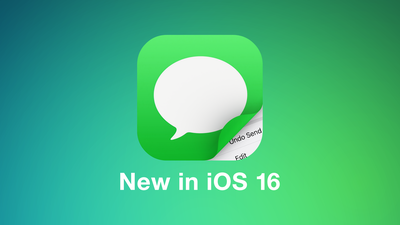
In iOS 16, Apple has brought some welcome feature additions to its stock Messages app. One of these features is the ability to mark a message as unread. Keep reading to learn how it works.
iOS 16 Messages Guide Feature
Email programs have long given users the ability to mark messages as unread. The feature is considered useful because it means if you get a message and don't have time to read it or address its contents, you can mark it as unread so that it appears as a new message again.

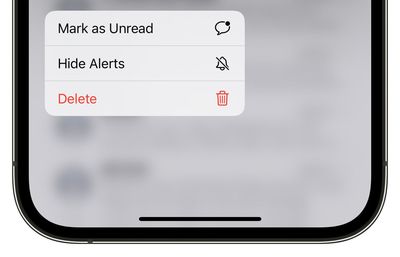
In iOS 16, Apple is finally bringing the same feature to its Messages app, so you can mark an SMS message or iMessage as new, thereby returning the blue dot to the message to remind you to return to it.

Here's how you mark a Message as unread on an iPhone or iPad running iOS 16 or iPadOS 16.

  1. Open the Messages app, and find the message in the conversations list that you want to mark as unread.
  2. Long press on the message in the conversations list.
  3. Tap Mark as Unread from the pop-over menu.
    ios 16 mark as unread messages

That's all there is to it. Did you know that you can also edit iMessages in iOS 16? Check out our dedicated how-to to learn how.

Popular Stories

imac video apple feature

Apple Unveils First New Products of 2026

Monday January 26, 2026 1:55 pm PST by
Apple today introduced its first two physical products of 2026: a second-generation AirTag and the Black Unity Connection Braided Solo Loop for the Apple Watch. Read our coverage of each announcement to learn more:Apple Unveils New AirTag With Longer Range, Louder Speaker, and More Apple Introduces New Black Unity Apple Watch BandBoth the new AirTag and the Black Unity Connection Braided...
iPhone 5s

iPhone 5s Gets New Software Update 13 Years After Launch

Monday January 26, 2026 3:56 pm PST by
Alongside iOS 26.2.1, Apple today released an updated version of iOS 12 for devices that are still running that operating system update, eight years after the software was first released. iOS 12.5.8 is available for the iPhone 5s and the iPhone 6, meaning Apple is continuing to support these devices for 13 and 12 years after launch, respectively. The iPhone 5s came out in September 2013,...
Apple Creator Studio

Apple's Next Launch is Today

Tuesday January 27, 2026 2:39 pm PST by
Update: Apple Creator Studio is now available. Apple Creator Studio launches this Wednesday, January 28. The all-in-one subscription provides access to the Final Cut Pro, Logic Pro, Pixelmator Pro, Motion, Compressor, and MainStage apps, with U.S. pricing set at $12.99 per month or $129 per year. A subscription to Apple Creator Studio also unlocks "intelligent features" and "premium...
Apple Logo Black

Apple Just Made Its Second-Biggest Acquisition Ever After Beats

Thursday January 29, 2026 10:07 am PST by
Apple today confirmed to Reuters that it has acquired Q.ai, an Israeli startup that is working on artificial intelligence technology for audio. Apple paid close to $2 billion for Q.ai, according to sources cited by the Financial Times. That would make this Apple's second-biggest acquisition ever, after it paid $3 billion for the popular headphone and audio brand Beats in 2014. Q.ai has...
Second Generation AirTag Feature

Apple Unveils New AirTag With Longer Range, Louder Speaker, and More

Monday January 26, 2026 6:07 am PST by
Apple today introduced the second-generation AirTag, with key features including longer range for tracking items and a louder speaker. For those who are not familiar, the AirTag is a small accessory that you can attach to your backpack, keys, or other items. Then, you can track the location of those items in the Find My app on the iPhone, iPad, Mac, Apple Watch, and iCloud.com. The new...