 In the Safari browser for iOS 13, Apple has added a new Website View menu that brings together useful options for browsing web pages, making them less challenging to navigate and easier on the eyes.
This article introduces you to the Website View menu's text size controls, which allow you to adjust the font size of a web page. In many cases, these controls work even if the website doesn't natively support zooming.
You can find the Website View menu in what's called the Smart Search field at the top of the Safari interface. Launch the app and navigate to a website, then tap the "aA" icon in the upper left corner of the screen.
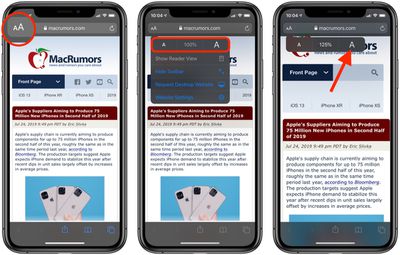
The text zoom options appear at the top of the Web View dropdown menu – tap the smaller A to reduce the zoom percentage and the bigger A to increase it. It's that simple.
The great thing about the Website View menu is that Safari will remember your preferences for that specific website and apply it automatically the next time content is loaded from the same parent URL.
Helpfully, all the zoom settings you've chosen for specific websites appear in the Settings app: simply tap Page Zoom, which you can find under "Settings for Websites".
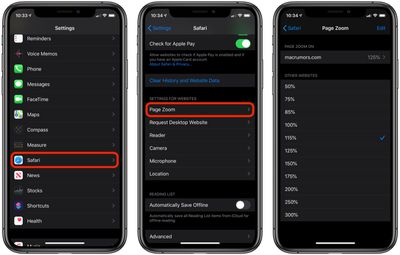
From here, you can also define the default text zoom level that Safari applies to all other websites that you haven't specifically set a preference for, which should make your general web browsing a more pleasurable experience overall.