If you are looking for an easy way to identify the species of plants and flowers that doesn't involve reaching for a taxonomy book, then try your iPhone. You don't even need to purchase an app, because in iOS 15 and later, Apple's software includes a feature called Visual Lookup that will do just what you need.
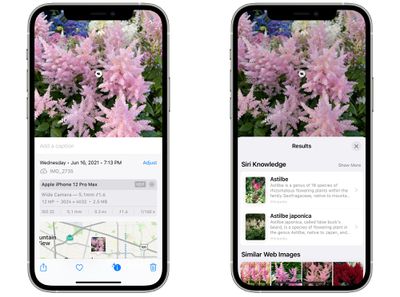
photos visual lookup
Since iOS 15, Apple has made advances in its on-device machine learning and integrated them into its stock Photos app to make your ‌iPhone‌ more intelligent at recognizing the contents of pictures you take.

This means the ‌Photos‌ app can identify various objects, landmarks, animals, books, plants, works of art, and more in your image library, and then offer information about them that it draws from the web.

The following steps show you how to use Visual Lookup to get taxonomic information on plants and flowers whenever you come across one that you don't recognize.

  1. Open the Photos app on your ‌iPhone‌ and select a picture with a clearly defined subject, such as a flower or animal.
  2. Check the info ("i") icon at the bottom of the screen. If it has a little star over it, tap it – this indicates there's a Visual Lookup you can examine.
  3. Tap the little icon in the center of the photo to bring up the Lookup search results.
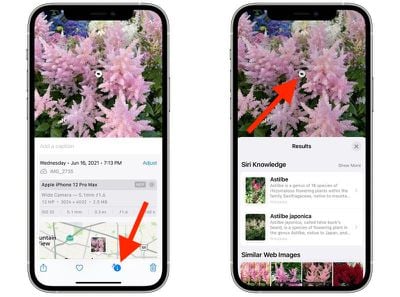
photos
Visual Lookup search results consist of Siri Knowledge, similar images found on the web, and other online sources of information. Note that Visual Lookup has limited availability depending on your region.


Popular Stories

m5 macbook pro deal

Why You Shouldn't Buy the Next MacBook Pro

Tuesday February 10, 2026 4:27 pm PST by
Apple is planning to launch new MacBook Pro models as soon as early March, but if you can, this is one generation you should skip because there's something much better in the works. We're waiting on 14-inch and 16-inch MacBook Pro models with M5 Pro and M5 Max chips, with few changes other than the processor upgrade. There won't be any tweaks to the design or the display, but later this...
iOS 26

Apple Releases iOS 26.3 and iPadOS 26.3

Wednesday February 11, 2026 10:07 am PST by
Apple today released iOS 26.3 and iPadOS 26.3, the latest updates to the iOS 26 and iPadOS 26 operating systems that came out in September. The new software comes almost two months after Apple released iOS 26.2 and iPadOS 26.2. The new software can be downloaded on eligible iPhones and iPads over-the-air by going to Settings > General > Software Update. According to Apple's release notes, ...
Apple Logo Zoomed

Apple Expected to Launch These 10+ Products Over the Coming Months

Tuesday February 10, 2026 6:33 am PST by
It has been a slow start to 2026 for Apple product launches, with only a new AirTag and a special Apple Watch band released so far. We are still waiting for MacBook Pro models with M5 Pro and M5 Max chips, the iPhone 17e, a lower-cost MacBook with an iPhone chip, long-rumored updates to the Apple TV and HomePod mini, and much more. Apple is expected to release/update the following products...
iPhone 16e Bottom Crop

Apple Reportedly Unveiling a New iPhone Next Week

Tuesday February 10, 2026 1:51 pm PST by
Apple plans to announce the iPhone 17e on Thursday, February 19, according to Macwelt, the German equivalent of Macworld. The report said the iPhone 17e will be announced in a press release on the Apple Newsroom website, so do not expect an event for this device specifically. The iPhone 17e will be a spec-bumped successor to the iPhone 16e. Rumors claim the device will have four key...
Apple Logo Black

Apple Acquires New Database App

Wednesday February 11, 2026 6:44 am PST by
Apple acquired Canadian graph database company Kuzu last year, it has emerged. The acquisition, spotted by AppleInsider, was completed in October 2025 for an undisclosed sum. The company's website was subsequently taken down and its Github repository was archived, as is commonplace for Apple acquisitions. Kuzu was "an embedded graph database built for query speed, scalability, and easy of ...