

iOS 15: How to Hide App Notification Badges on the Home Screen - MacRumors
Skip to Content

iOS 15: How to Hide App Notification Badges on the Home Screen

by

In iOS 15, Apple includes a new feature called Focus that's designed to help you reduce distractions for a set time. It's a useful tool to have at your fingertips when you want to be left alone to concentrate on something or simply rest.
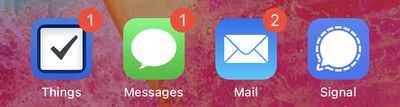
notification badges
With a pre-set Focus mode enabled, you can filter or hide incoming notifications, including notification badges for all apps on your device's Home Screen. The following steps show you how to hide notification badges on your iPhone and iPad.

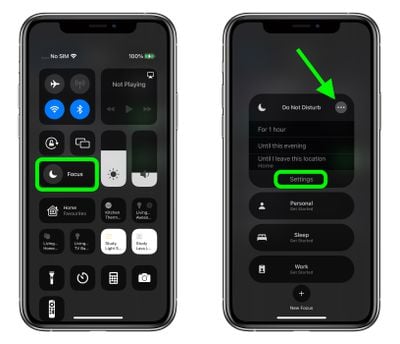
  1. Open Control Center by swiping down diagonally from the top-right corner of the screen.
  2. Tap the Focus button.
  3. Tap the ellipsis (three dots) button next to a Focus mode, then select Settings in the dropdown.
    focus

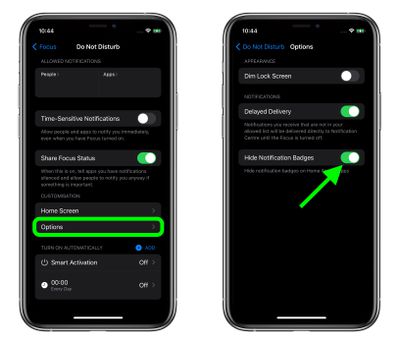
  4. Under "Customization," tap Options.
  5. Tap the switch next to Hide Notification Badges to enable the option.
    Focus

  6. Now open Control Center again, tap Focus, then enable the Focus mode for which you just opted to hide notification badges.
Note that when you have a Focus mode enabled, it syncs across Apple devices, so the same settings will apply to your Mac as well as your iPhone or ‌iPad‌, for example.

Related Forum: iOS 15

Popular Stories

iPhone 18 Pro Deep Red Feature

iPhone 18 Pro Launching Next Month With These 12 New Features

Sunday August 9, 2026 1:45 pm PDT by

It is now August, and that means the iPhone 18 Pro and iPhone 18 Pro Max are just a month away. The devices are expected to look similar to the iPhone 17 Pro and iPhone 17 Pro Max, but there will still be many year-over-year changes, with rumored features including a smaller Dynamic Island, 5G via satellite, and more. Apple is expected to unveil the iPhone 18 Pro, iPhone 18 Pro Max, and a...
iPhone 18 Pro Deep Red Feature

iPhone 18 Pro Launching Next Month With These 12 New Features

Thursday August 6, 2026 7:03 am PDT by
It is now August, and that means the iPhone 18 Pro and iPhone 18 Pro Max are just a month away. The devices are expected to look similar to the iPhone 17 Pro and iPhone 17 Pro Max, but there will still be many year-over-year changes, with rumored features including a smaller Dynamic Island, 5G via satellite, and more. Apple is expected to unveil the iPhone 18 Pro, iPhone 18 Pro Max, and a...
iOS 27 Feature Cool

Everything New in iOS 27 Beta 5

Monday August 10, 2026 3:02 pm PDT by
We're a little over a month away from the launch of iOS 27, and Apple is continuing to make changes. The fifth beta of iOS 27 changes the look of some app icons and adjusts Liquid Glass, plus it adds some smaller features that make the iPhone just a little nicer to use. App Icons There are updated Liquid Glass icons for Safari, Siri, Settings, Remote, App Store, and Preview. Some of the...










































