Erasing your iPhone or iPad is a good idea when it comes to selling the device, giving it away, or taking it to a store for repairs. It's also one way to start afresh if your device's storage is nearing full capacity, so it's worth knowing how it's done.
Unity Bloom Wallpaper iPhone iPad
Before you erase anything though, you should back up your device, just in case. You can back up your data to iCloud, but we'd advise you connect your ‌‌iPhone‌‌ up to a computer and perform a manual backup instead. Do that now, before going any further.

Now that you've backed up your ‌‌iPhone‌‌ or ‌‌iPad‌‌, it's time to erase the device. It's a simple procedure, once you know how. The following steps guide you through the process.

Erasing Your iPhone or iPad

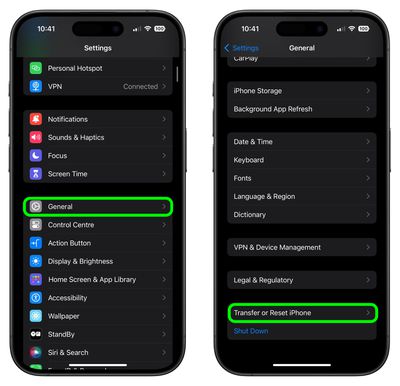
  1. Unlock your ‌iPhone‌ or ‌iPad‌ and launch the Settings app.
  2. Tap General.
  3. Scroll to the bottom and tap Transfer or Reset iPhone (or iPad).
    settings

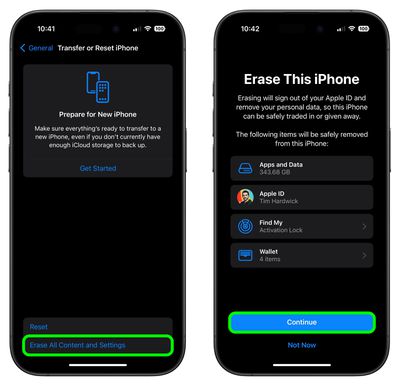
  4. Tap Erase All Content and Settings.
  5. Review the details of the data about to be wiped, then tap Continue.
  6. Tap in your passcode if requested.
  7. Enter your Apple ID password to erase the ‌iPhone‌ and remove it from your account.
  8. Tap Erase.
    settings

Allow the reset process to continue – it shouldn't take any longer than a couple of minutes. Once it's completed, you'll see the iOS or iPadOS welcome screen, then you're free to power off the device and sell it, pass it on, take it in for repair, set it up as new, or restore a backup.


Popular Stories

Verizon New

Verizon is Down: iPhones Show 'SOS' Mode Due to Network Outage [Resolved]

Wednesday January 14, 2026 10:18 am PST by
Verizon is experiencing a major outage across the U.S. today, with hundreds of thousands of customers reporting issues with the network on the website Downdetector. There are also complaints across Reddit and other social media platforms. iPhone users and others with Verizon service are generally unable to make phone calls, send text messages, or use data over 5G or LTE due to the outage....
iPhone Top Left Hole Punch Face ID Feature Purple

New Leak Reveals iPhone 18 Pro Display Sizes, Under-Screen Face ID, and More

Wednesday January 14, 2026 7:09 am PST by
While the iPhone 18 Pro models are still around eight months away, a leaker has shared some alleged details about the devices. In a post on Chinese social media platform Weibo this week, the account Digital Chat Station said the iPhone 18 Pro and iPhone 18 Pro Max will have the same 6.3-inch and 6.9-inch display sizes as the iPhone 17 Pro and iPhone 17 Pro Max. Consistent with previous...
iPhone Top Left Hole Punch Face ID Feature Purple

iPhone 18 Pro Launching Later This Year With These 12 New Features

Thursday January 15, 2026 10:56 am PST by
While the iPhone 18 Pro and iPhone 18 Pro Max are not expected to launch for another eight months, there are already plenty of rumors about the devices. Below, we have recapped 12 features rumored for the iPhone 18 Pro models, as of January 2026: The same overall design is expected, with 6.3-inch and 6.9-inch display sizes, and a "plateau" housing three rear cameras Under-screen Face ID...
2024 iPhone Boxes Feature

Apple Adjusts Trade-In Values for iPhones, Macs, and More

Thursday January 15, 2026 11:19 am PST by
Apple today updated its trade-in values for select iPhone, iPad, Mac, and Apple Watch models. Trade-ins can be completed on Apple's website, or at an Apple Store. The charts below provide an overview of Apple's current and previous trade-in values in the United States, according to the company's website. Most of the values declined slightly, but some of the Mac values increased. iPhone ...
maxresdefault

Google Gemini-Powered Siri Will Reportedly Have These 7 New Features

Tuesday January 13, 2026 7:52 pm PST by
Apple and Google this week announced that Gemini will help power a more personalized Siri, and The Information has provided more details. Subscribe to the MacRumors YouTube channel for more videos. As soon as this spring, the report said the revamped version of Siri will be able to… Answer more factual/world knowledge questions in a conversational manner Tell more stories Provide...