WhatsApp in 2020 launched disappearing messages on its end-to-end encrypted chat platform as a way of doubling down on user privacy. If you want to have control over how long a message lasts in WhatsApp, read on to learn how it works.

When you sit down and have a face-to-face conversation with someone, usually you're reasonably confident that your conversation isn't being recorded and stored somewhere. With its disappearing messages feature, WhatsApp attempts to offer a similar sense of confidence in the knowledge that you aren't leaving a permanent record or digital copy of everything that's said in a chat thread.
By enabling disappearing messages by default, you can choose how long they stick around in all new chats. The life of new messages can be set to 24 hours, seven days, or 90 days, and setting the option does not change or delete any of your existing chats.
Just remember that if the recipient of your message doesn’t open WhatsApp in the 24-hour, seven-day, or 90-day period, the message will disappear from the chat, but the preview of the message might still be displayed in their system notifications until WhatsApp is opened.
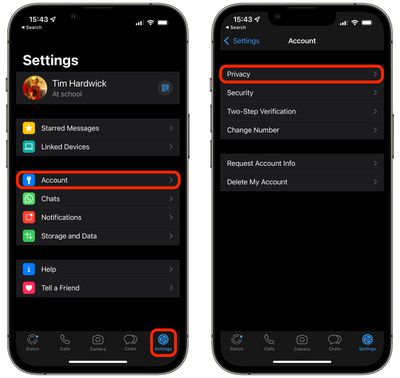
- Open WhatsApp on your iPhone and tap Settings in the strip of options along the bottom of the screen (you may need to exit out of a chat thread to see it).
- Tap Account.
- Tap Privacy.

- Under "Disappearing Messages," tap Default Message Timer.
- Select a duration after which messages should disappear in new chats. Options include 24 Hours, 7 Days, 90 Days, and Off.
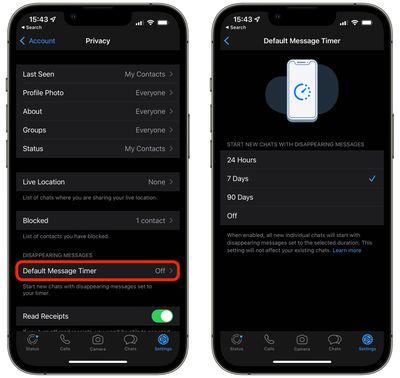
Note that when you've chosen a duration for disappearing messages, all new individual chats will set to the selected duration, but your selection won't affect any of your existing WhatsApp chats.
It's also worth bearing in mind that in group chats, any group participants can turn disappearing messages on or off. However, a group admin can change group settings to allow only admins to turn disappearing messages on or off.