In macOS Ventura and later, Apple includes an accessibility feature for Mac called Background Sounds. These sounds are designed to help you stay focused at work, promote calm, and minimize distractions. Keep reading to learn how it works.
Apple first introduced Background Sounds on iPhone, allowing users to play ambient soundscapes in the background. This feature is also available on Macs, so you can play calming sounds in your office or study to mask unwanted environmental noise and help minimize distractions so you can focus or rest.
The Background Sounds on offer include balanced, bright, and dark noise, as well as natural sounds like ocean, rain, and stream. All of the sounds can be set to play in the background to mask unwanted environmental or external noise, and the sounds mix into or duck under other audio and system sounds.
Follow the steps to access the Background Sounds feature in macOS 13 and later.
- Click the Apple () symbol in your Mac's menu bar.
- Select System Settings... from the dropdown menu.
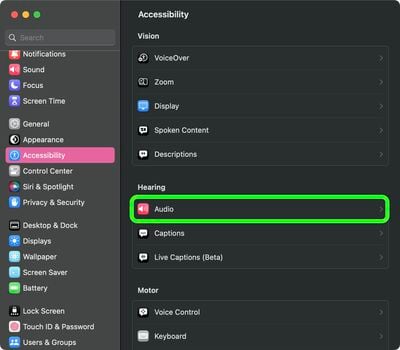
- Select Accessibility from the settings sidebar, then click Audio under the "Hearing" sub-menu.

- In the section titled "Background Sounds," click the Choose... button.
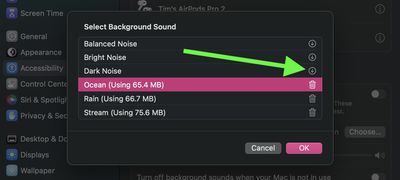
- Click the download button next to the sound you want to use.
- Once the audio file has downloaded, click Done.
- Toggle on the switch next to Background Sounds to begin playing the ambient soundscape.
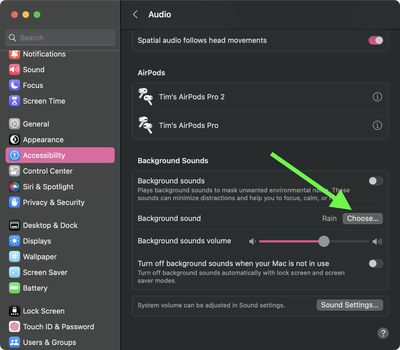
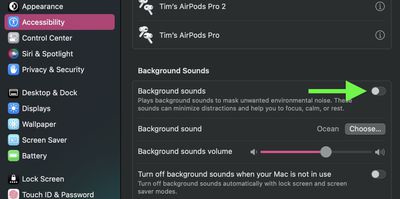
You can adjust the volume of the background sound independently using the volume slider in the Background Sounds menu. Note there's also an option to Turn off background sounds when your Mac is not in use – this will automatically turn off the audio when the Lock Screen or screen saver is active.