Delete Redundant Burst Mode Photos on iPhone and iPad - MacRumors
Skip to Content

Delete Redundant Burst Mode Photos on iPhone and iPad

by

Burst Mode refers to when the camera on your iOS device captures a series of photos in rapid succession, at a rate of ten frames per second. It's a great way to shoot an action scene or an unexpected event, since you're always more likely to end up with the picture you were aiming for.

burstmode
Whenever you take a series of burst photos, they automatically appear in the Photo app under the Album name Bursts. You'll also find them in the Recent Days section. Here's how to view your burst photos, pick out the best image for safe keeping, and delete the rest to save on storage space.

How to Delete Redundant Burst Photos

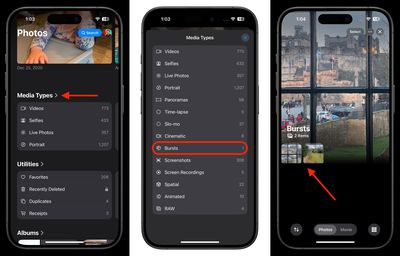
  1. In Photos, scroll down and tap Media Types.
  2. Select the Bursts album from the list. (If you don't see it, you haven't taken any Burst shots.)
  3. Tap a Burst collection to view it.
    photos

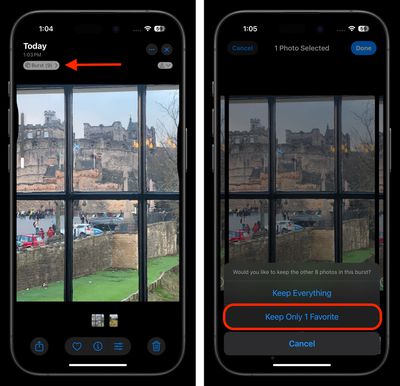
  4. Tap the Burst pill above the image in the upper left corner.
  5. Tap each image in the series that you want to keep. Any dots you see below images in a burst indicate that Apple's algorithms think they have the best focus and detail in the set, but you may think differently.
  6. Tap Done in the top-right corner of the screen.
  7. To keep only the images that you ticked in the burst series, select Keep Only Favorites from the pop-up menu.
    photos

That's all there is to it. To reclaim further device storage, be sure to check out our dedicated guide.


Popular Stories

apple back to school sans airpods 2

Apple's 2026 Back to School Offer is Coming Soon

Sunday July 12, 2026 7:29 am PDT by
Apple's stores will be rolling out Back to School marketing materials this week, according to Bloomberg's Mark Gurman. This suggests that the offer will begin in the U.S. in the next few days. Last year, college students and educational staff could receive a free accessory like AirPods 4 or an Apple Pencil Pro with the purchase of a qualifying Mac or iPad model. The Back to School offer is in...

Waze logo

5 New Waze Features Rolling Out Now: Here Are All the Details

Monday July 13, 2026 3:42 am PDT by
Google today announced that Waze is getting a handful of new features, including some Gemini-powered personalization enhancements for Conversational Reporting. Conversational Reporting already uses Gemini when users report traffic incidents like slowdowns, but now you can use it to suggest map updates like road closures or outdated addresses. Saying something like "The road is closed here"...
apple silicon 1 feature

Apple Silicon is Taking an Unexpected Turn

Friday July 10, 2026 7:24 am PDT by
Ever since the Mac switched from Intel processors to Apple silicon starting in 2020, each generation of M-series chips has included higher-end Pro and Max variants. If a recent report proves to be accurate, though, that streak will be coming to an end. According to Bloomberg's Mark Gurman, Apple will be releasing a regular M6 chip, but it has no plans to offer higher-end M6 Pro and M6 Max...