When you install third-party apps on your iPhone, they sometimes automatically install apps on your Apple Watch, too. Some of these wrist-based apps can be worthwhile additions, but many simply duplicate the function of the ‌iPhone‌ app and just fill up your Apple Watch with useless cruft. This article shows you two quick ways to delete unwanted Apple Watch apps.
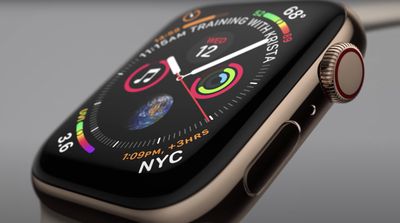
apple watch close up

How to Uninstall Apple Watch Apps Using iPhone

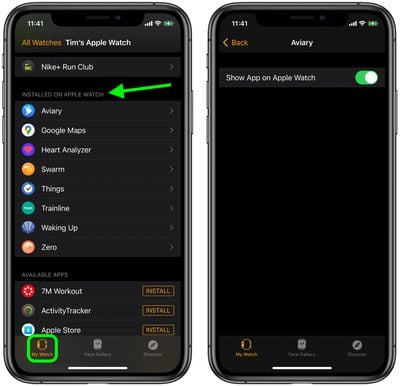
  1. Launch the iOS Watch app on your ‌iPhone‌.
  2. Tap My Watch in the bottom-left corner of the screen.
  3. Scroll down to the "Installed on Apple Watch" list and tap the app that you want to uninstall.
  4. Toggle the switch next to Show App on Apple Watch to the grey OFF position.
watch app

How to Delete Apple Watch Apps From Your Wrist

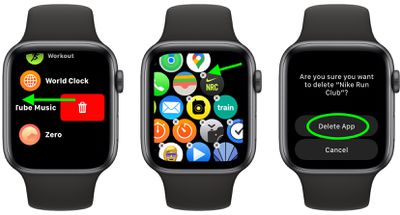
  1. Press the Digital Crown on your Apple Watch to bring up the App View.
  2. If you're using List View, swipe left across the app you want to remove, then tap the red trash button. If you're using Grid View, tap and hold to activate jiggle mode, then tap the X in the top-left corner of the app you want to remove.
  3. Tap Delete App to confirm.

apple watch

Want more tips for Apple Watch? Check out our favorite tips and tricks for watchOS 7.

Related Roundups: Apple Watch 11, Apple Watch SE 3
Related Forum: Apple Watch

Popular Stories

maxresdefault

Where's the New Apple TV?

Monday December 22, 2025 11:30 am PST by
Apple hasn't updated the Apple TV 4K since 2022, and 2025 was supposed to be the year that we got a refresh. There were rumors suggesting Apple would release the new Apple TV before the end of 2025, but it looks like that's not going to happen now. Subscribe to the MacRumors YouTube channel for more videos. Bloomberg's Mark Gurman said several times across 2024 and 2025 that Apple would...
top stories 2025 12 20

Top Stories: iOS 26.3 Beta, Major Apple Leaks, and More

Saturday December 20, 2025 6:00 am PST by
You'd think things would be slowing down heading into the holidays, but this week saw a whirlwind of Apple leaks and rumors while Apple started its next cycle of betas following last week's release of iOS 26.2 and related updates. This week also saw the release of a new Apple Music integration with ChatGPT, so read on below for all the details on this week's biggest stories! Top Stories i...
iPhone Top Left Hole Punch Face ID Feature Purple

iPhone 18 Pro Features Leaked in New Report, Including Under-Screen Face ID

Tuesday December 16, 2025 8:44 am PST by
Next year's iPhone 18 Pro and iPhone 18 Pro Max will be equipped with under-screen Face ID, and the front camera will be moved to the top-left corner of the screen, according to a new report from The Information's Wayne Ma and Qianer Liu. As a result of these changes, the report said the iPhone 18 Pro models will not have a pill-shaped Dynamic Island cutout at the top of the screen....
iOS 26

iOS 26.3 Brings AirPods-Like Pairing to Third-Party Devices in EU Under DMA

Monday December 22, 2025 3:20 pm PST by
The European Commission today praised the interoperability changes that Apple is introducing in iOS 26.3, once again crediting the Digital Markets Act (DMA) with bringing "new opportunities" to European users and developers. The Digital Markets Act requires Apple to provide third-party accessories with the same capabilities and access to device features that Apple's own products get. In iOS...
ios 18 security update

Don't Want to Upgrade to iOS 26? Here's How to Stay on iOS 18 [Update: Now Unavailable]

Friday December 19, 2025 10:37 am PST by
Since the beginning of December, Apple has been pushing iPhone users who opted to stay on iOS 18 to install iOS 26 instead. Apple started by making the iOS 18 upgrades less visible, and has now transitioned to making new iOS 18 updates unavailable on any device capable of running iOS 26. If you have an iPhone 11 or later, Apple is no longer offering new versions of iOS 18, even though there...
iOS 26

iOS 26.2 Adds These 8 New Features to Your iPhone

Monday December 22, 2025 8:47 am PST by
Earlier this month, Apple released iOS 26.2, following more than a month of beta testing. It is a big update, with many new features and changes for iPhones. iOS 26.2 adds a Liquid Glass slider for the Lock Screen's clock, offline lyrics in Apple Music, and more. Below, we have highlighted a total of eight new features. Liquid Glass Slider on Lock Screen A new slider in the Lock...
iPhone Chips

Apple Clings to Samsung as RAM Prices Soar

Monday December 22, 2025 6:17 am PST by
Apple is significantly increasing its reliance on Samsung for iPhone memory as component prices surge, according to The Korea Economic Daily. Apple is said to be expanding the share of iPhone memory it sources from Samsung due to rapidly rising memory prices. The shift is expected to result in Samsung supplying roughly 60% to 70% of the low-power DRAM used in the iPhone 17, compared with a...
iPhone Top Left Hole Punch Face ID Feature Purple

iPhone 18 Pro Launching Next Year With These 12 New Features

Tuesday December 23, 2025 8:36 am PST by
While the iPhone 18 Pro and iPhone 18 Pro Max are not expected to launch for another nine months, there are already plenty of rumors about the devices. Below, we have recapped 12 features rumored for the iPhone 18 Pro models. The same overall design is expected, with 6.3-inch and 6.9-inch display sizes, and a "plateau" housing three rear cameras Under-screen Face ID Front camera in...