iOS 15.4: How to Customize iPadOS Corner Gestures - MacRumors
Skip to Content

iOS 15.4: How to Customize iPadOS Corner Gestures

by

In iPadOS 15, Apple introduced a new productivity feature called Quick Notes that provides a quicker way to jot down things on your iPad without you having to go in and out of the Notes app.

Quick Notes Feature
Whether you're on the Home Screen or within any app, you can bring up a floating Quick Note window at any time using your finger or an Apple Pencil, by swiping diagonally up from the bottom-right corner of the screen.

In iOS 15.4, currently in beta, Apple has made it possible to change the corner of the screen that you swipe from to invoke Quick Notes, or to add the same gesture to the bottom-left corner of the screen.

Not only that, it has also made it possible to add a second corner gesture that takes an instant screenshot, and it has added an option turn off corner gestures completely. Here's how to customize your corner gestures.

  1. Launch the Settings app on your ‌iPad‌.
  2. Scroll down and tap Notes.
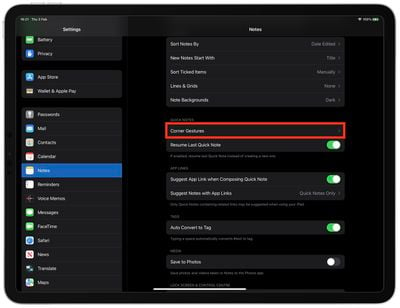
  3. Under the section "Quick Notes," tap Corner Gestures.
    settings

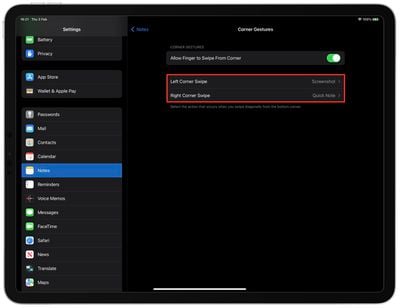
  4. Tap Left Corner Swipe or Right Corner Swipe.
  5. Choose Quick Note or Screenshot to add that action to the selected bottom-corner gesture, or choose Off to disable the corner gesture completely.
    settings

Note that the Corner Gestures menu in Settings has an on/off toggle to Allow Finger to Swipe From Corner in case you want to disable them altogether.

Tag: iPadOS

Popular Stories

Apple Event Logo

Apple's Next Era Begins September 1

Thursday May 7, 2026 10:36 am PDT by
Apple recently announced that Tim Cook will be stepping down as CEO later this year, after 15 years of leading the company. Effective September 1, Apple's hardware engineering chief John Ternus will become the company's next CEO, while Cook will become executive chairman of Apple's board of directors. In his new role, Apple said Cook will assist with "certain aspects" of the company,...
Instagram Feature 2

PSA: Instagram Encrypted Messaging Ends on Friday, May 8

Tuesday May 5, 2026 8:24 am PDT by
Instagram will remove end-to-end encryption for direct messages between users from May 8, 2026. When the date comes around, Meta will potentially be able to see the contents of all messages between users on the social media platform. Encrypting messages has been an optional feature in Instagram since 2023, but in March of this year the social media platform quietly updated a help page to say ...
macbook neo launch day

Apple May Drop Base $599 MacBook Neo as Chip, DRAM Costs Climb

Thursday May 7, 2026 4:55 am PDT by
Apple is considering dropping the cheapest MacBook Neo configuration as one possible response to the rising cost of building the popular laptop, according to Taiwan-based tech columnist and former Bloomberg reporter Tim Culpan. The Neo currently starts at $599 for a 256GB model, with a 512GB version at $699. Writing in his latest Culpium newsletter, Culpan says cutting the entry-level...