Skip to Content

iOS 15: How to Blur Your Background on a FaceTime Call

by

In iOS 15, Apple brings several enhancements to FaceTime, including new visual and audio effects to improve the video call experience.
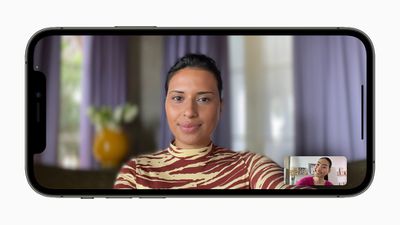
Apple iPhone12Pro iOS15 FaceTime portraitmode 060721 big
One of the new visual features is Portrait mode in calls. With this mode enabled, you can blur your background so that the focus is on you rather than what's behind you.

The feature is commonly used by other video conferencing apps like Zoom and Teams to obscure untidy domestic scenes and other sources of distraction or embarrassment. Here's how it works in ‌FaceTime‌ on iPhones and iPads running iOS 15.

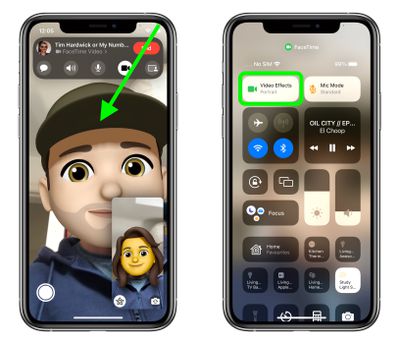
  1. Launch the FaceTime app and initiate a video call.
  2. Open Control Center with a diagonal swipe down from the top-right corner of your screen.
  3. Tap the Video Effects button.
    FaceTime

  4. Tap the Portrait button to enable it.
  5. Swipe up from the bottom of the screen to dismiss Control Center and return to the call.
    ios 15 facetime portrait 2

Unless you expand your view of yourself, you won't see too much difference in your appearance when Portrait mode is enabled, but the person on the other end of the call will see your environment faintly blurred, just like in a Portrait mode photo.


Related Forum: iOS 15

Popular Stories

iOS 27 Mock Quick

iOS 27 Will Reportedly Be Like Mac OS X Snow Leopard

Sunday March 15, 2026 9:42 am PDT by
In his Power On newsletter today, Bloomberg's Mark Gurman reiterated that iOS 27 will be similar to 2009's Mac OS X Snow Leopard, in the sense that one of Apple's biggest priorities is bug fixes for improved performance and stability. During WWDC 2008's State of the Union, Apple showed a slide that said Mac OS X Snow Leopard had "0 new features," as it opted to focus on performance and...
AirPods Max 2 Feature

Apple Announces AirPods Max 2 With H2 Chip and More

Monday March 16, 2026 6:12 am PDT by
Apple today unveiled AirPods Max 2, with key upgrades including the H2 chip, increased active noise cancellation, improved sound quality, and features such as Adaptive Audio, Conversation Awareness, Voice Isolation, and Live Translation. The new AirPods Max have the same overall design as the previous generation, with most of the new features coming from the upgrade to the H2 chip:- Adaptive ...
apple design award 2025

Apple Announces 2025 Design Award Winners Ahead of WWDC 2025

Tuesday June 3, 2025 10:14 am PDT by
As we wait for WWDC to kick off next Monday, Apple today announced the winners of its annual Apple Design Awards, recognizing apps and games for their innovation, ingenuity, and technical achievement. The 2025 Apple Design Award winners are listed below, with one app and one game selected per category: Delight and Fun - CapWords (App) and Balatro (Game) Innovation - Play (App) and PBJ -...