

If you find your iPhone regularly running out of battery later in the day, Low Power Mode is a handy option to have available. This article shows how to make Low Power Mode automatically turn on when your iPhone's battery reaches a certain level.
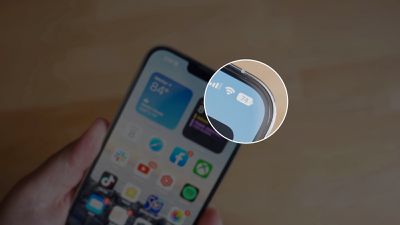
Most iPhone users will be familiar with the way iOS throws up a prompt to turn on Low Power Mode when the battery reaches 20%. Low Power Mode can also be turned on manually at any time by going to Settings -> Battery and toggling on the switch next to Low Power Mode.
If you find yourself constantly having to turn on Low Power Mode late in the day, why not set it up to run automatically when your battery is depleted to a certain level? By using personal automations in the Shortcuts app, you can do just that.
Bear in mind that Low Power Mode reduces your iPhone's performance and cuts out some background activities. For example, mail must be fetched manually, background app refresh is disabled, and motion and brightness are reduced.
If you're okay with those limitations, follow the steps below to automate the setting on your iPhone.
- Open the Shortcuts app on your iPhone.
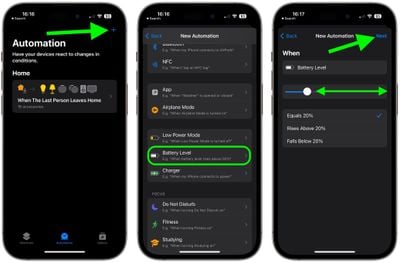
- Select the Automation tab at the bottom of the screen, then tap the + button in the top-right corner.
- Tap Create Personal Automation.
- Scroll down and select Battery Level from the options.
- Drag the slider to adjust the percentage level for when Low Power Mode should be activated (the prompt is normally triggered when the battery equals 20%), then tap Next.

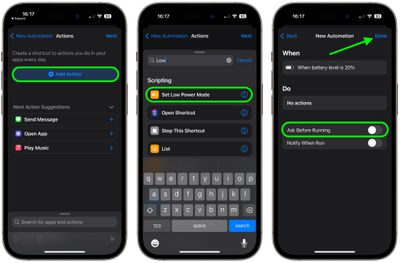
- Tap Add Action.
- Search for "Set Low Power Mode" and select it from the results, then tap Next.
- To ensure the automation runs in the background, toggle off the switch next to Ask Before Running, then tap Done.
Your personal automation should now be listed in the automation screen, ready to run when your iPhone next reaches the threshold you selected to enable Low Power Mode.


















