

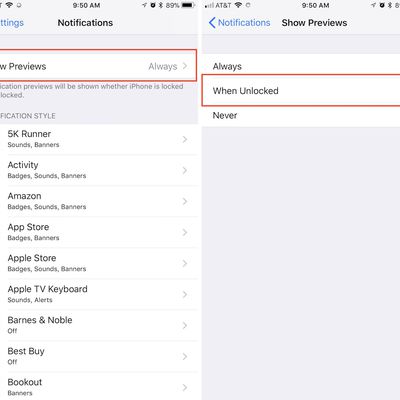
How to Hide Text Previews for Every App Notification on iOS 11's Lock Screen
iOS 11 has introduced a simple blanket solution for those who want to hide text previews for all of their apps at one time, bringing about a quick remedy for anyone concerned about privacy on iPhone and iPad. In previous iterations of iOS, you could only toggle the "Show Preview" notification setting on or off for select apps, and the feature was largely exclusive to a few of Apple's own...
Read Full Article • 13 comments
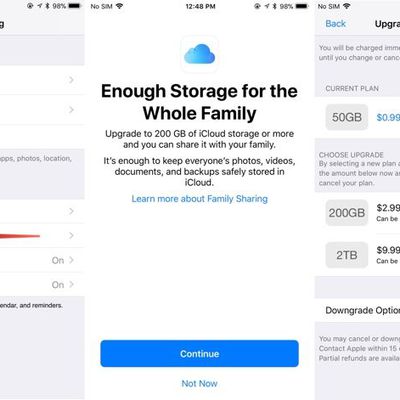
How to Sign Up for iCloud Family Storage Plans in iOS 11
Apple's Family Sharing feature allows you to share music, movies, apps, photos, and more with family members, and in iOS 11, Family Sharing extends to Apple's iCloud Storage plans.
When you purchase a 200GB or 2TB iCloud Storage plan, all members of your family can share the storage space. Depending on how many family members you have, family plans offer more storage at a better price than...
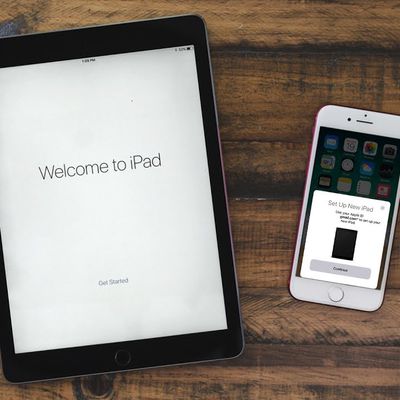
How to Use Automatic Setup in iOS 11 to Get Your New iPhone 8 Up and Running Quick
iOS 11 includes a new "Automatic Setup" feature, which is aimed at making it quicker to get a new device ready to use right out of the box. Automatic Setup streamlines the setup process for new iPhones and iPads, transferring over preferences, Apple ID and Wi-Fi info, preferred settings, and iCloud Keychain passwords.
Automatic Setup is not the same as restoring from an iCloud backup and it...

How to Use Instant Markup to Quickly Edit Screenshots
When you take a screenshot in iOS 11 or later, there's a new feature that's designed to let you open it right up and edit it with Apple's Markup tools.
Using the screenshot editing feature, you can capture what's on the screen of your iPad or iPhone and then add text, crop, highlight specific areas, and more.
Using Instant Markup
Press the Home button and the sleep/wake button...
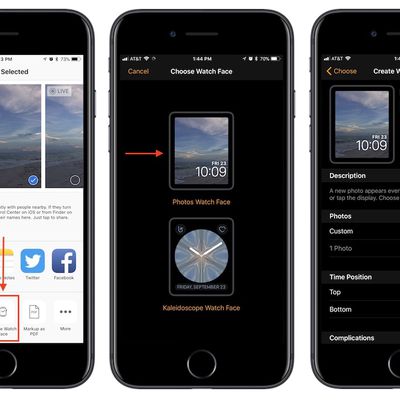
How to Turn a Photo Into an Apple Watch Face
With the launch of iOS 11 and watchOS 4, Apple made it easier than ever to turn your own personal photography into an Apple Watch face. As long as you're running iOS 11 or later and watchOS 4 or later on your iPhone and Apple Watch, follow these steps to quickly add one of your Camera Roll pictures onto the face of your Apple Watch, where you can even turn it into a kaleidoscope faces.
Turning ...
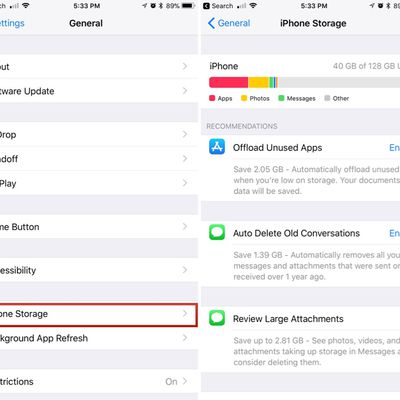
How to Save Space Using Built-In iOS Storage Features
Starting with iOS 11, Apple began offering a new feature that provides suggestions on how you can save space on your iOS device. These built-in space-saving suggestions, which can be found in the Settings app, can help you free up space on your iPhone when storage space is running low.
Toggling on Space Saving Suggestions
Open the Settings app.
Scroll down and tap on "General."
Choo...

How to Use the Flashlight on Your Apple Watch
watchOS 4 brought several new features to the Apple Watch, including a new flashlight function that lights up the face of the Apple Watch so you can have an extra light when you're digging around in a bag, trying to open a door in the dark, or wherever else you might require a little bit of light.
It doesn't put off as much light as an iPhone screen, but it's handy in a pinch, especially since ...
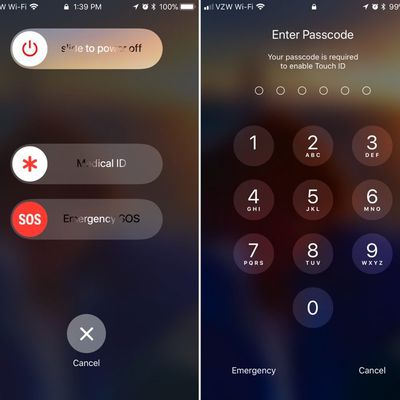
How to Use Emergency SOS on iPhone and Apple Watch
Starting with iOS 11, Apple added a new emergency feature to the iPhone, which is designed to allow you to quickly and discreetly place a call to emergency services. In the United States, SOS dials 911, and in other countries, it works with local emergency response teams.
Emergency SOS is activated through a series of button presses on an iPhone running iOS 11 or later, and the buttons you...
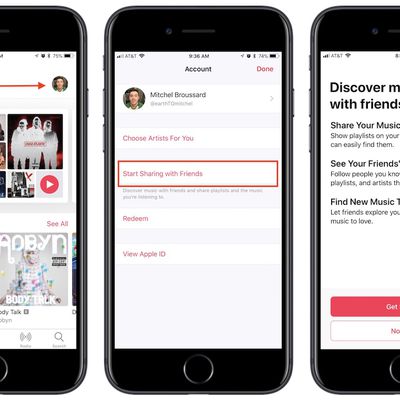
How to Make an Apple Music Profile to Connect With Friends in iOS 11
Although Apple has fumbled with social network features within its music apps in the past, the company is trying again with an all-new social sharing ability in iOS 11. There's no exact name for the feature, but Apple describes it as a way for you to discover music that your friends are listening to through sharing playlists, artists, and albums on your own personal Apple Music profile.
If you ...
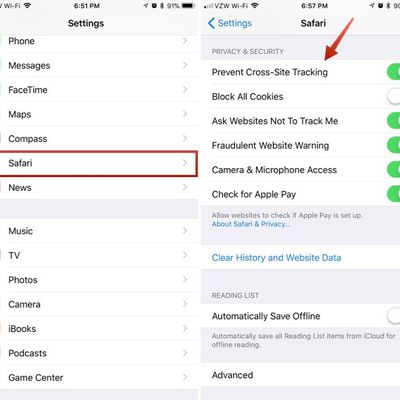
Safari in iOS 11: Enabling Cross-Site Tracking Prevention to Protect Your Privacy
Safari in iOS 11 introduces a new tracking prevention feature that's meant to protect your privacy and make it harder for companies to track your browsing habits across multiple websites.
Disabling Cross-Site Tracking isn't going to cut down on the number of ads that you see, but it will make it harder for advertisers to gather data about what you've been browsing to deliver targeted ads....
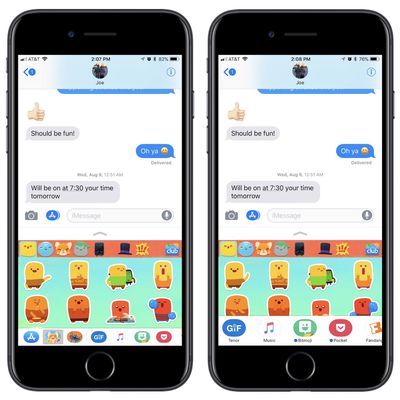
How to Use the Redesigned Messages App Drawer in iOS 11
In iOS 10, Apple introduced the Messages App Store, allowing users to jump into miniature versions of their favorite apps so they could do things like choose a movie time, send their location, pay a friend, give a recommendation from Apple Music, and attach stickers. With the launch of iOS 11, the app drawer and selection experience of Messages apps have been streamlined, and this guide will walk ...
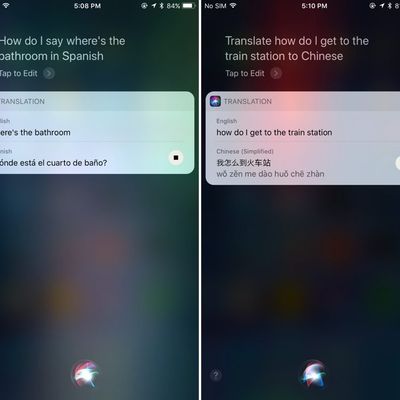
How to Use Siri's New Translation Feature in iOS 11
iOS 11 brings new functionality to Siri, including a translation feature that allows Siri to translate words and phrases spoken in English to a handful of other languages. Translation is super simple to use, and while the translations aren't always perfect, they get the gist of what you're attempting to say across to someone who speaks another language.
Using Siri Translate
Activate...
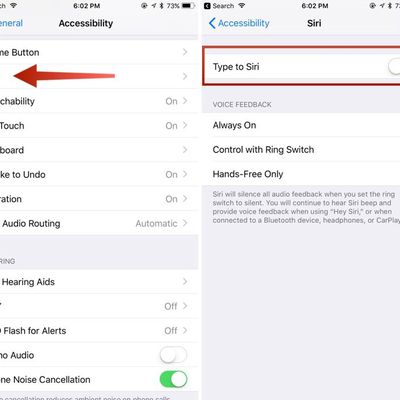
How to Enable Type to Siri in iOS
One of the common complaints about Siri is the vocal component -- speaking to Siri must be done verbally, which can be embarrassing and inconvenient in social situations. Apple hasn't provided a clear cut solution like an integrated Siri and Spotlight search feature, but iOS has had a Type to Siri feature since iOS 11.
Type to Siri is a function designed for those who are unable to speak, but...
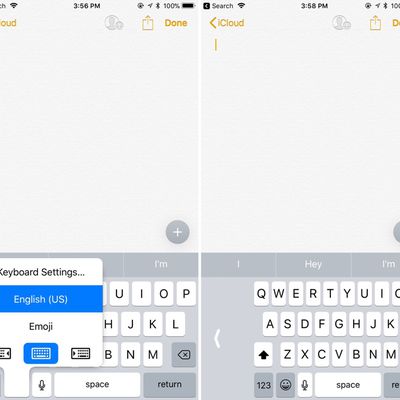
How to Use the New One-Handed Keyboard in iOS 11
There are a lot of little small tweaks and feature changes buried in iOS 11, and an option for a one-handed keyboard is one of them. With the one-handed keyboard, the entire on-screen keyboard can be shifted to either the left or the right so you can type more comfortably with a single hand even with a phone as large as the iPhone 7 Plus.
The feature is compatible with 4.7-inch and 5.5-inch...
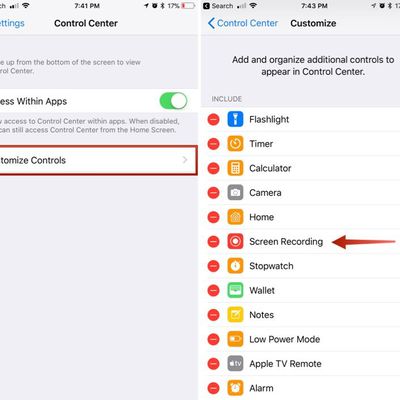
How to Screen Record Your iPhone or iPad
iOS comes with a handy new Control Center function that allows you to record what you're doing on your screen. It's great if you want to capture gameplay, walk someone through a tutorial in an app, demonstrate a bug, and more, and it's available on both iPhones and iPads.
Subscribe to the MacRumors YouTube channel for more videos.
Enabling Screen Recording Button
If you don't have the...
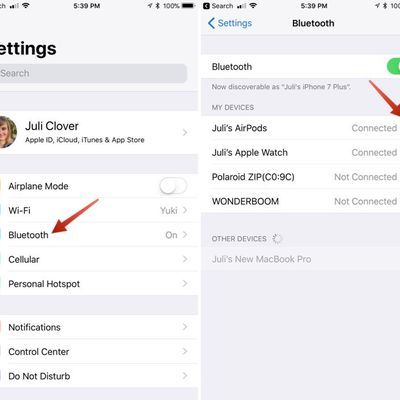
How to Customize the Gestures on Your AirPods
Your AirPods are equipped with accelerometers and other hardware that allow them to respond to a double tap, and though it isn't obvious, these gestures can be customized to your liking. Here's how:
Make sure your AirPods are connected to your iPhone or iPad, either when you're wearing them or with the case open and nearby your device.
Open up the Settings app.
Choose "Bluetooth."
Ne...
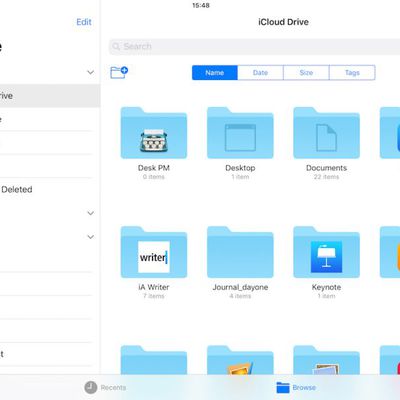
How to Use the New Files App in iOS 11
The new Files app in iOS 11 replaces iCloud Drive, offers a lot more functionality than its predecessor, and provides perhaps the best argument yet for using an iPad as your go-to mobile computer.
In Files, you have access not only to the files stored on your device and in iCloud, but also to those stored in third-party services that support integration with the app. Files also exploits all...
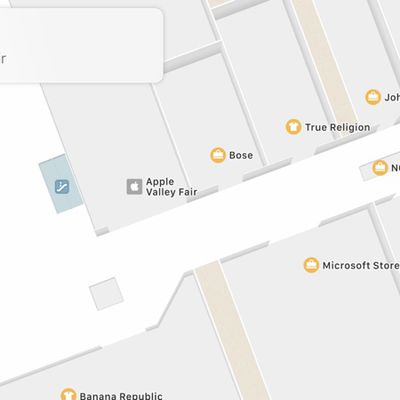
What's New in Maps in iOS 11: Indoor Mapping, Lane Guidance and Speed Limits
The Maps app in iOS 11 is outfitted with several new features that significantly improve the app's functionality. Indoor maps let you find restaurants, bathrooms, and other locations in airports and malls, while other new features like speed limits and lane guidance improve turn-by-turn directions.
Fun fact: In iOS 11, Apple has also updated the Maps icon. The new version is meant to show off...
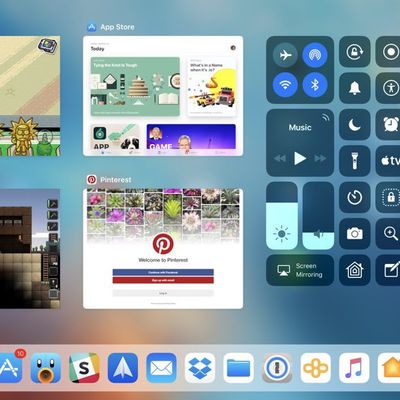
How to Use the iPad App Switcher
On the iPad, iOS 11 and iOS 12 merge the Control Center with the App Switcher as part of an overhauled interface that's meant to put more of a focus on multitasking. The update also adds new ways to access the App Switcher and it brings new, enhanced app switching functionality.
Accessing the App Switcher
On the Home screen, simply swipe up and hold to bring up the App Switcher.
Within ...
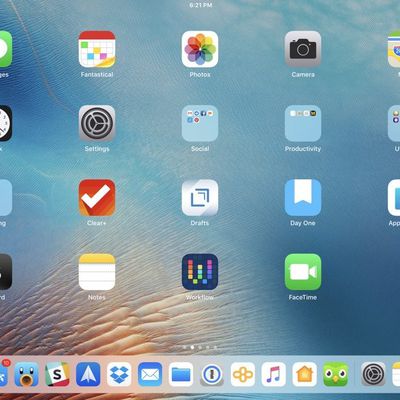
How to Use the New iPad Dock in iOS 11
iOS 11 is an update that brings a much improved user experience to the iPad, and front and center is a new dock. The new dock not only houses far more apps, much like the dock on the Mac, but it also much improves multitasking by allowing iPad users to quickly open apps and switch between them.
Subscribe to the MacRumors YouTube channel for more videos.
The dock is persistent and can be...














