Following the release of macOS Catalina version 10.15.7, an increasing number of users have experienced an issue with a system process named "accountsd" showing very high CPU usage in Activity Monitor, causing their Mac to slow down.

One user in the Apple Support Communities shared a screenshot of "accountsd" with CPU usage above 400%, rendering their 2018 MacBook Pro "useless."
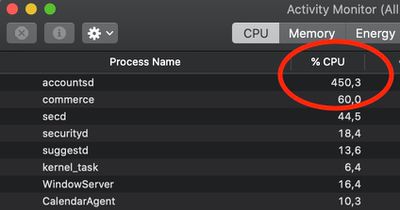
accountsd activity monitor
While this issue has popped up occasionally over the years, there has been a noticeable uptick in complaints across the Apple Support Communities, MacRumors Forums, Twitter, Reddit, Stack Exchange, and elsewhere since the release of macOS Catalina version 10.15.7, with users attempting to troubleshoot the issue.

What is accountsd?

Accountsd is a daemon, part of the Accounts framework. Apple's developer documentation says this framework helps users access and manage their external accounts from within apps, without requiring them to enter login credentials.

The Accounts framework provides access to user accounts stored in the Accounts database, which is managed by the system. An account stores the login credentials of a particular service, such as Twitter, and you use those credentials to authenticate with the service. When you integrate the Accounts framework into your app, you don't need to store account logins yourself. Instead, the user grants your app access to use their account login credentials, bypassing the need to type their username and password. If no account for a particular service exists in the user's Accounts database, you can let them create and save an account from within your app.

How to fix accountsd CPU usage?

Affected users have offered a wide range of potential solutions, but your mileage may vary.

Some users have managed to solve the issue by signing out of their Apple ID account under System Preferences > Apple ID > Overview > Sign Out, restarting their Mac, and then signing back in to the account, but this has not worked for everyone.

Some users have solved the issue by resetting their Mac's SMC and/or NVRAM.

One user on Stack Exchange believes the issue relates to a bug with file indexing on the Mac. Their solution involves resetting the indexing by navigating to System Preferences > Spotlight > Privacy and adding (+) your storage drive ("Macintosh HD" by default) to the "Prevent Spotlight from searching these locations" list. Then, remove (-) the drive from the list, and the Mac will begin reindexing. The indexing process can temporarily slow down your Mac, so these steps are recommended to be completed overnight.

As for more advanced troubleshooting, some users have had success with navigating to "~/Library/Accounts" and renaming the file "Accounts4.sqlite" to "Accounts4.sqlite.testbackup" or using more complex Terminal commands, but proceed with caution, as these solutions could impact your iCloud accounts or syncing.

Apple has yet to acknowledge this issue. Should a software update be released with a fix, we will update this article accordingly.

Related Forum: macOS Catalina

Top Rated Comments

70 months ago
buying a new mac always solves the problem and is the official solution straight from Apple HQ
Score: 21 Votes (Like | Disagree)
navaira Avatar
70 months ago
There is a bug in Catalina?

Unheard of.
Score: 16 Votes (Like | Disagree)
Internet Enzyme Avatar
70 months ago
This type of crap is so pervasive in macOS. . . Some stupid process like “photolibraryd” or something will just toss a plurality of your CPU into a bottomless pit
Score: 15 Votes (Like | Disagree)
70 months ago
I think this has been happening for the last 2-3 years (including Mojave) for me anyway. If apple is aware of it, it’s not priority and probably will not be fixed.
Score: 14 Votes (Like | Disagree)
WannaGoMac Avatar
70 months ago
Yet another reason to stick with Mojave...
Score: 10 Votes (Like | Disagree)
70 months ago
Yep, happened to me with a 2015 Macbook Pro. The whole OS was useless. To fix it, I signed out of iCloud and then signed in. No restart required.
Score: 9 Votes (Like | Disagree)

Popular Stories

M3 iPad Air

Apple's Next Two Products Are Coming Soon

Thursday February 12, 2026 11:17 am PST by
Apple plans to release an iPhone 17e and an iPad Air with an M4 chip "in the coming weeks," according to the latest word from Bloomberg's Mark Gurman. "Apple retail employees say that inventory of the iPhone 16e has basically dried out and the iPad Air is seeing shortages as well," said Gurman. "I've been expecting new versions of both (iPhone 17e and M4 iPad Air) in the coming weeks."...
Apple Sales Coach App

Apple Launching New 'Sales Coach' App

Friday February 13, 2026 2:01 pm PST by
Apple plans to launch a rebranded "Sales Coach" app on the iPhone and iPad later this month, according to a source familiar with the matter. "Sales Coach" will arrive as an update to Apple's existing "SEED" app, and it will continue to provide sales tips and training resources to Apple Store and Apple Authorized Reseller employees around the world. For example, there are articles and videos...
Coffee Burgundy and Purple iPhone 18 Pro Mock

Five iPhone 18 Pro Features Revealed in New Report

Friday February 13, 2026 8:43 am PST by
While the iPhone 18 Pro and iPhone 18 Pro Max are still seven months away, an analyst has revealed five new features the devices will allegedly have. Rumored color options for the iPhone 18 Pro models In a research note with investment firm GF Securities on Thursday, analyst Jeff Pu outlined the following upgrades for the iPhone 18 Pro models: Smaller Dynamic Island: It has been rumored...
iOS 26 Home Feature

Three New Apple Home Products Rumored for 2026

Friday February 13, 2026 4:18 pm PST by
Apple has a long list of new products rumored for 2026, including a series of home products that will see the company establishing more of a presence in the smart home space. Robots are on the horizon for 2027, but the 2026 releases will be a little tamer. HomePod mini We're expecting a new HomePod mini 2 to launch at any time. Apple isn't going to update the device's design, but we could...
Apple Announces Special Event in New York Feature

Apple Announces Special Event in New York, London, and Shanghai on March 4

Monday February 16, 2026 6:05 am PST by
Apple today announced a "special Apple Experience" in New York, London, and Shanghai, taking place on March 4, 2026 at 9:00am ET. Apple invited select members of the media to the event in three major cities around the world. It is simply described as a "special Apple Experience," and there is no further information about what it may entail. The invitation features a 3D Apple logo design...