iOS 27 is currently available as a developer beta, with a public beta set to follow in July. The update is expected to be released in September.
Below, we have recapped five new iOS 27 features that you might have missed.
Landscape Mode in More Apps
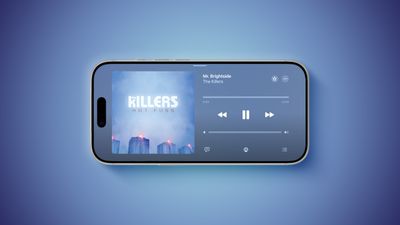
iOS 27 enables landscape mode in more of Apple's built-in iPhone apps, including Apple Music, Podcasts, Fitness, Health, Reminders, Home, Shortcuts, Apple Watch, Find My, Weather, Voice Memos, Apple TV Remote, and others.
In the Apple Music and Podcasts apps, landscape support is limited to the audio player for now.
Many of the apps feature a left-aligned sidebar in landscape mode. In the Messages app, which already supported landscape orientation on iOS 26 and earlier, you can now collapse the sidebar to show only names and profile pictures.
Landscape mode was already available on iOS 26 or earlier in Apple Maps, Calendar, Files, Notes, Mail, and some other Apple apps too, but iOS 27 expands support to many more apps. This change could be laying the groundwork for the "iPhone Ultra," as landscape-friendly apps would be well suited for the rumored foldable device.
iOS 27 also adds landscape support for Live Activities in the Dynamic Island.
To use landscape mode in a supported app, simply turn your iPhone sideways. Portrait Orientation Lock must be turned off in Control Center.
Landscape apps used to be more common on iOS many years ago. In fact, the Home Screen grid supported landscape orientation on the iPhone 6 Plus, iPhone 6s Plus, iPhone 7 Plus, and iPhone 8 Plus, but that functionality ended with the iPhone X.
Dual Capture for FaceTime
On the iPhone 17, iPhone 17 Pro, iPhone 17 Pro Max, and iPhone Air, a Dual Capture feature allows you to record video of yourself and what is in front of you at the same time. Starting with iOS 27, this feature is now supported in the FaceTime app on these devices, allowing you to show both your front and rear camera views on a video call.
New Drawing Tool in Messages
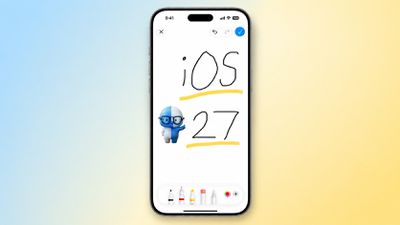
In the Messages app on iOS 27, there is a new "Drawing" option in the app drawer, which can be opened by tapping the plus sign in the bottom-left corner.
On older iOS versions, the Messages app once had a very basic drawing tool that was accessible by tapping a button on the keyboard in landscape orientation, but now Apple's complete set of Markup tools are available in the app.
Apple Cash Bill Splitting
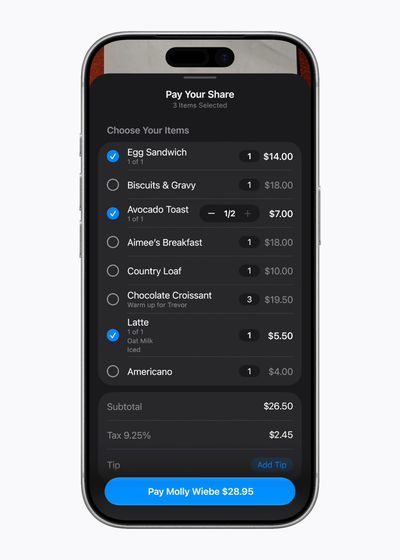
In the U.S. only, iOS 27 allows you to split bills with a new feature powered by Apple Cash and Apple Intelligence. This capability is available in the Apple Wallet and Messages apps, or by using the new Siri mode in the Camera app.
"When users point their iPhone at a receipt using Siri mode, it can surface the relevant action to split a bill with Apple Cash and identify the items on the receipt," said Apple. "As users select their items, their total payment is calculated, including their share of tax and tip, so they can pay back exactly what they owe with Apple Cash."
Find My Location Sharing Enhancements
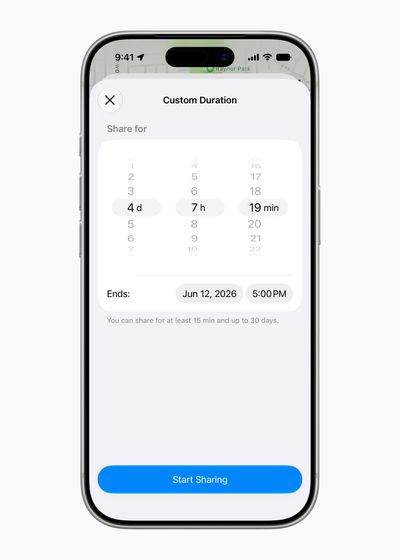
In the Find My app, you will have the ability to share your location with others for a custom duration, such as four days and six hours. Or, you can set a set an exact date and time for your location sharing to expire. In addition, you can now pause your location sharing with specific people until the end of the day, without them knowing.
On iOS 26 and earlier, there are only three preset timeframes available: indefinitely, until end of day, and one hour.


























![Apple Watch Ultra 3 Hits New Low Price With Amazon's $299 Discount [Updated]](https://images.macrumors.com/t/BXKI27vT0hWfumJQpYzf41rH3Mw=/112x112/article-new/2026/10/apple-watch-ultra-3-milanese.jpeg)