If the idea of digging out your Siri Remote to install a tvOS update on your Apple TV sounds like too much effort, Apple's upcoming iOS 27 software will have a new feature you'll surely welcome.
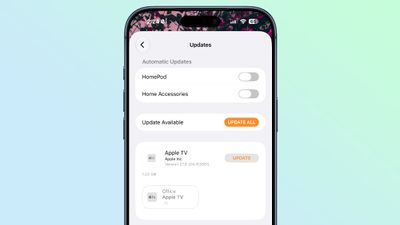
Based on the latest iOS 27 beta 2, you can push Apple TV software updates straight from your iPhone, and you don't even need to turn the Apple TV on first.
Apple's set-top box now appears in the Updates section of the iOS Home app's settings, right alongside the HomePod and HomePod mini, which have long supported the same thing. From there you can just tap the update button, and the newest software installs on its own. The same feature is also available from the Home app on iPad with iPadOS 27.
The feature addition suggests that Apple's upcoming smart home hub device that's reportedly in the works will also be controlled and updated through the Home app.
Apple is expected to launch a dedicated smart home hub later this year. Like the HomePod, it is expected to run a version of tvOS and serve as a central control point for smart home devices, video calls, Siri interactions, and information such as weather updates. Rumored features include a 7-inch square display and built-in speakers, suggesting a kind of hybrid between a HomePod and an iPad.
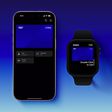
In a related addition, the virtual Apple TV remote can now be added to the iPhone's Home Screen in the beta software, so you don't necessarily have to invoke the Control Center to find it on your device.
iOS 27 is only on its second developer beta, but a public beta is due in July, while a wider rollout is expected this fall.
























![Apple Watch Ultra 3 Hits New Low Price With Amazon's $299 Discount [Updated]](https://images.macrumors.com/t/BXKI27vT0hWfumJQpYzf41rH3Mw=/112x112/article-new/2026/10/apple-watch-ultra-3-milanese.jpeg)