iOS 26.2 is currently in beta testing. The upcoming update includes a handful of new features and changes on the iPhone, including a new Liquid Glass slider for the Lock Screen's clock, offline lyrics for Apple Music, and more.
In a recent press release, Apple confirmed that iOS 26.2 will be released to all users in December, but it did not provide a specific release date.
Keep reading for eight new features coming with iOS 26.2. The update is compatible with the iPhone 11 and newer, but some features require a newer iPhone.
Liquid Glass Slider on Lock Screen
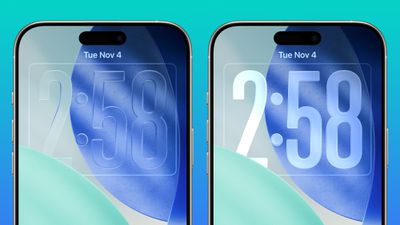
A new slider in the Lock Screen customization menu lets you adjust the opacity of Liquid Glass for the clock, allowing you to decide how clear or frosted it appears.
This comes after iOS 26.1 added "Clear" and "Tinted" options for Liquid Glass overall.
Offline Lyrics in Apple Music
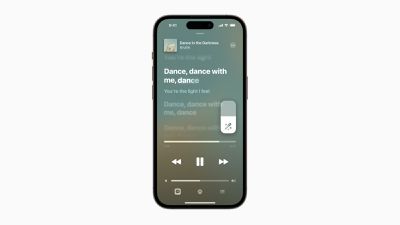
iOS 26.2 adds offline lyric support to Apple Music, allowing you to view a song's lyrics even when you are not connected to a Wi-Fi or cellular network.
Sleep Score Revisions
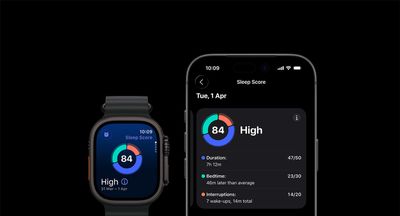
iOS 26.2 and watchOS 26.2 have revised Sleep Score ranges:
- Very Low: 0-40 (previously 0-29)
- Low: 41-60 (previously 30-49)
- OK: 61-80 (previously 50-69)
- High: 81-95 (previously 70-89)
- Very High: 96-100 (previously 90-100)
Apple says sleep scores are calculated based on how long you slept, the consistency of when you fell asleep, and the frequency and duration of waking up during the night. The feature is available in the Health app on all iPhone models compatible with iOS 26, and in the Sleep app on all Apple Watch models compatible with watchOS 26.
Alarms for Reminders
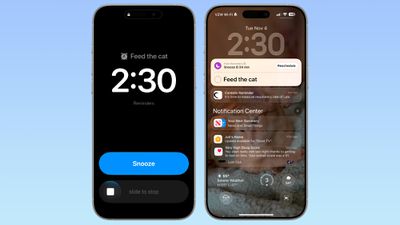
iOS 26.2 lets you set alarms for reminders in Apple's Reminders app.
When adding a reminder, selecting a time and then toggling on the "Urgent" option will cause an alarm to go off at the designated time.
Apple Podcasts Enhancements
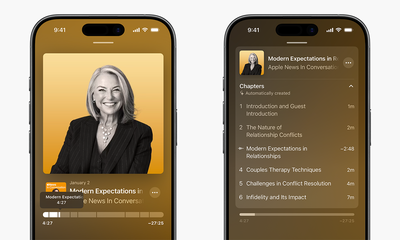
Apple's Podcasts app has three new features on iOS 26.2, including automatic chapters for episodes, timed links on the screen, and the ability to view other podcasts that a podcast mentions right from the audio player and the transcript.
Apple News Revamp
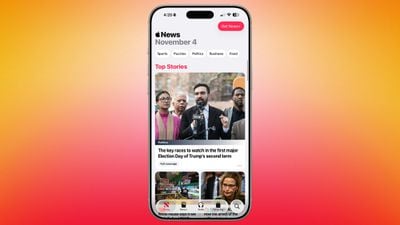
In the Apple News app, there is now a dedicated "Following" tab, and buttons for quick access to topics like sports, puzzles, politics, business, and food.
iPhone Screen Flash for Notifications
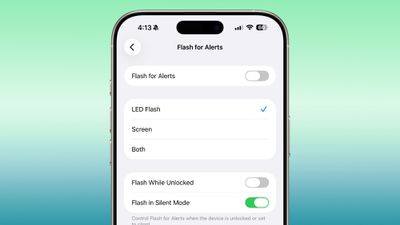
Starting with iOS 26.2, your iPhone's screen can flash when you receive a notification. Previously, this setting was limited to the LED camera flash on the back of the iPhone.
In the Settings app, under Accessibility → Audio & Visual → Flash for Alerts, there are now options for LED Flash, Screen, and Both. Or, you can keep the setting turned off.
AirPods Live Translation in EU
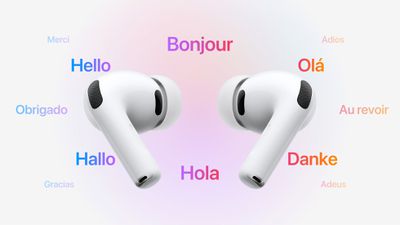
iOS 26.2 makes Live Translation on AirPods available in the EU.
Live Translation allows you to understand someone who is speaking a different language than you. For example, if you speak English, and someone is speaking to you in French, Siri can tell you what they are saying in English through your AirPods.
The feature works best when both participants in a conversation are using Live Translation on AirPods. If you are talking with someone who is not wearing AirPods, you can display a live transcription in the other person's language on your iPhone.
Live Translation is available on the AirPods Pro 3, AirPods Pro 2, and higher-end AirPods 4 with Active Noise Cancellation. The feature launched in the U.S. and select other countries with iOS 26, but it was not available in the EU until iOS 26.2, as Apple said it needed additional time to ensure compliance with the EU's Digital Markets Act.
In addition to compatible AirPods, users need an iPhone 15 Pro or newer with Apple Intelligence turned on and Apple's Translate app installed.
As of iOS 26.1, Live Translation on AirPods supports the following languages:
- English (U.S.)
- English (U.K.)
- French (France)
- German (Germany)
- Portuguese (Brazil)
- Spanish (Spain)
- Chinese — Simplified (China)
- Chinese — Traditional (China)
- Japanese
- Korean
- Italian
iOS 26 also has a built-in Live Translation feature in the Messages, Phone, and FaceTime apps, with no AirPods required.