In iOS 26, Live Translation enables hands-free communication by allowing users who don't share the same language to speak naturally while wearing AirPods. For conversations with non-AirPods users, the iPhone can display live transcriptions horizontally, showing translations in the other person's preferred language. Keep reading to learn how to use it.
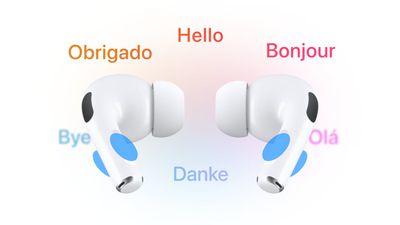
airpods translate
In iOS 26, Live Translation is integrated into Messages, FaceTime, and Phone to help users communicate across languages, translating text and audio on the fly.

However, the feature is at its most impressive when both conversation participants wear compatible AirPods with Live Translation enabled. Active Noise Cancellation automatically lowers the volume of the other speaker, helping users focus on translated audio while maintaining natural interaction flow.

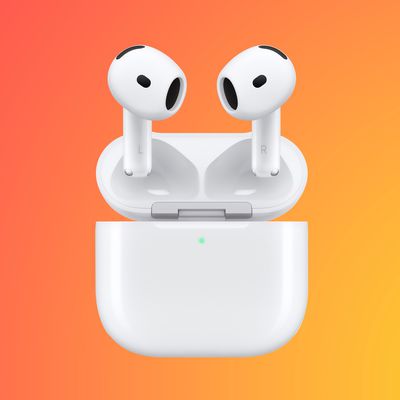
Apple's Live Translation was a headline feature when it announced AirPods Pro 3, but it also works with older models running iOS 26, including AirPods 4 with Active Noise Cancellation and AirPods Pro 2.

What You'll Need

  • AirPods 4 (ANC), AirPods Pro 2, or AirPods Pro 3.
  • iPhone 15 Pro or later.
  • iOS 26 or later.
  • The Translate app downloaded.
  • The latest AirPods firmware version.

Supported Languages

Live Translation supports real-time translation between English (UK and U.S.), French, German, Portuguese (Brazil), and Spanish. Apple plans to add Italian, Japanese, Korean, and Chinese (simplified) support later this year.

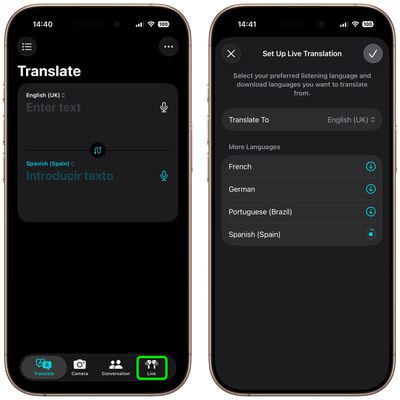
Before you can use Live Translation, you'll need to download the language the other person is speaking and the language you'd like to translate it to.

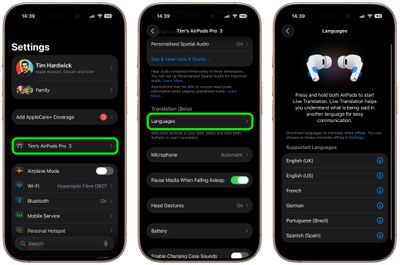
  1. Put your AirPods in your ears and make sure they're connected to your iPhone.
  2. Open Settings on your iPhone, then tap the name of your AirPods.
  3. Under "Translation," tap Languages, then select the languages you want to download.
settings

Start a Live Translation Conversation

  1. Wear your AirPods and connect them to your iPhone.
  2. Make sure Apple Intelligence is turned on (Settings ➝ Apple Intelligence & Siri).
  3. Open the Translate app, then tap Live.
  4. Select the language that the other person is speaking and the language that you want your AirPods to translate it to.
  5. Tap Start Translation.

translate app airpods

Once the other person speaks, your AirPods instantly translate their words into your chosen language. If you're in a noisy place, you can boost accuracy by letting your iPhone's microphones join in – just move your iPhone closer to the speaker.

When it's your turn, simply reply as you normally would. The Translate app's Live tab can display a transcript of your words on your iPhone screen, or you can tap the Play button to have your iPhone read the translation aloud.

If the person you're talking with also has supported AirPods set up with Live Translation, they'll be able to hear your response directly through their own AirPods. To stop Live Translation at any time, just tap the X button.

Other Ways to Use Live Translation

airpods live translation

To start Live Translation at any time, open the Translate app on your iPhone, tap Live, and then tap Start Translation. You can also set the Action button on your iPhone to launch the Translate app, letting you jump straight into Live Translation while wearing your AirPods.

There are several other quick ways to begin. You can press and hold the stems on both AirPods at once, or ask Siri by saying something like "Start Live Translation." You can also swipe down from the top-right corner of your iPhone to open Control Center and tap Translate. (To add Translate to Control Center, long press on a space between the buttons, tap Add Control, then search for and select Translate.)

Related Roundups: AirPods 4, AirPods Pro 3
Related Forum: AirPods

Top Rated Comments

Mr. Heckles Avatar
16 weeks ago
Does it translate Gen Z to Gen X?
Score: 10 Votes (Like | Disagree)
Night Spring Avatar
16 weeks ago
I tried this, and I wish it would do English to English. That would be the perfect hearing aid. Instead of trying to amplify the sound of the speaker you are talking to, it replaces that with a perfectly articulated speech right in your ear. That's exactly what hard of hearing people need in order to carry on a conversation
Score: 10 Votes (Like | Disagree)
csilverman Avatar
16 weeks ago
I remember when I first read about the Babel Fish in Hitchhiker's Guide and thought "man, I wish something like that existed".

I guess it sort of does, now, except it also functions as headphones and isn't as slimy.
Score: 9 Votes (Like | Disagree)
wanha Avatar
16 weeks ago
does it translate wife to husband? Asking, uhh, for a friend
Score: 7 Votes (Like | Disagree)
Rigby Avatar
16 weeks ago
This works surprisingly well. The quality of the translation is quite impressive, especially given that it works fully offline. Improvements I would like to have: the ability to adjust how much the other person's volume is lowered via ANC while the translation is played (I find it is currently still a little too loud) and of course more languages.
Score: 6 Votes (Like | Disagree)
Night Spring Avatar
16 weeks ago

Does this allow you to translate foreign television programs as well, or just person to person conversations?
This was exactly what I tried. I sat in front of a tv playing something and turned on live translation. It worked.
Score: 5 Votes (Like | Disagree)

Popular Stories

Verizon New

Verizon is Down: iPhones Show 'SOS' Mode Due to Network Outage [Resolved]

Wednesday January 14, 2026 10:18 am PST by
Verizon is experiencing a major outage across the U.S. today, with hundreds of thousands of customers reporting issues with the network on the website Downdetector. There are also complaints across Reddit and other social media platforms. iPhone users and others with Verizon service are generally unable to make phone calls, send text messages, or use data over 5G or LTE due to the outage....
Apple Creator Studio

Apple Introduces New 'Creator Studio' Bundle of Apps for $129 Per Year

Tuesday January 13, 2026 6:11 am PST by
Apple today introduced a new Apple Creator Studio bundle that offers access to six creative apps, as well as exclusive AI features and content, as part of a single subscription. In the U.S., pricing is set at $12.99 per month or $129 per year. Here are the six apps included with an Apple Creator Studio subscription:Final Cut Pro on the Mac and iPad Logic Pro on the Mac and iPad Pixelmator...
iOS 26

Here's What's New in iOS 26.3 So Far

Monday January 12, 2026 1:15 pm PST by
Apple today seeded the second beta of iOS 26.3, nearly a month after the first beta. So far, the update includes a couple of new features for iPhones. iOS 15.3 through iOS 18.3 were all released in late January over the years, so it is thereby likely that iOS 26.3 will be released towards the end of this month as well. The update is compatible with the iPhone 11 series and newer. Below,...
iPhone Top Left Hole Punch Face ID Feature Purple

New Leak Reveals iPhone 18 Pro Display Sizes, Under-Screen Face ID, and More

Wednesday January 14, 2026 7:09 am PST by
While the iPhone 18 Pro models are still around eight months away, a leaker has shared some alleged details about the devices. In a post on Chinese social media platform Weibo this week, the account Digital Chat Station said the iPhone 18 Pro and iPhone 18 Pro Max will have the same 6.3-inch and 6.9-inch display sizes as the iPhone 17 Pro and iPhone 17 Pro Max. Consistent with previous...
maxresdefault

Apple Confirms Google Gemini Will Power Next-Generation Siri This Year

Monday January 12, 2026 7:38 am PST by
In a statement shared with CNBC today, Apple confirmed that Google Gemini will power the next-generation version of Siri that is slated to launch later this year. Subscribe to the MacRumors YouTube channel for more videos. "After careful evaluation, we determined that Google's technology provides the most capable foundation for Apple Foundation Models and we're excited about the innovative...