Ask MacRumors
Should You Buy the Apple TV 4K?
The Apple TV is Apple's set-top box. The latest version of the Apple TV 4K came out in 2022, and it features the A15 Bionic chip, support for HDR10+, and a Siri Remote with a USB-C port for charging. Apple does not update the Apple TV frequently, releasing a new model around every three years.
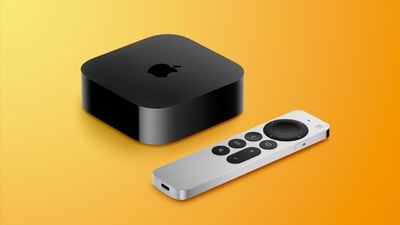
Introduced in October 2022, the third-generation Apple TV 4K is the latest and only Apple TV in the company's lineup. It is nearly four years old, and a new Apple TV is expected in 2026. Given that a new model is coming this year, now is not a good time to buy an Apple TV, and we recommend waiting for a refresh before you make a purchase.
Apple raised the price of the Apple TV 4K in June 2026, and it is now priced starting at $199, up from $129.
Apple TV 4K Feature Overview
Contents
The third-generation Apple TV 4K continues to look like the prior-generation version, with a simple black box design that plugs into a television set over HDMI. It is thinner and lighter than the previous version, and no longer requires an internal fan for cooling.
The Apple TV 4K, as the name suggests, offers 4K resolution with support for high frame rate HDR content, including HDR10+ and Dolby Vision. To get the complete experience, it must be paired with a 4K TV and 4K content is also required.
There's a faster A15 Bionic chip inside the Apple TV 4K that delivers up to 50 percent better CPU performance and 30 percent better GPU performance than the previous Apple TV 4K. The efficiency improvements of the chip also mean that the Apple TV uses up to 30 percent less power.
The Siri Remote has a one-piece aluminum body, which is a design introduced in 2021. There's a clickpad control wheel with five-way navigation, with the clickpad also supporting touch gestures. The clickpad's outer ring supports a circular gesture that lets you jog through TV and movie content. The Siri Remote is larger than the prior version and it includes a dedicated power button that controls a TV's power. It also includes volume buttons, a mute button, an option for pausing and fast-forwarding, and a menu button. There's a side button for activating Siri. With the 2022 model, the remote now charges via USB-C instead of Lightning.
The Apple TV 4K is priced starting at $199 for the 64GB model with Wi-Fi only. For $249, customers can buy a 128GB model that adds a gigabit Ethernet port and support for the Thread mesh networking protocol to connect even more smart home accessories. The Siri Remote with USB-C is available separately for $59.
Note: See an error in this roundup or want to offer feedback? Send us an email here.
How to Buy
The Apple TV 4K can be ordered from the online Apple Store, Apple retail stores, and third-party retailers. The Apple TV 4K is now priced at $199 for 64GB storage, or $249 for 128GB storage, an Ethernet port, and Thread support. Prior to June 2026, the Apple 64GB Apple TV was $129, and the 128GB version was $149.
Apple offers refurbished versions of the Apple TV at a $20 discount. The 2022 Siri Remote can also be purchased on a standalone basis for $59.
Hardware and Design
Apple did not change the design of the Apple TV 4K with the 2022 refresh, and it continues to be a simple black box that's about the size of the palm of your hand. Apple did tweak the size and weight of the Apple TV, and it is now smaller and lighter.
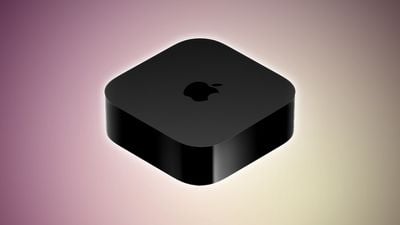
It measures in at 3.66 inches on each of its four sides (down from 3.9 inches) and it is 1.2 inches tall. It weighs in at 7.5 ounces, which is half the weight of the prior-generation model.
There is an Apple logo at the top, and aside from that, the device is unobtrusive, with the black design blending in well with home decor. It is small enough that it can fit on any shelf or TV unit next to a television set.
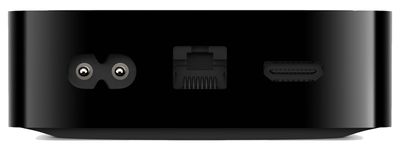
There are two Apple TV variants. One has an HDMI 2.1 port and a port for the power supply, while the second has the same ports with the addition of a Gigabit Ethernet port for a wired connection. Both models feature an IR receiver for connecting to the Siri Remote.
Processor and Internals
The third-generation Apple TV 4K is equipped with an A15 Bionic chip. CPU performance is up to 50 percent faster than the prior generation that was equipped with an A12 chip, and GPU performance is up to 30 percent faster for improved gameplay.

Apple says that the Apple TV offers improved responsiveness, faster navigation, and snappier UI animations. The Apple TV is available with either 64GB or 128GB of storage.
Connectivity
The Apple TV 4K supports 802.11ax WiFi 6 speeds. WiFi 6 brings improved speeds, expanded network capacity, lower latency, better power efficiency, and upgraded performance in locations with many smart home devices. It is not as fast as WiFi 6E, but it does outperform WiFi 5.
Along with WiFi 6, the more expensive version of the Apple TV has built-in Thread support. Thread is a low-power networking technology that offers a secure, mesh-based system able to interface with other Thread-enabled smart home devices for improved connectivity.
The Apple TV 4K also supports Bluetooth 5.0 and it comes with an IR receiver for remote input.
Variants
There are now two Apple TV 4K configurations at different price points. The entry-level model features 64GB of storage and a $199 price point, while the upgraded version features 128GB of storage, a Gigabit Ethernet port, and support for the Thread mesh networking protocol for those who use smart home devices. It is priced at $249.
4K, Dolby Vision and HDR10+ Support
Like prior versions of the Apple TV 4K, the third-generation Apple TV 4K supports 4K HDR content for brighter, more realistic colors and greater detail than is available with the 1080p resolution.

With the A15 chip, the Apple TV 4K supports both Dolby Vision and HDR10+ for the best possible quality for movies and TV shows on compatible TVs. Prior versions of the Apple TV supported Dolby Vision and HDR10, but not HDR10+.
The addition of HDR10+ improves HDR performance when the Apple TV is used with television sets that do not support Dolby Vision.
The Apple TV 4K requires a compatible 4K television to display content at a 4K resolution, and features like Dolby Vision require a TV that supports Dolby Vision. The Apple TV 4K connects to a television set using HDMI, and an HDMI cable is not included.
Supported Photo, Video, and Audio Formats
The Apple TV 4K supports SDR video with AVC/HEVC, Dolby Vision (Profile 5), HDR10+/HDR10/HLG with HEVC, H.264, and MPEG-4 video. Photo formats supported include HEIF, JPG, GIF, and TIFF.
Supported audio formats include HE-AAC (V1), AAC (from iTunes Store), MP3 (up to 320 Kbps), MP3 VBR, Apple Lossless, FLAC, AIFF, and WAV; AC-3 (Dolby Digital 5.1), E-AC-3 (Dolby Digital Plus 7.1 surround sound), and Dolby Atmos.
The Apple TV supports Spatial Audio with Dolby Atmos and standard lossless audio, ranging from 16-bit at 44.1 kHz to 24-bit at 48 kHz.
Siri Remote
The third-generation Apple TV continues to use the Siri Remote that was introduced alongside the second-generation version. It features a silver aluminum body and a touch-enabled clickpad with gesture support.
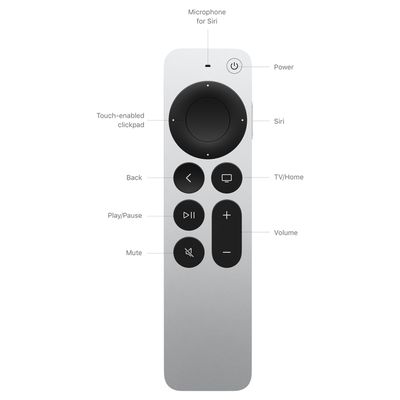
A single click on the remote brings you into a TV show or movie, while a swipe moves through long lists of content. The outer part of the clickpad can be swiped across to scrub through shows and movies, fast-forwarding and rewinding as needed. The remote includes a TV/Home button, a Back button, a Play/Pause button, a Mute button, and a set of volume buttons.
There is a dedicated Power button for turning the television off or on, and on the side of the remote, there's a dedicated button for activating Siri. The Siri functionality is limited to a select number of countries, with a list available on Apple's website.
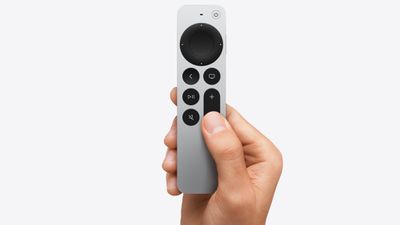
In countries where Siri support is unavailable, the Siri Remote is called the "Apple TV Remote."
Siri on the Apple TV works much like Siri on the iPhone. You can speak into the remote, with the Siri command relayed back to the Apple TV. Siri can be used for finding TV shows and movies to watch, answering simple questions, finding music, and more.
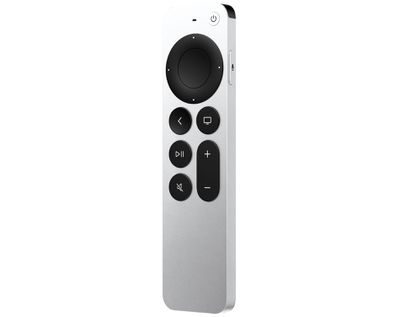
The bottom of the Siri Remote features a USB-C port that can be used to recharge it every few months. The prior version of the Siri remote included an accelerometer and gyroscope that allowed it to be used as a controller for Apple TV games, but the remote does not have that functionality and Apple instead expects users to play games with Bluetooth controllers.
Remote App
Along with the physical Siri Remote, the Apple TV can be controlled using a Remote app that's available in the App Store for the iPhone, iPad, and Apple Watch. The Remote app has a layout that's similar to the Siri Remote, offering virtual controls for navigating the Apple TV interface, accessing Siri, and controlling volume.
Bluetooth Accessories
Popular controllers from PlayStation, Xbox, and Nintendo can be paired with the Apple TV for gaming purposes, and Apple expects Apple Arcade and other games to be played with a controller rather than the Siri Remote.
The Apple TV 4K can also be paired with Bluetooth keyboards, though typing for searches and other purposes can be done with an iPhone tied to the same Apple Account as well.
tvOS and the TV app
tvOS is the operating system that runs on the Apple TV, offering an easy-to-navigate television watching experience on Apple's set-top box. With a full App Store, tvOS supports downloading third-party apps and games that can be used on the Apple TV, and the interface design puts content front and center. Get to what you want to watch using Siri commands, the Apple Remote, or the Remote app on iPhone and Apple Watch, and keep track of shows with "Up Next" and the Apple TV app.
tvOS includes several built-in apps like Photos for accessing your Photo Library, Apple Music, Apple Home for controlling smart home products, Podcasts, and Apple TV, an app that aggregates TV and movie content from tons of sources, including the Apple TV streaming service.
Channels are included in the Apple TV app, so you can subscribe to and watch content from paid services without having to open up a third-party app, and Apple suggests content you might like to watch.
The Apple TV app also includes a feature called "Insight" that provides information about actors, characters, and music from Apple TV movies and shows onscreen in realtime. Users can select an actor to see their background and filmography, or see what song is playing in a scene and add it to an Apple Music playlist.

When using an iPhone as a remote, viewers can also see InSight information on the device.
The Apple TV supports a number of screen saver options, from aerial screen savers captured with drones to collaborations that feature characters like Snoopy.

tvOS 26 Features
Apple adds new features to tvOS on a regular basis, and the 2025 update to tvOS is tvOS 26. tvOS updates never bring as many changes as iOS or macOS updates, but there are still useful features in tvOS 26 that you should know about.
Liquid Glass Redesign
With tvOS 26, Apple updated the Apple TV with a new Liquid Glass design. It features app icons that look like multiple pieces of glass layered on top of one another, along with translucent menu elements and more rounded buttons.

The updated design is only available on the second and third-generation Apple TV 4K models.
TV App
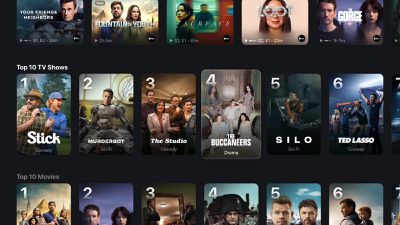
The TV app displays movies and TV show posters in vertical cards instead of horizontal cards, so they take up less space on the screen for more to be viewable without scrolling to the side.
Profiles
tvOS 26 is able to automatically display profiles when your Apple TV is activated, so multiple people in the home can more quickly access their personalized watchlists and recommendations.

Logins
tvOS 26 links login information to your Apple Account for supported apps, so it's easier to sign into apps when setting up an Apple TV.
Sing
Apple Music subscribers that use Apple Music Sing for karaoke can now use the iPhone as a microphone when singing along with the on-screen lyrics. Users can also queue up songs and react to performances with emoji.

For some songs in other languages, Apple Music Sing also offers translations.
FaceTime
FaceTime in tvOS 26 supports incoming call notifications, larger-sized Contact Posters, and Live Captions in French, German, Japanese, Korean, Mandarin, and Spanish.
Screen Savers
There are new aerial screen savers that were captured across India.

Current Version
The current version of tvOS is tvOS 26.6, released in July.
tvOS 27
Apple is adding a handful of new features in tvOS 27, the version of tvOS that was released in September 2026.
- Podcasts app - The Podcasts app has an updated design.
- Performance - Apps launch up to 30 percent faster, animations are smoother, and Control Center is more responsive.
- AirPlay - AirPlaying to an Apple TV from another Apple device is faster.
- AppleCare - The Settings app includes AppleCare coverage information.
- Apple Music - Apple Music supports Hi-Res Lossless audio.
- Larger Text - Support for larger text allows viewers with low vision to increase onscreen text size.
- Generated Subtitles - On-device speech recognition can be used to automatically transcribe spoken audio in uncaptioned video content, including clips recorded on iPhone, received from friends and family, or streamed online, across the iPhone, iPad, Mac, Apple TV, and Apple Vision Pro. The feature will be available in English in the U.S. and Canada at launch.
- FaceTime - Apple added a new FaceTime API that allows sign language interpretation app developers to add a human interpreter to an ongoing video call.
tvOS 27 is compatible with the Apple TV 4K 2nd generation from 2021 and the Apple TV 4K 3rd generation from 2022. It is not available on the original Apple TV 4K or the Apple TV HD.
What's Next for the Apple TV
Design
Apple TV design updates don't happen often, and that's not changing. The next Apple TV is going to have the same squircle shape as the current model, and it'll continue to be made from a black plastic material.
We're expecting the 2026 Apple TV to be indistinguishable from the existing Apple TV on the exterior, with no changes to size or design.
New Chip
The Apple TV 4K is going to get a new A-series chip, and that'll be the biggest upgrade. Rumors suggest Apple is planning to use the A17 Pro that was first introduced in the iPhone 15 Pro models.
Compared to the A15 Bionic in the current Apple TV, the A17 Pro is a solid update, and it's a good reason to hold off on buying the current model. The A17 Pro is built on a 3-nanometer process for faster speeds and better efficiency. It has hardware-accelerated ray tracing for higher-quality graphics in games and it supports hardware-accelerated AV1 decoding, which is useful for streaming content.
The A17 Pro is the oldest chip Apple makes that supports Apple Intelligence, and it's also used in the iPad mini 7.
Since Apple has held the Apple TV update for so long, it's possible it'll get an even newer chip like the A18 or A19. A RAM update is possible too, especially if the Apple TV has any kind of Apple Intelligence support.
Apple Intelligence and Siri
The next Apple TV is ready to launch, but new Siri features are the holdup. Apple wants to release the Apple TV with the smarter version of Siri that Apple is testing in iOS 27, iPadOS 27, and macOS 27.
Bloomberg's Mark Gurman says the Apple TV is linked to "new artificial intelligence features" that Apple has postponed until iOS 27, which is launching in September 2026. Apple intended to debut the Apple Intelligence Siri features in spring 2026, but the company was still experiencing issues with Siri. At this point, we're not going to see new Siri capabilities until iOS 27, which also means a delay for all the devices that Apple is holding.
Along with the Apple TV, the rumored home hub and a new version of the HomePod are waiting on Siri AI's launch.
Updated Siri features may require more RAM and a faster chip, so if you want the smarter Siri on the Apple TV, that's another reason to wait before making a purchase.
Wi-Fi
The Apple TV could get Apple's N1 networking chip with Wi-Fi 7 support. Wi-Fi 7 works with the 6GHz band offered by newer routers.
6GHz connectivity is faster and less congested, which you want for a streaming device.
Bluetooth and Thread
The Apple TV 4K could get Bluetooth 6 for connecting devices like controllers and earbuds.
Apple's N1 chip also supports Thread, so the Apple TV will be able to continue to serve as a Thread border router and a Matter hub for smart home devices.
Siri Remote
It's possible Apple will introduce a new Siri Remote alongside the Apple TV, though it's unclear what Apple might change.
Pricing
There were rumors of a price drop, but with the June 2026 price increase for the 2022 Apple TV and all Macs and iPads, a lower price is unlikely.
Launch Date
With Siri AI set to launch in September in iOS 27, we could see the Apple TV refreshed in the same timeframe.
Apple TV 4K Roundup Update History
- August 12 - Updated buyer's guide advice.
- July 31 - Updated for tvOS 26.6 launch.
- July 20 - Updated with next-generation Apple TV rumors.
- June 25 - Updated to reflect new pricing.
- June 10 - Updated with tvOS 27 info.
- June 2 - Added new Apple TV refresh rumors.
- May 20 - Added tvOS 27 info.
- April 2 - Updated buyer's guide information.
- March 10 - Updated rumors about next-gen Apple TV launch timing.
- February 26 - Updated for tvOS 26.3 launch.
- December 12 - Updated for tvOS 26.2 launch.
- November 7 - Updated for tvOS 26.1 launch.
- November 3 - Updated rumors about next-gen Apple TV launch timing.