Skip to Content

Things 3.22 Introduces Refreshed Interface and More

The latest version of popular task manager app Things 3 is now available with comprehensive support for iOS 26 and Apple's other major software updates, introducing a redesigned interface and a range of enhancements.
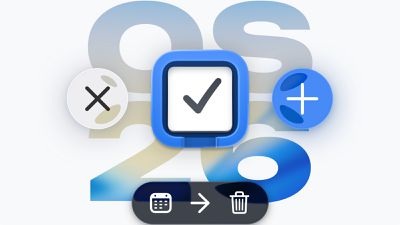
ios 26 things 3
Things 3.22 features a complete visual refresh tailored for Liquid Glass, with an updated app icon and refined UI elements throughout. The new icon is available in four variants: Default, Dark, Tinted, and Clear.

The interface now incorporates redesigned curves for windows, to-dos, dialogs, and control elements, offering wider spacing and visual transparency in areas such as the sidebar. The release also introduces dynamic interface elements, such as glassy buttons that scale and glow in response to touch. The app's signature Magic Plus button now displays fluid-like deformation when moved.

Things gains full support for the new Windowed Apps mode in iPadOS 26. It supports the creation of new windows via both contextual menu actions—such as right-clicking a list and selecting "Open in New Window"—and through the File menu. Additionally, iPad users can now access a full system menu bar by swiping down from the top of the screen. Things has updated its menu structure accordingly to expose more powerful controls and keyboard shortcuts in this environment.
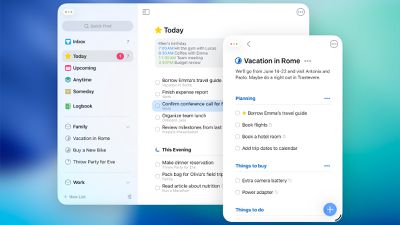
ipados 26 things 3
The widget system has also been updated. Widgets now support new appearance styles, including Dark, Tinted, and the new Clear option. With the latest release, widgets are also supported on the Vision Pro, where they can be placed freely in the user's immersive workspace.

Things 3.22 introduces quick controls on both the Mac and Apple Watch. On macOS, the app adds two Control Center toggles: New To-Do and List (with user-defined destination). These can be added to the Control Center panel or pinned directly to the menu bar for fast access. On the Apple Watch, the New To-Do control allows task creation via swipe, typing, or voice input.

Things also now supports Apple's Writing Tools framework on the Vision Pro. This allows users to edit the text in their task with options to rewrite, summarize, proofread, or reformat content.

The update also expands integration with Spotlight and Apple Shortcuts. On macOS, users can create a new to-do directly from Spotlight by typing "Create To-Do," pressing Return, and entering a title. The task will be added to the Inbox even if Things is not running. Things 3.22 is available now.


Related Roundups: iOS 26, iPadOS 26
Related Forum: iOS 26

Popular Stories

Apple MacBook Pro M4 hero

Apple Planning 'MacBook Ultra' With Touchscreen and Higher Price

Sunday March 8, 2026 8:05 am PDT by
Apple is planning to launch an all-new "MacBook Ultra" model this year, featuring an OLED display, touchscreen, and a higher price point, Bloomberg's Mark Gurman reports. Gurman revealed the information in his latest "Power On" newsletter. While Apple has been widely expected to launch new M6-series MacBook Pro models with OLED displays, touchscreen functionality, and a new, thinner design...
imac video apple feature

Apple Unveils Seven New Products

Friday March 6, 2026 11:48 am PST by
Apple this week unveiled seven products, including an iPhone 17e, an iPad Air with the M4 chip, updated MacBook Air and MacBook Pro models, a new Studio Display, a higher-end Studio Display XDR, and an all-new MacBook Neo that starts at just $599. iPhone 17e features the same overall design as the iPhone 16e, but it gains Apple's A19 chip, MagSafe for magnetic wireless charging and magnetic...
ios 26 4 yellow

Everything New in iOS 26.4 Beta 4

Monday March 9, 2026 3:50 pm PDT by
Apple is continuing to test the iOS 26.4 beta, and the latest update is now available for developers and public beta testers. As testing goes on, there are fewer new features in each beta, but today’s release adds new emoji characters and a few other changes. New Emoji Apple added new emoji characters, including trombone, treasure chest, distorted face, hairy creature, fight cloud, orca,...

Top Rated Comments

25 weeks ago
I have been a Things user for over a decade. I frequently drift away from it, and then force myself to use it again. The main problem is there's too much friction to add items to Things. We're 2025, and integration with other apps and the Apple Ecosystem has become stale and insufficient. It's too much of a silo. A new icon and a control center button won't change this.
Score: 12 Votes (Like | Disagree)
25 weeks ago

They must still be getting a good stream of new customers so are going with an 'if it ain't broke don't fix it' attitude to their business. Nice deal for people who paid once like 8 years ago, and have been getting constant updates since.
For what it's worth, Things is the #2 Productivity app on the App Store. And for good reason. Every single detail of the UI is super smooth and well considered. I think the streamlined feature set is an asset and I'm glad they don't just lard on additional things constantly. I've got my wish list like everyone else, but they've been able to keep it a purchased app instead of a rental by keeping the focus narrow, and I'm fine with that. When Things 4 comes out, I'll buy it for my Mac and iPhone immediately.

For people clamoring for tons of features, I would recommend OmniFocus ('https://www.omnigroup.com'). I used it for years, but ultimately found it too complex for my needs and I was spending as much time maintaining and tweaking the "system" as actually getting things done. Omni Group has a decades-long history developing for the Mac and OmniFocus is very high quality software.


Attachment Image
Score: 7 Votes (Like | Disagree)
25 weeks ago
CulturedCode makes good software, honouring the ancient "made in Germany" quality. I also like their lack of subscriptions. However, I would like some small improvements to be added though, like negative filtering (e.g. show work items, but not home errands).

PS: use Things each and every day - "it just works".
Score: 7 Votes (Like | Disagree)
orbital~debris Avatar
25 weeks ago

It is a To Do app that has been around for many years. It was very popular at one time.
It's stood the test of time – it's an incredibly well-engineered app and so solid. I literally cannot recall a time when it's database and syncing didn't feel robust, and I've used it heavily for years now.
Score: 7 Votes (Like | Disagree)
dumastudetto Avatar
25 weeks ago

Ahem... what is "Things" and why are we supposed to know it?
Things 3 is a radically performant, human-crafted productivity experience... unavailable with any other ecosystem (Android, Windows, Linux). If you want to get Things done, you need Things. Things uses the renowned GTD productivity system in a uniquely streamlined way to get you spending more time focusing on the task, and less time messing around in the task management application.
Score: 6 Votes (Like | Disagree)
canadianreader Avatar
25 weeks ago
Doubled in price but still one time purchase no subscription nonsense
Score: 6 Votes (Like | Disagree)