6 visionOS-Inspired Design Elements Coming to iOS 26 - MacRumors
Skip to Content

6 visionOS-Inspired Design Elements Coming to iOS 26

With iOS 26, macOS 26, tvOS 26, and watchOS 26, Apple is planning to debut a new design that's been described as taking inspiration from visionOS, the newest operating system. With WWDC coming up soon, we thought we'd take a closer look at visionOS and some of the design details that Apple might adopt based on current rumors and leaked information.
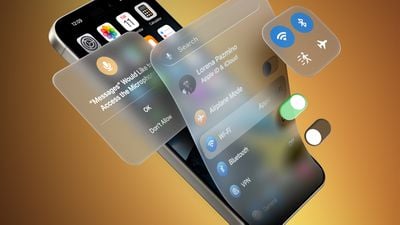
iOS 19 visionOS UI Elements

1. Translucency

Inside Apple, the ‌iOS 26‌ redesign project is known as "Solarium," which gives us some insight into Apple's focus. A solarium is basically an all-glass room that's designed to let in a lot of light.
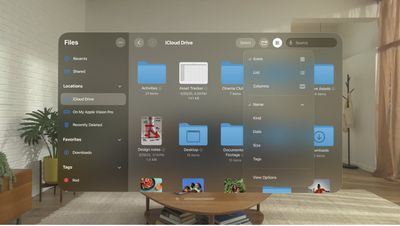
visionos files app translucency
Since launch, visionOS has had menus and interface elements that are translucent because in an AR/VR environment, people need to be able to see their surroundings as much as possible to feel immersed.

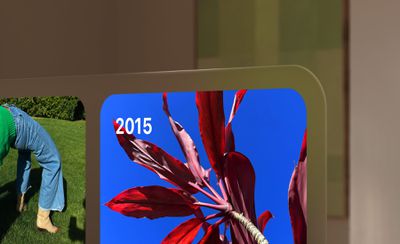
The translucent design elements in visionOS better blend into the background for an unobtrusive look, letting color and light from the real world blend through. It's not hard to picture how this sort of translucent design would work well in apps like Photos, which we've already seen a mockup of.

2. Floating Navigation Bars and Menus

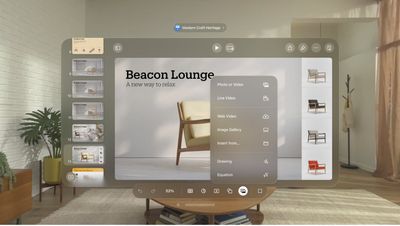
Floating menus and navigation bars go right along with translucency. In visionOS, everything is essentially floating in the open space around you, whether you're looking at your surroundings through the passthrough camera, or a virtual reality background.
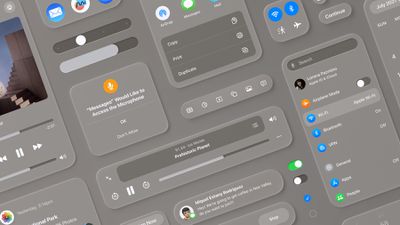
visionOS design
In ‌iOS 26‌, Apple could replicate this effect with shading and shadowing that makes interface elements look slightly raised over the content in the background, for a soft, blurred depth effect.
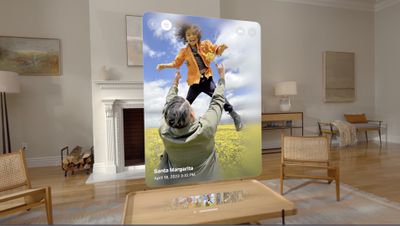
spatial photo visionos 2
visionOS has a lot of top-aligned toolbars rather than bottom bars, so it's possible we'll see iOS shifting that way too.

3. Rounded Buttons and Interface Elements

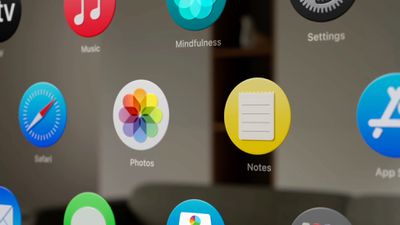
iOS already has rounded squares and rounded rectangles for icons, notifications, menus within apps, search bars, and all of the card-style interfaces that we're used to, but visionOS is even rounder. The floating navigation bars in iOS could be pill-shaped with more starkly rounded edges.
visionos app icons
visionOS also has more dramatic rounding at the corners, and the app icons are fully round. ‌iOS 26‌ could be rounder in general, more closely matching some of the shapes in visionOS. Leaker Jon Prosser has claimed that there will be an option for round app icons, but it's not clear if Apple would want to go in that direction for iOS because Android has long used round app icons. The iconic squircle has been one of many design features distinguishing iOS from Android.
visionos keynote app

4. Glassy Look

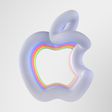
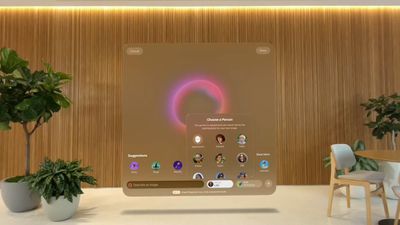
With its translucency, the visionOS interface can look almost like frosted glass. Apple's WWDC 2025 design features a frosted glass rainbow with shifting pastel colors, which is perhaps a hint at plans to adopt a frosted, sea-glass-style look that's not too far off from what we've already got in visionOS.
visionos image playground
visionOS actually uses a system-designed material that Apple calls glass for app windows. It lets light, virtual content, and objects in the surroundings show through menus and windows. Glass adapts to background color and provides contrast for app content while also taking into account people's physical surroundings. Apple could use a similar material design in ‌iOS 26‌.

visionos glassy look

5. Subtle Lighting Changes

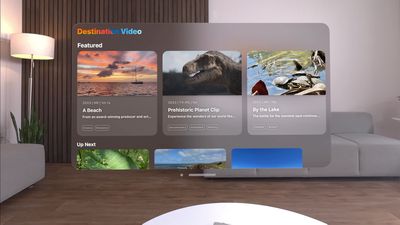
In visionOS, the translucent interface elements can interact with lighting conditions of the room the user is in. That doesn't translate to the iPhone, but iOS is apparently going to have some subtle light effects that will emphasize the translucency and glass-like design.
visionos app preview
In visionOS, the windows also cast shadows that are responsive to head movements. That's not something that translates to iOS, but lighting and shadow effects that shift when you move your iPhone is a possibility. In fact, Prosser claims there's a glint on the Lock Screen's Flashlight and Camera (or customized) buttons when moving the iPhone.
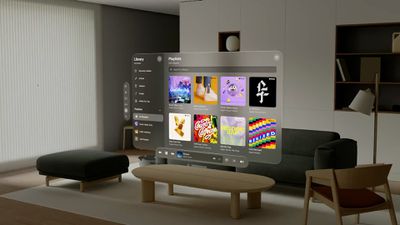
visionos glass
Apple could use dynamic shadowing in apps and for widgets, and adaptive color could further the effect by allowing interface elements to blend with wallpaper and shift with ambient light.

6. Simplicity

For the most part, visionOS has a simplified design in Apple apps, with an airier feel due to the spacing that's needed to ensure people have enough room to look at a button to interact with it. ‌iOS 26‌ could adopt streamlined navigation and menu elements for a less cluttered look.
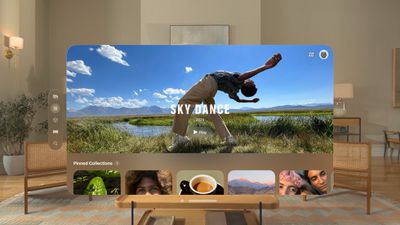
visionos 2 photos app design
visionOS uses cleaner fonts, bolder text, and increased line height, which may or may not translate to iOS.
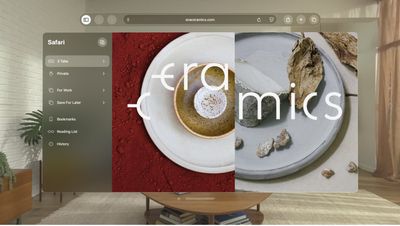
visionos safari
Apple is likely taking a good look at navigation, menu options, and layout, because one of the main aspects of the redesign is more cross-platform cohesion, according to Bloomberg's Mark Gurman. He says that ‌iOS 26‌ will be "simpler to use, faster to navigate, and easier to learn."

Design Consistency

It's not just ‌iOS 26‌ that's being overhauled. The visual changes and tweaks to menus, buttons, and navigation will also extend to macOS 26, and of course, iPadOS 26. ‌watchOS 26‌ and tvOS 26 will see design refreshes, too.

Apple will undoubtedly provide developers with new design guidelines and resources to extend the updated look to third-party apps.

WWDC Debut

The new design that we've been hearing so much about is set to be unveiled at the WWDC keynote event on Monday, June 9. It starts at 10:00 a.m. and while Apple will livestream it, if you can't watch, you can follow along here on MacRumors.com or on our MacRumorsLive X account. Apple will provide developers with the new operating system updates complete with redesign after the keynote event, and a public beta will follow in July. ‌iOS 26‌ and its sister updates will launch to the public in September.

Related Roundups: iOS 26, iPadOS 26
Related Forum: iOS 26

Popular Stories

bug security vulnerability issue fix larry

Apple Fixes Possibly Exploited CoreGraphics Flaw on Older iPhones

Tuesday October 27, 2026 5:16 am PDT by
Among the flurry of iOS 27.2 releases on Monday, Apple also pushed a wave of software updates for its older operating systems, including a fix for a CoreGraphics vulnerability that Apple says may have been exploited in targeted attacks. The releases include iOS 26.7.2, iPadOS 26.7.2, iOS 18.7.11, iPadOS 18.7.11, macOS Tahoe 26.7.2, macOS Sequoia 15.8.2, and tvOS 26.6.1. iOS 18.7.11 and...
apple pro tell logo

Apple Launches Two Products Today

Friday November 13, 2026 2:37 am PST by
Apple is releasing two new products today, Friday, November 13: the all-new Apple HomeView and the fourth-generation Apple TV 4K, both of which have been available to pre-order since mid-October. Apple HomeView: Apple's new smart home display, powered by Apple Intelligence with Siri AI, for entertainment and managing the home. Available in tabletop and wall-mounted models, it can recognize up...
iPhone Duo Outer Display Hand

Apple Aiming to Upgrade the iPhone Duo in Four Ways

Sunday November 15, 2026 8:42 am PST by
Bloomberg's Mark Gurman today said Apple has four goals for future iPhone Duo models: Face ID, an Action button, a telephoto camera, and a thinner-and-lighter design. Gurman said Apple has already developed iPhone Duo 2 prototypes with Face ID on the outer display, but it is "running out of time" to finalize the feature for that model, so it might not arrive until the iPhone Duo...

Top Rated Comments

bradman83 Avatar
19 months ago

I'm pumped for the interface lift. I'm looking forward to a new generation of thinking on interface elements. Some things are tired like the traffic light elements, the way the dock works, and Finder. Those could use some reimagining for the modern era.

Some basic UI elements shouldn't be messed with though. For all of the massive UI changes that Windows has gone through since Windows 95 the basic arrangement of window controls hasn't changed. I would argue a huge part of the appeal of macOS is that core aspects of the UI have been consistent over the past 25 years. That's not to say change isn't warranted, but things shouldn't change simply for the sake of change, there should be a meaningful improvement to functionality.
Score: 40 Votes (Like | Disagree)
19 months ago
Hopefully under Accessibility they will include checkboxes to disable Translucent and Glassy.
Score: 39 Votes (Like | Disagree)
19 months ago

I'm pumped for the interface lift. I'm looking forward to a new generation of thinking on interface elements. Some things are tired like the traffic light elements, the way the dock works, and Finder. Those could use some reimagining for the modern era.
Devil is in the details, my friend. Those things you call "tired" have specific UI functions and if they aren't replicated in a usable way, it will suck to use a Mac.

It's really easy to throw around cheap fluff like "reimagining for the modern era" but I've been through enough of that done poorly to be very skeptical.
Score: 36 Votes (Like | Disagree)
trusso Avatar
19 months ago

I'm pumped for the interface lift. I'm looking forward to a new generation of thinking on interface elements. Some things are tired like the traffic light elements, the way the dock works, and Finder. Those could use some reimagining for the modern era.
Absolutely not. Apple needs to stop breaking paradigms that have existed for decades because they work.
Score: 30 Votes (Like | Disagree)
19 months ago
I am afraid that this iOS redesign will be even worse than redeisign from iOS 6 to iOS 7.
Score: 26 Votes (Like | Disagree)
19 months ago

I already hate 1, 4, and 5. They have the effect of reducing contrast and clarity of the UI
Ditto. My first impression of that was 'eye strain city'. Low contrast, soft edges, not really sure where to focus. I certainly hope that can all be turned off. Does Tim Cook actually use his products? He's not that young, he wears glasses that have to be either bifocal or progressive, What Is He Doing!

As for round vs square icons, why not go all the way to the hexagonal war-gaming grid. Think of all the icons you can pack in that way.
Score: 20 Votes (Like | Disagree)
Latest Stories
Early Apple Watch Black Friday Deals Arrive With Series 12 Hitting New Record Lows
12 hours ago
Apple's Smart Glasses Strategy Hinges on Siri and iPhone Apps
12 hours ago
AirPods Pro 3 Discounted to $179.99 in Early Black Friday Sale
12 hours ago
Apple Aiming to Upgrade the iPhone Duo in Four Ways
13 hours ago
Apple Black Friday Starts Early: Save on Apple Watch, MacBook Air, and More
12 hours ago
Top Stories: Apple's New Software Approach, iPhone Duo-Optimized Apps, and More
2 days ago
HomeView Tidbits: Mirror, Sleep Timer, and Other Details
2 days ago
Siri AI Still Not Enabled on HomePod Mini 2 With Latest Software Update
2 days ago
Apple Releases tvOS 27.2.1 With Siri AI for Older Apple TVs
2 days ago
Microsoft 365 Outage Resolving After Nearly 24 Hours
2 days ago
iPhone Duo Survives 450,000 Folds, but Hinge is Weakening
2 days ago
Apple TV 4K Launch Day Deal Arrives at Amazon
2 days ago
The MacRumors Show: HomeView and Apple TV 4K First Impressions
3 days ago
YouTube App Not Working on Your New Apple TV? Here's the Fix
3 days ago
Apple Meets Thai Officials Over iPhone Spyware Warnings
3 days ago
Apple Shares HomeView 27.2 Release Notes With List of Features
3 days ago
HomeView in Québec: Apple Says Canadian French Support to Arrive in Software Update
3 days ago
Apple Watch Ultra 3 Gets Big $250 Discounts Ahead of Black Friday
3 days ago
Apple Says HomeView Sets New Record in Design-Focused Interview
3 days ago
Best Apple Deals of the Week: AirTag 2 Hits Record Low Price, Plus Early Black Friday Sales
3 days ago
iPhone 18 and 18e Coming in Spring 2027 With A20 Chip
3 days ago
King Charles to Join Elton John's Apple Music Radio Show
3 days ago
Select 'Apple Home Collection' Accessories Now Available to Order
3 days ago
Major Microsoft 365 Outage Continues
3 days ago
Apple Launches Two Products Today
3 days ago
Hands-On With the New Apple TV 4K and Siri AI
3 days ago
Siri AI Coming to Older Apple TV 4K Models in tvOS 27.2.1
3 days ago
HomeView Launch Kicks Off as First Orders Reach Customers
3 days ago
Apple Continues to Move Up iPhone Duo Delivery Dates
3 days ago
Apple Explains How HomeView Keeps Camera Data Private
3 days ago