

Latest iOS 18.4 Beta Lets You Turn Off Privacy-Compromising Search Feature

iOS 18.4 includes a new Safari feature that puts your searches front and center, showing your recent search history whenever you open up a new Safari tab and tap into the search field.
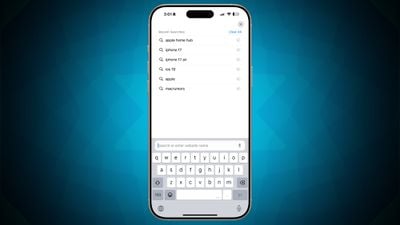
ios 18 4 safari search
When the feature first came out in the iOS 18.4 beta, there was no option to disable it, but Apple rectified that with the fourth beta update. In the Safari section of the Settings app, there is now a "Show Recent Searches" option that can be toggled off.

Disabling Show Recent Searches returns the Safari search interface to its iOS 18.3.2 behavior, where recent searches are not shown when tapping into the search window of a new tab.

Apple appears to have added the option to toggle off the search feature after receiving feedback during the iOS 18.4 beta testing period.

While some users may like the option to have recent searches readily available when opening up a new Safari tab, having searches so visible may not be desirable for those who sometimes need to hand over their iPhones and iPads to someone else.

iOS 18.4 is still being beta tested, with Apple aiming for an early April launch date. The update also includes new emoji characters, Apple Intelligence Priority Notifications, Visual Intelligence for the iPhone 15 Pro, a Vision Pro app, and more. All of the features in the update are listed in our iOS 18.4 beta guide.


Tag: Safari
Related Forums: iOS 18, iPadOS 18

Popular Stories

iOS 26

iOS 26.1 Available Now With These 8 New Features

Monday November 3, 2025 5:54 am PST by
Following more than a month of beta testing, Apple released iOS 26.1 on Monday, November 3. The update includes a handful of new features and changes, including the ability to adjust the look of Liquid Glass and more. Below, we outline iOS 26.1's key new features. Liquid Glass Toggle iOS 26.1 lets you choose your preferred look for Liquid Glass. In the Settings app, under Display...
2024 iPhone Boxes Feature

Apple Adjusts Trade-In Values for iPhones, iPads, Macs, and More

Thursday November 6, 2025 11:12 am PST by
Apple today updated its trade-in values for select iPhone, iPad, Mac, and Apple Watch models. Trade-ins can be completed on Apple's website, or at an Apple Store. The charts below provide an overview of Apple's current and previous trade-in values in the U.S., according to its website. Maximum values for most devices either decreased or saw no change, but the iPad Air received a slight bump. ...
Finder Siri Feature

Apple's New Siri Will Be Powered By Google Gemini

Wednesday November 5, 2025 11:57 am PST by
The smarter, more capable version of Siri that Apple is developing will be powered by Google Gemini, reports Bloomberg. Apple will pay Google approximately $1 billion per year for a 1.2 trillion parameter artificial intelligence model that was developed by Google. For context, parameters are a measure of how a model understands and responds to queries. More parameters generally means more...
Liquid Glass General Feature

Apple Shares Liquid Glass Design Gallery

Thursday November 6, 2025 2:45 pm PST by
Apple is promoting the new Liquid Glass design in iOS 26, showing off the ways that third-party developers are embracing the aesthetic in their apps. On its developer website, Apple is featuring a visual gallery that demonstrates how "teams of all sizes" are creating Liquid Glass experiences. The gallery features examples of Liquid Glass in apps for iPhone, iPad, Apple Watch, and Mac. Apple...
Apple Logo Spotlight

Report: Apple to Launch These New Products in 2026

Sunday November 2, 2025 5:34 am PST by
Apple is planning to launch at least 15 new products in 2026, according to Bloomberg's Mark Gurman. Gurman outlined what to expect from Apple in 2026 in the latest edition of his "Power On" newsletter. He said the company is heading "into one of its most pivotal years in recent memory," with the rollout of major new Apple Intelligence features, intense regulatory pressure on the App Store,...
iOS 26

Apple Releases iOS 26.1 With Liquid Glass Toggle, Slide to Stop Alarm, New Apple Intelligence Languages and More

Monday November 3, 2025 1:11 pm PST by
Apple today released iOS 26.1, the first major update to the iOS 26 operating system that came out in September, iOS 26.1 comes over a month after iOS 26 launched. ‌iOS 26‌.1 is compatible with the ‌iPhone‌ 11 series and later, as well as the second-generation ‌iPhone‌ SE. The new software can be downloaded on eligible iPhones over-the-air by going to Settings > General >...
apple watch se 3 always on

Apple to Remove iPhone-Apple Watch Wi-Fi Sync in EU With iOS 26.2

Thursday November 6, 2025 4:37 am PST by
Apple in iOS 26.2 will disable automatic Wi-Fi network syncing between iPhone and Apple Watch in the European Union to comply with the bloc's regulations, suggests a new report. Normally, when an iPhone connects to a new Wi-Fi network, it automatically shares the network credentials with the paired Apple Watch. This allows the watch to connect to the same network independently – for...
Early Black Friday Deals 2

The Best Early Black Friday Apple Deals

Sunday November 2, 2025 10:04 am PST by
We're officially in the month of Black Friday, which will take place on Friday, November 28 in 2025. As always, this will be the best time of the year to shop for great deals, including popular Apple products like AirPods, iPad, Apple Watch, and more. In this article, the majority of the discounts will be found on Amazon. Note: MacRumors is an affiliate partner with some of these vendors. When ...

Top Rated Comments

Devnul0 Avatar
8 months ago
Even better … how about leaving what I had on the screen, on the screen so I can refer to it as I'm typing my search query? I can't do that today because it brings up the start page when I start typing.
Score: 10 Votes (Like | Disagree)
coolaaron88 Avatar
8 months ago
Its nice to have options
Score: 8 Votes (Like | Disagree)
QCassidy352 Avatar
8 months ago

Are you searching for furry content? Who cares?

And if you're handing your phone to a stranger or someone else, forget it. You've given them the unlocked keys to the kingdom already.
There are plenty of innocent reasons you might not want a search history to pop up. Searching for gift/surprise ideas for family members is the one that comes most readily and obviously to mind (family members also likely being the ones to whom you’d hand your phone). Or something about a topic you don’t want to pop up for minor children—and no I don’t mean adult content but maybe just something innocuous that’s not for all ages (current world events or politics, for example, are not things I need popping up for my kid, who can read but not understand such headlines).

In any case… even if it were just to protect searchers of furry content, why NOT have the option? Aren’t options good?
Score: 6 Votes (Like | Disagree)
Anonymous123 Avatar
8 months ago
It’d also be nice to have this option in other apps where search history is saved, such as Mail, Music, #images search within Messages, etc.
Score: 4 Votes (Like | Disagree)
jbc25 Avatar
8 months ago
I'm glad they're releasing a new version that can do this, but there's honestly no good reason why the option to turn it off shouldn't have been there from the beginning. Better late than never, but this reflects a growing trend of bizarre design/feature decisions at Apple lately.
Score: 1 Votes (Like | Disagree)
Astuces iOS Avatar
8 months ago
No reason to turn this off... I like this lol
Score: 1 Votes (Like | Disagree)













