Phishing Attacks Use This Simple Trick to Defeat iPhone Message Security - MacRumors
Skip to Content

Phishing Attacks Use This Simple Trick to Defeat iPhone Message Security

A new social engineering tactic is being used by cybercriminals to trick iPhone users into disabling iMessage's built-in phishing protection, in a bid to expose them to malicious links and scams, according to BleepingComputer.

General Apps Messages Redux
The scam exploits a security feature in iMessage that automatically disables links from unknown senders. Apple told the outlet that when users reply to these messages or add the sender to their contacts, the links become clickable – a behavior that scammers are now actively exploiting, according to the report. The deceptive messages often masquerade as notifications from trusted organizations like USPS or toll road authorities.

Scammers are apparently looking to exploit the familiar "reply STOP" or "reply NO" that often appears at the end of messages from authentic businesses or services, as there's been a surge in SMS phishing (smishing) attacks that specifically ask recipients to reply "Y" to "activate" supposedly legitimate links.

By getting users to respond, attackers not only enable the previously disabled links but also identify active phone numbers that are more likely to engage with future scams.

Tech-savvy users are likely to easily identify these as phishing attempts, but the main concern is that older or less experienced users will be particularly vulnerable to the tactic. Needless to say, the best way to ensure that you never fall for the scam is to never reply to suspicious messages from unknown senders.
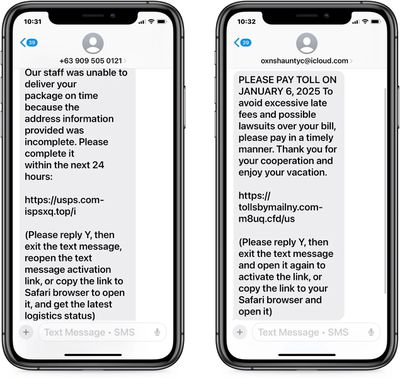
phishing scam

SMS phishing attacks with disabled links (Image credit: BleepingComputer)

Another line of defense is to enable message filtering on your iPhone or iPad. Message filtering sorts messages from people who are not in your contacts into a separate list, where you can more easily view them in the Messages app. To filter messages from unknown senders, open Settings and go to Apps ➝ Messages, then toggle on the switch next to Filter Unknown Senders.

Bear in mind that the feature can filter legitimate messages – from couriers or your bank, for example – so don't automatically assume that a filtered message is dodgy. And, as mentioned above, you can't open links in a message from an unknown sender until you add them to your contacts or reply to the message, but that's by design.


Popular Stories

Waze logo

5 New Waze Features Rolling Out Now: Here Are All the Details

Monday July 13, 2026 3:42 am PDT by
Google today announced that Waze is getting a handful of new features, including some Gemini-powered personalization enhancements for Conversational Reporting. Conversational Reporting already uses Gemini when users report traffic incidents like slowdowns, but now you can use it to suggest map updates like road closures or outdated addresses. Saying something like "The road is closed here"...
Mac Pro Feature Teal

Apple's M7 Ultra Chip Designed to Match a 2019 Mac Pro Feat

Sunday July 12, 2026 8:53 am PDT by
Apple's M7 Ultra chip coming in 2028 is designed to support up to 1.5TB of unified memory, according to Bloomberg's Mark Gurman. However, whether such a configuration is offered may depend on the state of the ongoing memory chip shortage. In 2019, Apple released an Intel-based Mac Pro with up to 1.5TB RAM....
apple silicon 1 feature

Apple Silicon is Taking an Unexpected Turn

Friday July 10, 2026 7:24 am PDT by
Ever since the Mac switched from Intel processors to Apple silicon starting in 2020, each generation of M-series chips has included higher-end Pro and Max variants. If a recent report proves to be accurate, though, that streak will be coming to an end. According to Bloomberg's Mark Gurman, Apple will be releasing a regular M6 chip, but it has no plans to offer higher-end M6 Pro and M6 Max...

Top Rated Comments

vertsix Avatar
20 months ago
Why doesn't Apple use Apple Intelligence to detect and remove these things?

Genuine question, I know Apple Intelligence sucks at this time but I'm sure it can be easily trained to detect these samples?
Score: 27 Votes (Like | Disagree)
McWetty Avatar
20 months ago
“iPhone users hate this one trick…” is the only way this article could be more clickbait. /s

Snark aside… I eliminated this spamming by removing all my personal data from data brokers. It took me an entire Saturday, but I managed to remove my email/phone/address from over 40 online sources and I haven’t gotten a single SMS spam since. Not even during the US election season.
Score: 9 Votes (Like | Disagree)
20 months ago

I eliminated this spamming by removing all my personal data from data brokers. It took me an entire Saturday, but I managed to remove my email/phone/address from over 40 online sources
Would be very interested to hear specifics on how you (or anyone else) did this. Did you pay for some service that automates it, or manually go through and fill out forms? Thanks!
Score: 6 Votes (Like | Disagree)
20 months ago
The faster we leave SMS behind the better.
I have had the same phone number for 20+ years and it must be part of an active list scammers use because at this point I receive phishing SMS's at least 2-3 times a week and regularly use TrueCaller to filter out this garbage.
Score: 6 Votes (Like | Disagree)
spazzcat Avatar
20 months ago
Don't reply to messages from pepole you don't know or don't make any sense because they have no context.
Score: 5 Votes (Like | Disagree)
WarmWinterHat Avatar
20 months ago

Care to share some details? Would be super cool if you started a thread on this topic.
Here you go; there are PDFs in the right column:

https://inteltechniques.com/workbook.html

This has been the standard for a while, and most sites that have guides have copied from this. The author no longer updates the guide or works in the field, but it's still useful.

I did the same a few years ago and even though I have a very unique name, nothing comes up when you google/bing/ddg my name, or my phone number.
Score: 4 Votes (Like | Disagree)