Belkin Recalls BoostCharge Pro Power Bank With Apple Watch Charger Due to Fire Hazard
Belkin last month voluntarily recalled the BoostCharge Pro Fast Wireless Charger for Apple Watch + Power Bank 10K (model BPD005). The company said it will be offering a full refund to all customers who purchased the product.
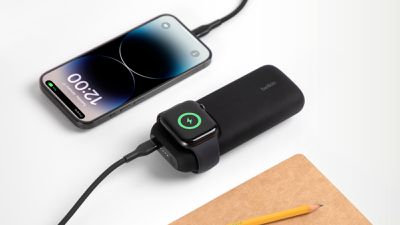
In its recall notice, Belkin said a manufacturing defect can cause the battery in the power bank to overheat, which could pose a fire hazard to consumers.
Belkin has advised customers to immediately stop using the product:
If you have purchased the Belkin BoostCharge Pro Fast Wireless Charger for Apple Watch + Power Bank 10K, BPD005, it is important that you immediately stop using it, disconnect it from any power supply or other products, and contact us for further instructions. Place your BPD005 in a safe, dry location away from anything flammable or anything that can damage the power bank. Do not place your power bank into any trash or recycling bins.
More details are available on Belkin's website.
Belkin released the BoostCharge Pro Fast Wireless Charger for Apple Watch + Power Bank 10K in May 2023. The power bank has a 10,000 mAh battery, a 20W USB-C charging port, and a built-in fast-charging puck for the Apple Watch Series 7 and newer.
In 2021, Belkin similarly recalled another wireless charger due to the risk of fire.
Popular Stories
In May, Apple agreed to pay $250 million to settle a U.S. class action lawsuit over Siri AI's delayed launch, and eligible iPhone users could receive up to a $95 payout.
This week, the California court overseeing the case held a hearing regarding preliminary approval of the settlement, but the judge has not yet issued a ruling. It will likely be at least a few more months before eligible...
The Apple TV 4K hasn't been updated since 2022, and it's due for a refresh. An update is planned for 2026, but Apple is likely going to wait to launch it after Siri AI launches in iOS 27.
Design
Apple TV design updates don't happen often, and that's not changing. The next Apple TV is going to have the same squircle shape as the current model, and it'll continue to be made from a black...
In select U.S. states, residents can add their driver's license or state ID to the Apple Wallet app on the iPhone and Apple Watch, and then use it to display proof of identity or age at select airports and businesses, and in select apps.
To set up the feature, open the Wallet app on the iPhone and tap on the plus sign in the top-right corner. Next, tap on Driver's License and ID Cards,...