

Apple on Friday shared a wealth of information about its new Vision Pro headset, including a detailed user guide and dozens of support documents.
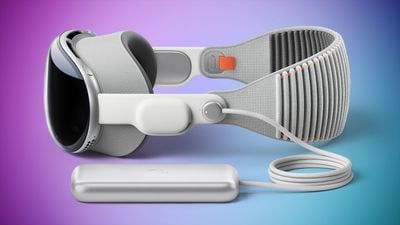
We have already highlighted many topics separately, such as Optic ID, Guest User, Travel Mode, Personas, supported gestures, compatible Bluetooth accessories, charging and battery management details, cleaning instructions, the lack of Find My tracking, using the Vision Pro as an external display for a Mac, and more.
With assistance from MacRumors contributor Aaron Perris, we have created a list with nearly every Apple support document related to the Vision Pro.
- About Activation Lock on Apple Vision Pro
- About Automatic Display Alignment
- About Optic ID advanced technology
- About the materials used in Apple Vision Pro
- About visionOS 1 Updates
- About visual discomfort with Apple Vision Pro
- Apple Vision Pro Battery and Performance
- Attach and pair your ZEISS Optical Inserts
- Before you begin an immersive experience
- Close an app on Apple Vision Pro
- Connect and charge Apple Vision Pro battery
- Create a workspace in Apple Vision Pro
- Delete apps from your Apple Vision Pro
- Factory reset your Apple Vision Pro
- Find your Apple Vision Pro serial number
- Get your Apple Vision Pro ready for service
- How to clean Apple Vision Pro and accessories
- How to get the best fit wearing Apple Vision Pro
- How to remove and replace your Apple Vision Pro Audio Strap for service
- How to remove or attach your Apple Vision Pro head band
- How to remove your Apple Vision Pro battery or power cable for service
- How to safely use your Apple Vision Pro
- How to send your Apple Vision Pro Enclosure to Apple for service
- How to send your ZEISS Optical Inserts in for replacement
- How to set up Optic ID
- How to set up your Apple Vision Pro
- If you experience motion sickness while using Apple Vision Pro
- If you need help with eye setup on Apple Vision Pro
- If you need to order or replace your ZEISS Optical Inserts
- If your Apple Vision Pro doesn't fit properly
- If your eyes are too close or too far from your Apple Vision Pro displays
- Let another person use your Apple Vision Pro with Guest User
- Liquid damage to Apple Vision Pro and accessories not covered by warranty
- Restart Apple Vision Pro
- Set up your Persona (beta) on Apple Vision Pro
- Share your view on Apple Vision Pro
- Store your Apple Vision Pro
- Update visionOS on your Apple Vision Pro
- Use AirPods with Apple Vision Pro
- Use Apple Vision Pro on an airplane with Travel Mode
- Use Bluetooth accessories with your Apple Vision Pro
- Use gestures with Apple Vision Pro
- Use your Mac with Apple Vision Pro
- What to do before you sell, give away, or trade in your Apple Vision Pro
Apple also shared video overviews of the Settings app, Control Center, Guest User, accessibility features, and more on visionOS.
Related Roundup: Apple Vision Pro
Buyer's Guide: Vision Pro (Neutral)
Related Forum: Apple Vision Pro



/https://forums.macrumors.com/attachments/2345152/)










































![Apple Watch Ultra 3 Hits New Low Price With Amazon's $299 Discount [Updated]](https://images.macrumors.com/t/BXKI27vT0hWfumJQpYzf41rH3Mw=/112x112/article-new/2026/10/apple-watch-ultra-3-milanese.jpeg)




