

iOS 17.1 Adds Custom Playlist Art Options to Apple Music - MacRumors
Skip to Content

iOS 17.1 Adds Custom Playlist Art Options to Apple Music

Apple added a new feature to the Apple Music app in the first beta of iOS 17.1 that offers a selection of color-matched playlist artwork options for the first time.
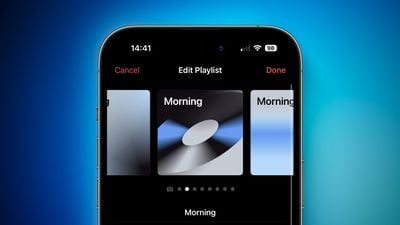
iOS 17 Playlist Artwork Feature 1
As of beta one, Apple provides eight different artwork styles featuring geometric shapes and gradients, with the title of the playlist in the top left corner. The colors used in the artwork are picked from the album artwork of whatever song is first in the playlist. The default artwork continues to be the tiled album artwork of the first four songs in a playlist and the ability to choose a custom image from Photos or Files remains.

Previously, users had to keep the basic tiled image or upload a custom image. Since not all users have custom graphics or photos they want to use for playlists and the default artwork is relatively simple, playlists can be difficult to identify and look fairly generic. Now, users can quickly and easily set a unique appearance for each playlist that fits in with ‌Apple Music‌'s UI.

Other ‌Apple Music‌ changes and improvements in iOS 17.1 include favoriting songs from the Lock Screen and suggested songs in playlists. The ability for multiple users to collaborate on and add to the same playlist and ‌Apple Music‌ SharePlay for CarPlay are also expected to be added in a future update. iOS 17.1 introduces a host of new features, including NameDrop to Apple Watch, UK bank balances in the Wallet app, and more.

Related Forums: iOS 17, iPadOS 17

Popular Stories

apple music

Apple Music to Label AI-Generated Songs

Thursday August 20, 2026 4:41 pm PDT by
Apple sent emails to its music industry partners about the upcoming launch of a Made With AI label that Apple will apply to AI-generated content (via The Hollywood Reporter). Content tagged as being "materially generated using AI" will have a label visible to all Apple Music users. In March, Apple announced Transparency Tags, a system that lets music creators disclose when AI has been...
iOS 27 Next to iPhone

Here's When iOS 27 Rolls Out Around the World

Sunday September 13, 2026 3:00 am PDT by
Apple is about to release iOS 27, which will finally deliver more advanced Siri AI capabilities as well as a variety of other refinements, improvements, and new features to iPhones. It's Apple's biggest software update of the year, and Apple announced at Wednesday's iPhone event that it will be releasing iOS 27 sometime tomorrow – Monday, September 14. iOS 27 won't be the only release on...
iOS 27 Icon iPhone

iOS 27 Available Tomorrow With These 8 New Features

Sunday September 13, 2026 4:30 pm PDT by
During its iPhone 18 Pro and iPhone Duo event last week, Apple announced that iOS 27 will be released widely on Monday, September 14. iOS 27 should be available around 10 a.m. Pacific Time / 1 p.m. Eastern Time tomorrow via the Settings app, under General → Software Update. Below, we have highlighted eight new features and changes coming with iOS 27, with the main attraction being a...


Top Rated Comments

39 months ago
Didn't they decouple all the stock apps from iOS years ago so they could update the apps via App Store whenever they wanted? So why do they remain tied to iOS updates? Makes no sense to me. iOS updates should be for actual OS updates and features, not for their apps. Really just makes it seem like they've run out of ideas with every major iOS release.
Score: 10 Votes (Like | Disagree)
zach-coleman Avatar
39 months ago

What about letting us customize the Music app home screen more than we can now? I would love to be able to remove the recently added music section from the home screen.
Also would love to be able to assign album artwork of my own to the artist section, which is missing a lot of artwork/covers. And no way to add them.
Bring back the old app design where you could customize the bottom navbar please. I wish I could just go straight into playlists…
Score: 6 Votes (Like | Disagree)
39 months ago
What I'm really wanting these days is the ability to TAG a song or an artist however I choose (say "driving music" or "upbeat" or "solo artist") so I could assemble smart playlists based on tags. Playlists are all well and good (and definitely have their place), but the concept has not really evolved past the mixtape paradigm.
Score: 5 Votes (Like | Disagree)
talkingheads Avatar
39 months ago

Bring back the old app design where you could customize the bottom navbar please. I wish I could just go straight into playlists…
Yes please Apple bring it back.
The Music app on the Mac has the same problems that I mentioned above.
We need more customization options on both OS’s.
Score: 5 Votes (Like | Disagree)
talkingheads Avatar
39 months ago
What about letting us customize the Music app home screen more than we can now? I would love to be able to remove the recently added music section from the home screen.
Also would love to be able to assign album artwork of my own to the artist section, which is missing a lot of artwork/covers. And no way to add them.
Score: 5 Votes (Like | Disagree)
phenste Avatar
39 months ago
has anyone found any use for favoriting songs in Apple Music?
Score: 4 Votes (Like | Disagree)








































