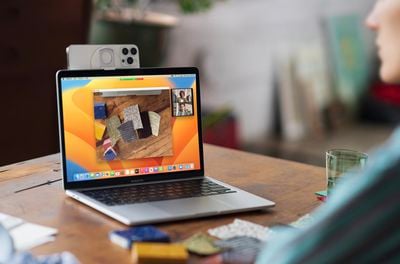
Apple has detailed macOS Ventura's and iOS 16's new Continuity Camera feature in a recently published support document, offering details, instructions, and tips for the feature.
Continuity Camera is a new feature in macOS Ventura that allows users to use an iPhone as a webcam on their Mac. Continuity Camera works wirelessly or wired in FaceTime, Zoom, and other apps. With Continuity Camera, users will get video directly from their iPhone camera, which has significantly better quality than the built-in camera on Macs.
Continuity Camera also allows users to use different effects from their iPhones. For the first time on Mac, for example, users can use the Wide Camera on the iPhone to enable Center Stage. Studio Light, Portrait mode, and Desk View, which simultaneously shows a user's desk and face, are also available.
To attach an iPhone to a MacBook, users can purchase a new Belkin iPhone mount that attaches an iPhone to the top bezel of a MacBook. The mount retails for $29.95 and is available on Apple's online store.
According to the support document, users will need an iPhone running iOS 16 or later and a Mac with macOS Ventura to use Continuity Camera. Additionally, users must be signed into the same Apple ID on both devices with two-factor authentication enabled, and Bluetooth or Wi-Fi must also be enabled.
Thursday February 5, 2026 12:54 pm PST by Joe Rossignol
Apple turns 50 this year, and its CEO Tim Cook has promised to celebrate the milestone. The big day falls on April 1, 2026.
"I've been unusually reflective lately about Apple because we have been working on what do we do to mark this moment," Cook told employees today, according to Bloomberg's Mark Gurman. "When you really stop and pause and think about the last 50 years, it makes your heart ...
Tuesday February 3, 2026 7:47 am PST by Joe Rossignol
While the iOS 26.3 Release Candidate is now available ahead of a public release, the first iOS 26.4 beta is likely still at least a week away. Following beta testing, iOS 26.4 will likely be released to the general public in March or April.
Below, we have recapped known or rumored iOS 26.3 and iOS 26.4 features so far.
iOS 26.3
iPhone to Android Transfer Tool
iOS 26.3 makes it easier...
Tuesday February 3, 2026 12:45 pm PST by Joe Rossignol
Apple recently acquired Israeli startup Q.ai for close to $2 billion, according to Financial Times sources. That would make this Apple's second-biggest acquisition ever, after it paid $3 billion for the popular headphone maker Beats in 2014.
This is also the largest known Apple acquisition since the company purchased Intel's smartphone modem business and patents for $1 billion in 2019....
Thursday February 5, 2026 12:22 pm PST by Joe Rossignol
Apple plans to announce the iPhone 17e on Thursday, February 19, according to Macwelt, the German equivalent of Macworld.
The report, citing industry sources, is available in English on Macworld.
Apple announced the iPhone 16e on Wednesday, February 19 last year, so the iPhone 17e would be unveiled exactly one year later if this rumor is accurate. It is quite uncommon for Apple to unveil...
Friday February 6, 2026 3:06 pm PST by Juli Clover
In the iOS 26.4 update that's coming this spring, Apple will introduce a new version of Siri that's going to overhaul how we interact with the personal assistant and what it's able to do.
The iOS 26.4 version of Siri won't work like ChatGPT or Claude, but it will rely on large language models (LLMs) and has been updated from the ground up.
Upgraded Architecture
The next-generation...
I would argue that this feature is being marketed completely wrongly. It should not be used for laptops or iMacs (which already have a webcam), but mainly targeted for owners of Mac Minis, Mac Studios, Mac Pros, etc. who use a third party screen and have no or an old webcam. These are the real beneficiaries of this feature. I for one have an LG 5K Screen hanging on my Mac Studio and will definitely use it.