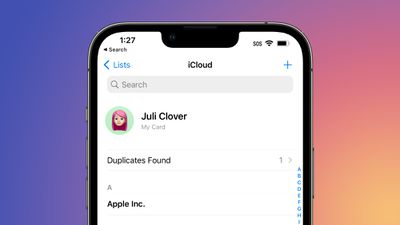
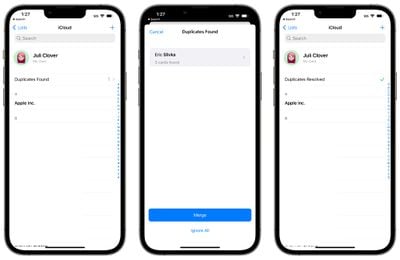
If your Contacts app is riddled with duplicates that you haven't been able to fix, iOS 16 has a solution. The update includes a dedicated feature for merging duplicate contacts, solving problems with multiple contacts once and for all.
In the iOS 16 Contacts app, if you have more than one contact card for the same person, the app will automatically detect the duplicate and let you know that duplicates were found.
The "Duplicates Found" interface is at the top of the app, and if you tap it, the Contacts app is able to merge all of the duplicate contact cards into one.
Prior to now, there was no built-in way to quickly manage duplicate contacts in the iOS Contacts app, so the new iOS 16 feature should be a relief for those dealing with Contacts issues. This feature did previously exist on the Mac, but it was not available on iOS devices.
Friday October 23, 2026 11:05 am PDT by Juli Clover
Some iPhone Duos are already experiencing hinge issues that cause display cracks, based on photos shared on Reddit and the MacRumors forums. Almost all of the display faults are right along the hinge, and most result in a line of bright pixels across one side of the screen.
An iPhone Duo owner in Australia said his device cracked after being opened fewer than 20 times, and there was no...
Thursday October 22, 2026 11:01 am PDT by Juli Clover
Apple has temporarily removed Keynote, Pages, and Numbers from the App Store, just after releasing an update that added iPhone Duo support and a new Intelligent Assistant.
It is not clear if the apps were removed intentionally, or if it is a bug. Apple has not said when the apps will be reinstated, but if it was in error, they should return soon.
Update: The Mac versions are back without...
Friday October 23, 2026 7:11 am PDT by Joe Rossignol
Apple Music has a 404 page easter egg on the web: a functional iPod that appears when you load a page that does not exist, such as music.apple.com/macrumors.
"Page Not Found," says Apple. "Give this a spin instead."
Apple is clever with this. If you navigate to music.apple.com/ipod instead, the page says "Looking for something?" instead of "Page Not Found."
The easter egg is only...
This is awesome. I have a bunch of duplicates because of previous intentions with LinkedIn, Facebook, multiple Outlook databases, 2 different personal email contact lists, etc.
Anyone could explain why iPhone 7plus (A10 chip) won’t be upgraded to iOS16 while iPad 5gen (A9) will to iPadOS 16? They have limit even more devices in macOS Ventura…
I suspect it’s because of the headline feature (new Lock Screen) probably needing the neural processor from the A11 and newer chips (to get that blurred background right). Since the iPads didn’t get this feature, they got away with it. That, and there are probably lots of A9/A10 iPads being used in schools.