

You Can Get Translations Directly From the Camera App in iOS 16 - MacRumors
Skip to Content

You Can Get Translations Directly From the Camera App in iOS 16

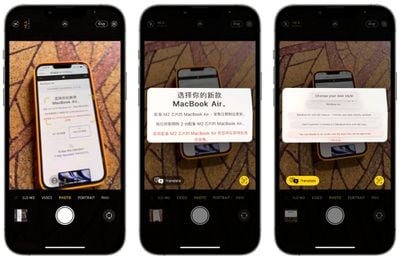
Apple in iOS 16 has brought its system wide translate feature to the Camera app, allowing the iPhone to be used to translate signs, packaging, and more in real time.
ios 16 translate camera
Using the translate feature is as simple as opening up the Camera app and pointing it at the text you want to translate. Tap on the text selection button in the app to select the detected text, and then choose the translate option to get an instant translation.

You can pause the view to get translations overlaid on text, and zoom in for a closer look. It's a useful feature that's perfect for signs and other wording that you might not understand when you're traveling.

The Google Translate app has long had a similar feature where you can activate a camera in the app and translate whatever text is around you, so this new iOS 16 feature basically puts the iOS Camera app on par with Google's Translate option.

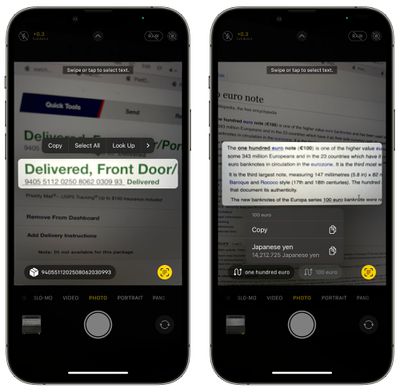
Apple has also added new Quick Actions that can be used with this Camera feature and with other Live Text options across iOS. Quick Actions make data that's detected in photos, videos, and through the Camera app actionable. Flight information, shipments, foreign languages, currencies, URLs, and more can be tapped on so you can track packages, make conversions, visit URLs, and more, all from content within photos and videos.
actionable live text ios 16
iOS 16 is available to developers at the current time, with Apple planning to make a public beta available in July.


Related Forum: iOS 16

Popular Stories

iphone 16 teal

'Siri AI' Lawsuit Update: Apple to Pay Owners of These iPhone Models

Thursday July 9, 2026 7:08 am PDT by
In May, Apple agreed to pay $250 million to settle a U.S. class action lawsuit over Siri AI's delayed launch, and eligible iPhone users could receive up to a $95 payout. This week, the California court overseeing the case held a hearing regarding preliminary approval of the settlement, but the judge has not yet issued a ruling. It will likely be at least a few more months before eligible...

Apple TV Thumb 3

Everything Coming in the 2026 Apple TV 4K

Wednesday July 8, 2026 4:51 pm PDT by
The Apple TV 4K hasn't been updated since 2022, and it's due for a refresh. An update is planned for 2026, but Apple is likely going to wait to launch it after Siri AI launches in iOS 27. Design Apple TV design updates don't happen often, and that's not changing. The next Apple TV is going to have the same squircle shape as the current model, and it'll continue to be made from a black...
apple wallet drivers license feature iPhone 15 pro

Apple Says iPhone Driver's Licenses Will Expand to These 6 U.S. States

Thursday July 9, 2026 7:29 am PDT by
In select U.S. states, residents can add their driver's license or state ID to the Apple Wallet app on the iPhone and Apple Watch, and then use it to display proof of identity or age at select airports and businesses, and in select apps. To set up the feature, open the Wallet app on the iPhone and tap on the plus sign in the top-right corner. Next, tap on Driver's License and ID Cards,...

Top Rated Comments

chumps52 Avatar
54 months ago
I've not used Apple's translate much, but if it's as accurate as Google Translate (probably not, but if it's close enough at least), I might replace the latter with this...
Score: 7 Votes (Like | Disagree)
54 months ago
As someone teaching themselves a new language I’m looking forward to this new feature
Score: 4 Votes (Like | Disagree)
54 months ago
Very cool feature! I can see this being very useful.
Score: 3 Votes (Like | Disagree)
red elma Avatar
54 months ago
Awesome feature!
Score: 3 Votes (Like | Disagree)
54 months ago
Fantastic addition. Will definitely be using this.
Score: 2 Votes (Like | Disagree)
Sakurambo-kun Avatar
54 months ago
Siri understands a small number of languages compared to Google Translate, so unless that's changed then this won't be on the same level.
Score: 2 Votes (Like | Disagree)











































