iOS 16 Makes It Easier to Manage AirPods Settings
iOS 16 is designed to make it simpler to manage your connected AirPods and Beats headphones by adding a new section to the Settings app when the accessories are connected.
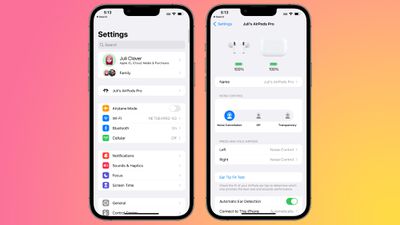
In iOS 15, accessing AirPods settings requires opening up the Bluetooth interface and tapping on the "i" next to the AirPods listing, and it's a menu that's hidden and harder to find for those who are not particularly familiar with the iPhone.
With iOS 16 and iPadOS 16, if you pair a set of AirPods to your iOS device, you can see a new AirPods setting app directly below your name, making it much easier to get to the various options for adjustment.
You can still access the same settings in the Bluetooth menu and see AirPods information under General > About.
The AirPods settings have changed, and on supported models, there are direct options to set up Personalized Spatial Audio and view the AirPods in Find My.
Popular Stories
In a memo shared with Apple Stores and Apple Authorized Service Providers this week, and later obtained by MacRumors, Apple provided technicians with guidance on how to diagnose and address the iPhone Duo's inner display cracking issue.
If a customer reports the issue, Apple advised technicians to inspect the iPhone Duo and repair or replace it in accordance with their standard procedures....
While the new iPad mini has an OLED display, the device does not support ProMotion, meaning the display's refresh rate is limited to 60Hz instead of 120Hz.
ProMotion support would have allowed for the iPad mini's refresh rate to automatically adjust from 10Hz to 120Hz depending on the content being displayed, but evidently Apple has kept the feature exclusive to the iPad Pro among iPad...
In the U.S. and most other countries, Apple's website shows the new iPad mini being held by pinched fingers, but this is not the case in South Korea.
The new iPad mini shown with pinched fingers on Apple's website in the U.S.
On its South Korean website, Apple simply shows an image of the iPad mini on its own.
The new iPad mini shown without pinched fingers on Apple's website in South Korea ...



















































