

iMovie for iOS Updated With 'Magic Movie' and 'Storyboards' Options, Final Cut Pro Optimized for Mac Studio

Apple today announced it has updated iMovie app for the iPhone and iPad with two new types of video projects called "Magic Movie" and "Storyboards."
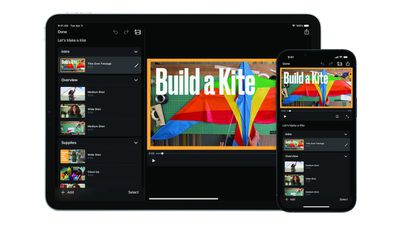
iMovie Magic Movie Feature
Apple says the "Magic Movie" function instantly creates a custom video from the clips and photos a user selects, with transitions, effects, and music automatically added. "Storyboards" helps users learn to edit and improve their video storytelling skills with pre-made templates for popular types of videos shared on social media platforms, such as DIY videos, cooking tutorials, product reviews, science experiments, and more.

iMovie for macOS was also updated today with support for importing "Magic Movie" and "Storyboard" projects created with the iOS app. The free updates are currently rolling out on the App Store across the iPhone, iPad, and Mac.

Apple also updated Final Cut Pro, Compressor, and Motion on macOS with optimized performance on the Mac Studio and more. The new version of Final Cut Pro also supports importing "Magic Movie" and "Storyboard" projects created with iMovie.

iMovie for iOS version 3.0 release notes:

• Get started, learn, and be inspired by two brand-new types of video projects: Magic Movie and Storyboards
• Create a Magic Movie to instantly make and share custom videos with titles, transitions, and music in just a few taps
• Select an album of photos and videos, and Magic Movie will create a polished video using your media
• Start with a Storyboard project to improve your storytelling skills using a template that guides you through the video-making process
• Choose from 20 Storyboards for common video projects like Cooking, DIY, Q&A, Product Review, and Book Report
• Customize and organize your storyboard video by adding, reordering, and grouping shots within the flexible shot list
• Learn different types of video framing and storytelling techniques with the shot tips provided in each type of storyboard
• Record video or take photos right into each Storyboard placeholder clip, or add media from your Photos library
• Enhance your Magic Movie or Storyboard video with 20 dynamic styles that include title layouts, fonts, filters, color palettes, and music
• Go further by editing clips with tools like trim, split, and clip speed
• Apply title treatments, record voiceover narration, or adjust the depth-of-field effect in Cinematic mode video clips* to further customize your videos
• Import Magic Movie and Storyboard projects into a timeline in iMovie for Mac or Final Cut Pro** to take your project further
• Save Magic Movie and Storyboard videos to your Photos library, send to friends and family via Messages or Mail, or share with your followers on social media
* Requires iPhone 13, iPad mini (6th generation), iPad Pro 11-inch or iPad Pro 12.9-inch (3rd generation or later)
** Requires iMovie for Mac version 10.3.2 or Final Cut Pro version 10.6.2

iMovie 3.0 requires a device running iOS 15.2 or later or iPadOS 15.2 or later.

Tag: iMovie

Popular Stories

iOS 26

iOS 26.2 Coming Soon With These 8 New Features on Your iPhone

Thursday December 11, 2025 8:49 am PST by
Apple seeded the second iOS 26.2 Release Candidate to developers earlier this week, meaning the update will be released to the general public very soon. Apple confirmed iOS 26.2 would be released in December, but it did not provide a specific date. We expect the update to be released by early next week. iOS 26.2 includes a handful of new features and changes on the iPhone, such as a new...
iOS 26

iOS 26.4 and iOS 27 Features Revealed in New Leak

Friday December 12, 2025 10:56 am PST by
Macworld's Filipe Espósito today revealed a handful of features that Apple is allegedly planning for iOS 26.4, iOS 27, and even iOS 28. The report said the features are referenced within the code for a leaked internal build of iOS 26 that is not meant to be seen by the public. However, it appears that Espósito and/or his sources managed to gain access to it, providing us with a sneak peek...
iOS 26

Apple Releases iOS 26.2 With Alarms for Reminders, Lock Screen Changes, Enhanced Safety Alerts and More

Friday December 12, 2025 10:10 am PST by
Apple today released iOS 26.2, the second major update to the iOS 26 operating system that came out in September, iOS 26.2 comes a little over a month after iOS 26.1 launched. ‌iOS 26‌.2 is compatible with the ‌iPhone‌ 11 series and later, as well as the second-generation ‌iPhone‌ SE. The new software can be downloaded on eligible iPhones over-the-air by going to Settings >...
AirPods Pro Firmware Feature

Apple Releases New Firmware for AirPods Pro 2 and AirPods Pro 3

Thursday December 11, 2025 11:28 am PST by
Apple today released new firmware designed for the AirPods Pro 3 and the prior-generation AirPods Pro 2. The AirPods Pro 3 firmware is 8B30, up from 8B25, while the AirPods Pro 2 firmware is 8B28, up from 8B21. There's no word on what's include in the updated firmware, but the AirPods Pro 2 and AirPods Pro 3 are getting expanded support for Live Translation in the European Union in iOS...
macOS Tahoe 26 Thumb

Apple Releases macOS Tahoe 26.2 With Edge Light

Friday December 12, 2025 10:08 am PST by
Apple today released macOS Tahoe 26.2, the second major update to the macOS Tahoe operating system that came out in September. macOS Tahoe 26.2 comes five weeks after Apple released macOS Tahoe 26.1. Mac users can download the macOS Tahoe update by using the Software Update section of System Settings. macOS Tahoe 26.2 includes Edge Light, a feature that illuminates your face with soft...
AirTag 2 Mock Feature

Apple AirTag 2: Four New Features Found in iOS 26 Code

Thursday December 11, 2025 10:31 am PST by
The AirTag 2 will include a handful of new features that will improve tracking capabilities, according to a new report from Macworld. The site says that it was able to access an internal build of iOS 26, which includes references to multiple unreleased products. Here's what's supposedly coming: An improved pairing process, though no details were provided. AirTag pairing is already...
ipados 26 1 slide over

Apple Releases iPadOS 26.2 With Multitasking Improvements

Friday December 12, 2025 10:09 am PST by
Apple today released iPadOS 26.2, the second major update to the iPadOS 26 operating system released in September. iPadOS 26.2 comes a month after iPadOS 26.1. The new software can be downloaded on eligible iPads over-the-air by going to Settings > General > Software Update. iPadOS 26.2 continues with the multitasking improvements that were added with iPadOS 26.1. You can now drag and...
iphone fold text

'iPhone Fold' Arrival Expected to Cement Book-Style Era for Foldables

Friday December 12, 2025 3:55 am PST by
Foldable smartphone panel shipments are projected to jump 46% year-over-year in 2026, with Apple's entry into the market serving as the main catalyst, according to Counterpoint Research's latest Foldable-Rollable Display Shipment Tracker. "Apple is the key driver as it starts to procure panels for its first foldable iPhone," said Counterpoint's Guillaume Chansin. The research firm expects...

Top Rated Comments

Macropanda Avatar
48 months ago

It still does not support portrait video, though right?
Good! People that film in portrait don’t need encouraging.
Score: 23 Votes (Like | Disagree)
FCX Avatar
48 months ago
Would have been nice to see the Pro Apps get their own writeup, instead of buried in the iOS iMovie article. Jeez, people.
Score: 17 Votes (Like | Disagree)
Mr. Awesome Avatar
48 months ago
iMovie on iOS desperately needs a complete redesign - it’s so incredibly incapable compared for the macOS version it’s insane.
Score: 10 Votes (Like | Disagree)
Unregistered 4U Avatar
48 months ago

How in 2022 is the main video editing app made by Apple not even able to adjust the brightness, contrast, saturation etc?
The main video editing app made by Apple is Final Cut Pro. They have a free video editing app called iMovie, but it’s not their main focus.
Score: 9 Votes (Like | Disagree)
TheYayAreaLiving ?️ Avatar
48 months ago
This is awesome. I'm happy Apple is focused on updating all the stock apps. However, I do agree with the above comment. It needs a complete redesign. Starting with Podcast?
Score: 7 Votes (Like | Disagree)
tobybrut Avatar
48 months ago
With the release of the new Final Cut Pro, expect a lot of YouTube videos entitled, "Why I Re-bought the Mac Studio Ultra After I Returned It."
Score: 5 Votes (Like | Disagree)















