Videos Show Menu Bar Behavior in Apps Not Updated for MacBook Pro Notch

When Apple unveiled the new MacBook Pro models with a notch to house the camera in the thinner display bezel, many observers pointed out potential problems for third-party apps that place additional content across the menu bar, in the form of dropdown menus that extend from the left or menu items that extend from the right.
notch behavior feature
The concern was that extended menus or menu items in the menu bar would be inadvertently hidden behind the notch. Based on new video evidence, that at least appears to be the case for non-updated apps that make extensive use of menu items, but not the case for apps that have extended dropdown menus.

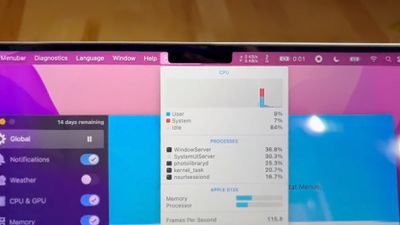
Snazzy Labs YouTuber Quinn Nelson shared two videos on Twitter bemoaning the impact that the notch has on versions of two third-party apps that have not been updated to make way for the notch. In the first video, menu bar items for popular app iStat Menus are shown as being partially concealed behind the notch but still accessible using the mouse pointer.

By contrast, in the second video, when Nelson launches an old version of DaVinci Resolve, he discovers that the video editing app's extended dropdown menus avoid the area of the menu bar concealed by the notch, and that the mouse pointer is blocked from entering the concealed space.


The latter behavior is an intentional move by Apple. By disabling the active space under the notch area and blocking off the mouse pointer, this ensures that older versions of apps can't display menus in that space. At a system level, on the other hand, the mouse pointer can enter the notch area, where it can be hidden. This behavior also applies in fullscreen mode.

In the second video, Nelson goes on to complain that the notch is causing DaVinci Resolve's extended menus to take over the menu items of iStat Menus on the right-hand side of the menu bar. This is actually normal behavior in macOS running on any Mac, but the notch does reduce the amount of menu bar space available for both sets of content.

Monterey ensures that app menus are shown on either side of the notch by using a new "compatibility mode" that disables the active display area taken up by the camera housing. For what it's worth, Bjango, the developer of iStat Menus, doesn't believe that adding compatibility mode support to their app would change the behavior of the app's status items when other apps are in the foreground and isn't likely to solve the issue presented in the video.


Related Roundup: MacBook Pro
Buyer's Guide: MacBook Pro (Buy Now)
Related Forums: MacBook Pro, macOS Monterey

Popular Stories

iOS 26

iOS 26.2 Coming Soon With These 8 New Features on Your iPhone

Thursday December 11, 2025 8:49 am PST by
Apple seeded the second iOS 26.2 Release Candidate to developers earlier this week, meaning the update will be released to the general public very soon. Apple confirmed iOS 26.2 would be released in December, but it did not provide a specific date. We expect the update to be released by early next week. iOS 26.2 includes a handful of new features and changes on the iPhone, such as a new...
Google maps feaure

Google Maps Quietly Added This Long-Overdue Feature for Drivers

Wednesday December 10, 2025 2:52 am PST by
Google Maps on iOS quietly gained a new feature recently that automatically recognizes where you've parked your vehicle and saves the location for you. Announced on LinkedIn by Rio Akasaka, Google Maps' senior product manager, the new feature auto-detects your parked location even if you don't use the parking pin function, saves it for up to 48 hours, and then automatically removes it once...
AirPods Pro Firmware Feature

Apple Releases New Firmware for AirPods Pro 2 and AirPods Pro 3

Thursday December 11, 2025 11:28 am PST by
Apple today released new firmware designed for the AirPods Pro 3 and the prior-generation AirPods Pro 2. The AirPods Pro 3 firmware is 8B30, up from 8B25, while the AirPods Pro 2 firmware is 8B28, up from 8B21. There's no word on what's include in the updated firmware, but the AirPods Pro 2 and AirPods Pro 3 are getting expanded support for Live Translation in the European Union in iOS...
iOS 26

iOS 26.4 and iOS 27 Features Revealed in New Leak

Friday December 12, 2025 10:56 am PST by
Macworld's Filipe Espósito today revealed a handful of features that Apple is allegedly planning for iOS 26.4, iOS 27, and even iOS 28. The report said the features are referenced within the code for a leaked internal build of iOS 26 that is not meant to be seen by the public. However, it appears that Espósito and/or his sources managed to gain access to it, providing us with a sneak peek...
Foldable iPhone 2023 Feature 1

Apple to Make More Foldable iPhones Than Expected [Updated]

Tuesday December 9, 2025 9:59 am PST by
Apple has ordered 22 million OLED panels from Samsung Display for the first foldable iPhone, signaling a significantly larger production target than the display industry had previously anticipated, ET News reports. In the now-seemingly deleted report, ET News claimed that Samsung plans to mass-produce 11 million inward-folding OLED displays for Apple next year, as well as 11 million...
AirTag 2 Mock Feature

Apple AirTag 2: Four New Features Found in iOS 26 Code

Thursday December 11, 2025 10:31 am PST by
The AirTag 2 will include a handful of new features that will improve tracking capabilities, according to a new report from Macworld. The site says that it was able to access an internal build of iOS 26, which includes references to multiple unreleased products. Here's what's supposedly coming: An improved pairing process, though no details were provided. AirTag pairing is already...
iOS 26

Apple Releases iOS 26.2 With Alarms for Reminders, Lock Screen Changes, Enhanced Safety Alerts and More

Friday December 12, 2025 10:10 am PST by
Apple today released iOS 26.2, the second major update to the iOS 26 operating system that came out in September, iOS 26.2 comes a little over a month after iOS 26.1 launched. ‌iOS 26‌.2 is compatible with the ‌iPhone‌ 11 series and later, as well as the second-generation ‌iPhone‌ SE. The new software can be downloaded on eligible iPhones over-the-air by going to Settings >...
iOS 26

15 New Things Your iPhone Can Do in iOS 26.2

Friday December 5, 2025 9:40 am PST by
Apple is about to release iOS 26.2, the second major point update for iPhones since iOS 26 was rolled out in September, and there are at least 15 notable changes and improvements worth checking out. We've rounded them up below. Apple is expected to roll out iOS 26.2 to compatible devices sometime between December 8 and December 16. When the update drops, you can check Apple's servers for the ...
maxresdefault

iOS 26 Code Leak Reveals Apple Smart Home Hub Details

Thursday December 11, 2025 4:02 pm PST by
Apple is working on a smart home hub that will rely heavily on the more capable version of Siri that's coming next year. We've heard quite a bit about the hub over the last two years, but a recent iOS 26 code leak provides additional insight into what we can expect and confirms rumored features. Subscribe to the MacRumors YouTube channel for more videos. Macworld claims to have access to an ...

Top Rated Comments

mystery hill Avatar
54 months ago
Don't blame the developers. It's notch their fault.
Score: 61 Votes (Like | Disagree)
robertts Avatar
54 months ago
I don't understand why this isn't handled at the system level. So, every Mac app needs to engineer a solution for the notch?
Score: 44 Votes (Like | Disagree)
Your Royal Highness Avatar
54 months ago
OK it’s a legitimate concern but that guy and his annoying crackle is ??
Score: 44 Votes (Like | Disagree)
macpot Avatar
54 months ago
The guy is sooo excited like he discovered a new kind of atom or something... ?

This can be fixed in the next "Minor" update!
Score: 32 Votes (Like | Disagree)
Wiesenlooser Avatar
54 months ago
It's valid criticism that needs to be fixed but the guy is super obnoxious.
Score: 31 Votes (Like | Disagree)
Max Webb Avatar
54 months ago
I get the issue, but it's not the end of the world, it will just take a small software fix to change how it works.
Score: 30 Votes (Like | Disagree)