Skip to Content

Videos Show Menu Bar Behavior in Apps Not Updated for MacBook Pro Notch

When Apple unveiled the new MacBook Pro models with a notch to house the camera in the thinner display bezel, many observers pointed out potential problems for third-party apps that place additional content across the menu bar, in the form of dropdown menus that extend from the left or menu items that extend from the right.
notch behavior feature
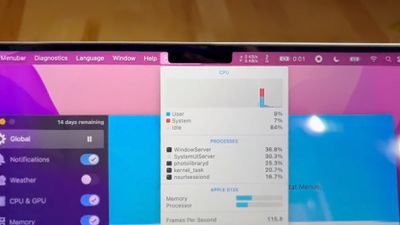
The concern was that extended menus or menu items in the menu bar would be inadvertently hidden behind the notch. Based on new video evidence, that at least appears to be the case for non-updated apps that make extensive use of menu items, but not the case for apps that have extended dropdown menus.

Snazzy Labs YouTuber Quinn Nelson shared two videos on Twitter bemoaning the impact that the notch has on versions of two third-party apps that have not been updated to make way for the notch. In the first video, menu bar items for popular app iStat Menus are shown as being partially concealed behind the notch but still accessible using the mouse pointer.

By contrast, in the second video, when Nelson launches an old version of DaVinci Resolve, he discovers that the video editing app's extended dropdown menus avoid the area of the menu bar concealed by the notch, and that the mouse pointer is blocked from entering the concealed space.


The latter behavior is an intentional move by Apple. By disabling the active space under the notch area and blocking off the mouse pointer, this ensures that older versions of apps can't display menus in that space. At a system level, on the other hand, the mouse pointer can enter the notch area, where it can be hidden. This behavior also applies in fullscreen mode.

In the second video, Nelson goes on to complain that the notch is causing DaVinci Resolve's extended menus to take over the menu items of iStat Menus on the right-hand side of the menu bar. This is actually normal behavior in macOS running on any Mac, but the notch does reduce the amount of menu bar space available for both sets of content.

Monterey ensures that app menus are shown on either side of the notch by using a new "compatibility mode" that disables the active display area taken up by the camera housing. For what it's worth, Bjango, the developer of iStat Menus, doesn't believe that adding compatibility mode support to their app would change the behavior of the app's status items when other apps are in the foreground and isn't likely to solve the issue presented in the video.


Related Roundup: MacBook Pro
Buyer's Guide: MacBook Pro (Buy Now)
Related Forums: MacBook Pro, macOS Monterey

Popular Stories

Multicolored Low Cost A18 Pro MacBook Feature

Apple Accidentally Leaks 'MacBook Neo'

Tuesday March 3, 2026 7:00 am PST by
Apple appears to have prematurely revealed the name of its rumored lower-cost MacBook model, which is expected to be announced this Wednesday. A regulatory document for a "MacBook Neo" (Model A3404) has appeared on Apple's website. Unfortunately, there are no further details or images available yet. While the PDF file does not contain the "MacBook Neo" name, it briefly appeared in a link...
imac video apple feature

Apple Unveils Two New Products

Monday March 2, 2026 7:49 am PST by
Apple today introduced two new devices, including the iPhone 17e and an updated iPad Air. iPhone 17e features the same overall design as the iPhone 16e, but it gains Apple's A19 chip, MagSafe for magnetic wireless charging and magnetic accessories, Apple's second-generation C1X modem for faster 5G, and a doubled 256GB of base storage. In the U.S., the iPhone 17e starts at $599, just like the ...
MacBook Neo Feature Pastel 1

Apple Announces $599 'MacBook Neo' With A18 Pro Chip

Wednesday March 4, 2026 6:15 am PST by
Apple today announced the "MacBook Neo," an all-new kind of low-cost Mac featuring the A18 Pro chip for $599. The MacBook Neo is the first Mac to be powered by an iPhone chip; the A18 Pro debuted in 2024's iPhone 16 Pro models. Apple says it is up to 50% faster for everyday tasks than the bestselling PC with the latest shipping Intel Core Ultra 5, up to 3x faster for on-device AI workloads,...

Top Rated Comments

57 months ago
Don't blame the developers. It's notch their fault.
Score: 61 Votes (Like | Disagree)
57 months ago
I don't understand why this isn't handled at the system level. So, every Mac app needs to engineer a solution for the notch?
Score: 44 Votes (Like | Disagree)
Your Royal Highness Avatar
57 months ago
OK it’s a legitimate concern but that guy and his annoying crackle is 🤮🤢
Score: 44 Votes (Like | Disagree)
macpot Avatar
57 months ago
The guy is sooo excited like he discovered a new kind of atom or something... 😴

This can be fixed in the next "Minor" update!
Score: 32 Votes (Like | Disagree)
57 months ago
It's valid criticism that needs to be fixed but the guy is super obnoxious.
Score: 31 Votes (Like | Disagree)
Max Webb Avatar
57 months ago
I get the issue, but it's not the end of the world, it will just take a small software fix to change how it works.
Score: 30 Votes (Like | Disagree)