Adobe Launches Premiere and Photoshop Elements 2022

Adobe today released new versions of Photoshop Elements and Premiere Elements, which is the company's affordable photo and video editing software aimed at more casual users who want to improve their photos and videos with simple editing tools.

adobe elements artistic effects
For Photoshop Elements 2022, Adobe is introducing an Adobe Sensei-powered feature that transforms a photo into a work of art. With a one-click filter, users can apply effects inspired by afamous works of art or popular art styles to their photos, and then adjust the result.

Adobe is adding moving overlays like snowflakes or sparkles that can be added to photos, along with animated frames. These can be saved as MP4s and shared as videos on social media networks.

adobe elements overlays
With a warp tool, photos can be automatically warped to fit inside or around an object. A photo could, for example, be wrapped around a coffee cup in an image or placed in the frames of sunglasses for fun dual-photo opportunities.

adobe elements warp
Guided Edits, a feature that walks users through different edits that can be made to their photos, gets updates on a yearly basis. For the 2022 update, Adobe is adding Guided Edits for improving pet photos and extending photo backgrounds.

adobe elements pet portraits
Other features in Photoshop Elements 2022 include animated slideshow templates, automatic software updates, a refreshed design that makes navigation easier, and support for GIF playback in the organizer.

adobe slideshow templates
For Premiere Elements 2022, Adobe added a new feature that resizes videos for social media while keeping the most important elements of the video front and center. Adobe says that it's ideal for clips with movement, such as a child's birthday party or a sporting event. There are also motion titles, mattes, and backgrounds available for non-horizontal videos.
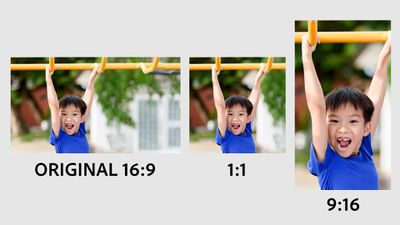
adobe premiere elements aspect ratio
Premiere Elements 2022 includes new Guided Edits for adding animated overlays like fluttering butterflies and adjusting shadows and highlights in videos.

adobe elements premiere shadows
Like Photoshop Elements 2022, Premiere Elements 2022 has gained a refreshed look, automatic software updates, new animated slideshow templates and GIF playback in the Organizer, plus it's easier to reduce file size with a slider that adds compression.

For more on what's new in Photoshop Elements and Premiere Elements, make sure to check out Adobe's website. The updates are available for purchase from Adobe for $99 each starting today, with bundle and upgrade pricing available.

Note: MacRumors is an affiliate partner with Adobe. When you click a link and make a purchase, we may receive a small payment, which helps us keep the site running.


Tag: Adobe

Popular Stories

iOS 26

iOS 26.4 and iOS 27 Features Revealed in New Leak

Friday December 12, 2025 10:56 am PST by
Macworld's Filipe Espósito today revealed a handful of features that Apple is allegedly planning for iOS 26.4, iOS 27, and even iOS 28. The report said the features are referenced within the code for a leaked internal build of iOS 26 that is not meant to be seen by the public. However, it appears that Espósito and/or his sources managed to gain access to it, providing us with a sneak peek...
apple beta 26 lineup

Apple Leak Confirms Work on Foldable iPhone, AirTag 2, and Dozens More Devices

Monday December 15, 2025 2:05 pm PST by
Last week, details about unreleased Apple devices and future iOS features were shared by Macworld. This week, we learned where the information came from, plus we have more findings from the leak. As it turns out, an Apple prototype device running an early build of iOS 26 was sold, and the person who bought it shared the software. The OS has a version number of 23A5234w, and the first...
Apple Logo Top Half

Early iOS 26 Software Leak Uncovers Dozens of Upcoming Apple Features

Monday December 15, 2025 3:05 pm PST by
Software from an iPhone prototype running an early build of iOS 26 leaked last week, giving us a glimpse at future Apple devices and iOS features. We recapped device codenames in our prior article, and now we have a list of some of the most notable feature flags that were found in the software code. In some cases, it's obvious what the feature flags are referring to, while some are more...
Apple Foldable Thumb

Leak Reveals Foldable iPhone Details

Monday December 15, 2025 9:09 am PST by
The first foldable iPhone will feature a series of design and hardware firsts for Apple, according to details shared by the Weibo leaker known as Digital Chat Station. According to a new post, via machine translation, Apple is developing what the leaker describes as a "wide foldable" device, a term used to refer to a horizontally oriented, book-style foldable with a large internal display....
iOS 26

Apple Releases iOS 26.2 With Alarms for Reminders, Lock Screen Changes, Enhanced Safety Alerts and More

Friday December 12, 2025 10:10 am PST by
Apple today released iOS 26.2, the second major update to the iOS 26 operating system that came out in September, iOS 26.2 comes a little over a month after iOS 26.1 launched. ‌iOS 26‌.2 is compatible with the ‌iPhone‌ 11 series and later, as well as the second-generation ‌iPhone‌ SE. The new software can be downloaded on eligible iPhones over-the-air by going to Settings >...
iOS 26

iOS 26.2 Coming Soon With These 8 New Features on Your iPhone

Thursday December 11, 2025 8:49 am PST by
Apple seeded the second iOS 26.2 Release Candidate to developers earlier this week, meaning the update will be released to the general public very soon. Apple confirmed iOS 26.2 would be released in December, but it did not provide a specific date. We expect the update to be released by early next week. iOS 26.2 includes a handful of new features and changes on the iPhone, such as a new...
macOS Tahoe 26 Thumb

Apple Releases macOS Tahoe 26.2 With Edge Light

Friday December 12, 2025 10:08 am PST by
Apple today released macOS Tahoe 26.2, the second major update to the macOS Tahoe operating system that came out in September. macOS Tahoe 26.2 comes five weeks after Apple released macOS Tahoe 26.1. Mac users can download the macOS Tahoe update by using the Software Update section of System Settings. macOS Tahoe 26.2 includes Edge Light, a feature that illuminates your face with soft...
airpods max 2024 colors

AirPods Max 2 Likely to Offer These 10 New Features

Monday December 15, 2025 7:41 am PST by
Apple released the AirPods Max on December 15, 2020, meaning the over-ear headphones launched five years ago today. While the AirPods Max were updated with a USB-C port and new color options last year, followed by support for lossless audio and ultra-low latency audio this year, the headphones lack some of the features that have been introduced for newer generations of the regular AirPods and the ...

Top Rated Comments

neuropsychguy Avatar
55 months ago
I’m a longtime user of Adobe products but there are few reasons to get Photoshop Elements when we have such excellent alternatives — Affinity Photo, Pixelmator Pro, and Acorn.

These are all about 50% the price of Photoshop Elements and regularly go on sale.

Edit: I'm not affiliated with any of those companies or products. I've been using Adobe Photoshop off and on for almost 30 years. I use both Affinity and Pixelmator from time to time (and have never used Acorn) but use them much more than Photoshop. There are reasons to use Photoshop Elements but those are mainly if someone has been using it for years and can't or won't switch (or needs it for some other random reason). For anyone not yet in the Adobe ecosystem or who is willing and able to switch, the alternatives are terrific and cheaper.
Score: 13 Votes (Like | Disagree)
neuropsychguy Avatar
55 months ago

Those products you suggest are way out of the scope of the user base that Photoshop Elements is aimed at. Affinity Photo is an excellent alternative to Photoshop, but way to complex for an Elements user.
Then why not just use Apple's Photos app if someone needs something simple? I know there are differences in what they can do but someone who needs simple editing can stick with Photos. Someone who needs something more can learn an alternative.

If someone already knows Adobe UIs then they can get Photoshop Elements. If people have no experience with Photoshop or Elements, why would they spend time and more money learning it when they could spend less money and the same amount of time learning an alternative. If someone is starting from scratch (meaning no experience with any image editing software), it's not going to be harder to learn how to edit in Pixelmator or Affinity or Acorn than it is in Photoshop Elements.

I say that as someone who just "gets" and who generally likes Adobe's UIs. Photoshop Elements was great years ago. It's still great but there are more powerful (but still straightforward to use) alternatives that cost much less. I've been using Photoshop and other Adobe products since the early 1990s so I'm not making this argument from an "anti-Adobe" position.
Score: 6 Votes (Like | Disagree)
ruka.snow Avatar
55 months ago

I’m a longtime user of Adobe products but there are few reasons to get Photoshop Elements when we have such excellent alternatives — Affinity Photo, Pixelmator Pro, and Acorn.

These are all about 50% the price of Photoshop Elements and regularly go on sale.
Those products you suggest are way out of the scope of the user base that Photoshop Elements is aimed at. Affinity Photo is an excellent alternative to Photoshop, but way to complex for an Elements user.
Score: 4 Votes (Like | Disagree)
ian87w Avatar
55 months ago
Do these "Elements" software still use UI from the 90s? Sometimes I downloaded their trial just for fun, and every time I was amazed that the UI has not changed at all. It feels like those old Windows 3.1 programs and color schemes.
Score: 3 Votes (Like | Disagree)
TheYayAreaLiving ?️ Avatar
55 months ago
Can’t wait to see what the picture quality is going to look like.
Score: 3 Votes (Like | Disagree)
CarlJ Avatar
55 months ago

Yet Adobe has managed to do it for decades and people still want to buy it along with the books teaching them how to use it. Intermediate programs can be the hardest to leave behind.
I suspect a huge amount of it goes simply on name recognition - "photoshop" is a verb these days, and modified images are "photoshopped" in the common psyche, much like a tissue is almost invariably called a "kleenex". So when people want something more than Photos.app offers (and oftentimes they don't realize all that Photos.app can do), they think, "well, I need Photoshop".
Score: 3 Votes (Like | Disagree)