Many iPhone 13 Owners Unable to Get Find My Working on New MagSafe Wallet

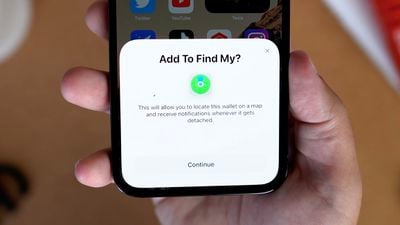
Alongside the new iPhone 13 models, Apple introduced an updated version of the MagSafe Wallet that has Find My built in. The new MagSafe Wallet is designed to be easier to find should it slip off of an ‌iPhone‌ or fall out of a pocket, but some new ‌MagSafe‌ Wallet owners are unable to get ‌Find My‌ to connect.

wallet find my bug
According to a long thread on Reddit, affected users do not get the proper ‌Find My‌ pop up when attaching a ‌MagSafe‌ Wallet to an ‌iPhone‌. The issue seems to be impacting ‌iPhone‌ 13 models in particular, but there are also some complaints from ‌iPhone‌ 12 owners.

The ‌MagSafe‌ Wallet is meant to connect to ‌Find My‌ automatically when attached to an ‌iPhone‌, as we demonstrate in our hands-on video below, but it simply does not work for some people.


Some users have been directed by Apple Support to Erase Network Settings and have had success with that method, but others say that this method does not work.

I had 3 calls with customer support and we were able to get it working for my iPhone 13 pro max. This is what worked: they told me to go to Settings > General > Transfer or Reset > Erase > Erase Network Settings. The phone restarted, and after restarting and attaching the wallet to the back of my phone, the animation popped up and wallet is now in my Find My app!

Reddit user EndlessApology was told by Apple Support to take more drastic measures and put his ‌iPhone‌ into Device Firmware Update (DFU) mode to reinstall the OS using a Mac.

Got my own Wallets today and immediately had this issue with both my 13 Pro & Pro Max. Spoken to Apple tech, and followed what they said and it fixed it. Put the phones into DFU mode, and reinstall the OS and Firmware. Set the phone up again without doing any recovery. Once set back up, pop the wallet on and it'll pop up after about 5 seconds, and let you pair to Find My. After that, if you need to, reset the phone on the device itself, and restore from back up in set up. Sorted :)

DFU mode has been largely successful for most of the Reddit users who have attempted to fix the issue, but it is a huge hassle that shouldn't be necessary for a simple accessory pairing process. Based on the Reddit thread, Apple is aware of the issue, so it's possible that a fix will be coming in a future update.

For now, users who want to get their ‌MagSafe‌ Wallets working right away should try the Reset Network Settings option and if that doesn't work, the DFU method to reinstall iOS 15.


Related Forum: iPhone

Popular Stories

iOS 26

iOS 26.2 Coming Soon With These 8 New Features on Your iPhone

Thursday December 11, 2025 8:49 am PST by
Apple seeded the second iOS 26.2 Release Candidate to developers earlier this week, meaning the update will be released to the general public very soon. Apple confirmed iOS 26.2 would be released in December, but it did not provide a specific date. We expect the update to be released by early next week. iOS 26.2 includes a handful of new features and changes on the iPhone, such as a new...
iOS 26

iOS 26.4 and iOS 27 Features Revealed in New Leak

Friday December 12, 2025 10:56 am PST by
Macworld's Filipe Espósito today revealed a handful of features that Apple is allegedly planning for iOS 26.4, iOS 27, and even iOS 28. The report said the features are referenced within the code for a leaked internal build of iOS 26 that is not meant to be seen by the public. However, it appears that Espósito and/or his sources managed to gain access to it, providing us with a sneak peek...
AirPods Pro Firmware Feature

Apple Releases New Firmware for AirPods Pro 2 and AirPods Pro 3

Thursday December 11, 2025 11:28 am PST by
Apple today released new firmware designed for the AirPods Pro 3 and the prior-generation AirPods Pro 2. The AirPods Pro 3 firmware is 8B30, up from 8B25, while the AirPods Pro 2 firmware is 8B28, up from 8B21. There's no word on what's include in the updated firmware, but the AirPods Pro 2 and AirPods Pro 3 are getting expanded support for Live Translation in the European Union in iOS...
iOS 26

Apple Releases iOS 26.2 With Alarms for Reminders, Lock Screen Changes, Enhanced Safety Alerts and More

Friday December 12, 2025 10:10 am PST by
Apple today released iOS 26.2, the second major update to the iOS 26 operating system that came out in September, iOS 26.2 comes a little over a month after iOS 26.1 launched. ‌iOS 26‌.2 is compatible with the ‌iPhone‌ 11 series and later, as well as the second-generation ‌iPhone‌ SE. The new software can be downloaded on eligible iPhones over-the-air by going to Settings >...
Google maps feaure

Google Maps Quietly Added This Long-Overdue Feature for Drivers

Wednesday December 10, 2025 2:52 am PST by
Google Maps on iOS quietly gained a new feature recently that automatically recognizes where you've parked your vehicle and saves the location for you. Announced on LinkedIn by Rio Akasaka, Google Maps' senior product manager, the new feature auto-detects your parked location even if you don't use the parking pin function, saves it for up to 48 hours, and then automatically removes it once...
AirTag 2 Mock Feature

Apple AirTag 2: Four New Features Found in iOS 26 Code

Thursday December 11, 2025 10:31 am PST by
The AirTag 2 will include a handful of new features that will improve tracking capabilities, according to a new report from Macworld. The site says that it was able to access an internal build of iOS 26, which includes references to multiple unreleased products. Here's what's supposedly coming: An improved pairing process, though no details were provided. AirTag pairing is already...
macOS Tahoe 26 Thumb

Apple Releases macOS Tahoe 26.2 With Edge Light

Friday December 12, 2025 10:08 am PST by
Apple today released macOS Tahoe 26.2, the second major update to the macOS Tahoe operating system that came out in September. macOS Tahoe 26.2 comes five weeks after Apple released macOS Tahoe 26.1. Mac users can download the macOS Tahoe update by using the Software Update section of System Settings. macOS Tahoe 26.2 includes Edge Light, a feature that illuminates your face with soft...
iOS 26

15 New Things Your iPhone Can Do in iOS 26.2

Friday December 5, 2025 9:40 am PST by
Apple is about to release iOS 26.2, the second major point update for iPhones since iOS 26 was rolled out in September, and there are at least 15 notable changes and improvements worth checking out. We've rounded them up below. Apple is expected to roll out iOS 26.2 to compatible devices sometime between December 8 and December 16. When the update drops, you can check Apple's servers for the ...

Top Rated Comments

HeavenDynamic Avatar
55 months ago
This might be the buggiest iOS/iPhone release ever. It was understandable when it was a major update like iOS 7, 8, 11 or 13 but there’s almost nothing new this year.
Score: 35 Votes (Like | Disagree)
macloverHK Avatar
55 months ago
Another day, another bug
Score: 30 Votes (Like | Disagree)
zorinlynx Avatar
55 months ago
Anyone else think they should stop tying OS releases to new phone releases? If there wasn't such a rush to get the new OS out the door for a new phone release, maybe we wouldn't have so many bugs hitting the production releases of iOS.
Score: 27 Votes (Like | Disagree)
TMRJIJ Avatar
55 months ago

So are these all pandemic bugs? No wonder Tim wants people back in office. ?
It’s that new 1080p camera on the new iMacs and M1X MacBooks. Craig can’t stop fixing his hair during FaceTime group meetings long enough to catch this stuff.


Attachment Image
Score: 15 Votes (Like | Disagree)
xxray Avatar
55 months ago
This is hilarious at this point.
Score: 13 Votes (Like | Disagree)
BenLeong Avatar
55 months ago
Yikes. Whoever is in charge of iOS over there kind of blew it this time around. Every release will have bugs, but 15 seems to be a train wreck. Glad I haven’t downloaded it.
Score: 13 Votes (Like | Disagree)