Hands-On With the New iPad Mini 6

Apple last week launched an updated version of the iPad mini, which has been entirely overhauled with an iPad Air-like design. The new mini is basically a smaller version of the iPad Air, and we thought we'd check it out and share first impressions after 48 hours with the little tablet.


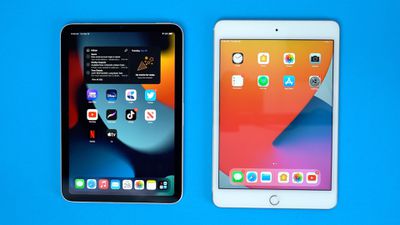
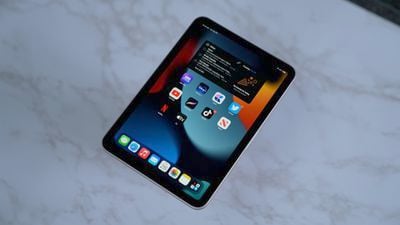
With an 8.3-inch display, the ‌iPad mini‌ has a bigger screen size than ever before, but it's actually a touch less tall than the prior-generation version thanks to much slimmer bezels and the removal of the Home button.
ipad mini 3
Since there's no Home button, the ‌iPad mini‌ uses a Touch ID power button, which works well. It's just like the ‌Touch ID‌ power button on the ‌iPad Air‌, and it's identical to the ‌Touch ID‌ Home buttons we used for years before Apple started the transition to Face ID. It's quick and hassle-free, though it does take some getting accustomed to if you're used to ‌Face ID‌.

ipad mini 4
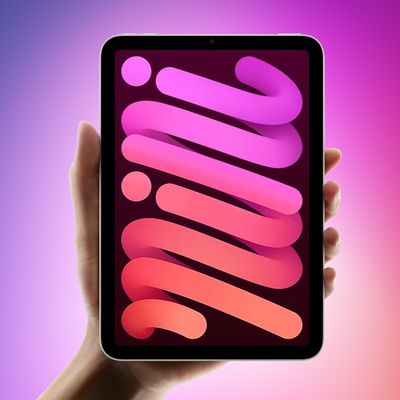
Design wise the ‌iPad mini‌ also looks like a little version of the ‌iPad Air‌ with the same squared-off edges, plus it adopts USB-C, which is useful if you want to connect peripherals or charge using the same cable you use for your MacBook. Apple also made the ‌iPad mini‌ 6 in new colors like pink, purple, starlight (a silver/gold) and space gray.

ipad mini 5
The size and weight of the ‌iPad mini‌ feel great in the hand, and it's the perfect size for reading or playing games on the go. It's equipped with the same A15 chip that's in the iPhone 13 Pro, with 5-core GPU included, so it's second in speed only to the M1 iPad Pro.

If you're used to devices like the ‌iPad Pro‌ or even the new ‌iPhone‌ 13 Pro, the ‌iPad mini‌'s display might disappoint. It's not mini-LED like the ‌iPad Pro‌ and it doesn't support ProMotion so there are no 120Hz refresh rates.
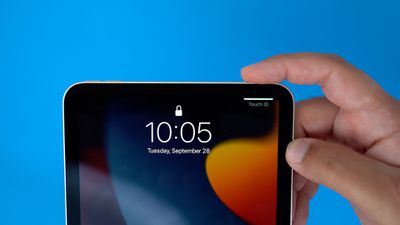
ipad mini 6
The rear camera technology is mediocre and hasn't really seen an update, but it's using a new 12-megapixel Ultra Wide front-facing camera that supports Center Stage, Apple's FaceTime feature. Center Stage is meant to keep you in the frame even when you walk around, and it works for ‌FaceTime‌, Zoom, and other video apps.

ipad mini 7
You can use the Apple Pencil 2 with the ‌iPad mini‌, and to make a space to charge it on the side, Apple moved the volume buttons to the top of the tablet. This can take some getting used to, but it's an acceptable change to get ‌Apple Pencil‌ 2 support. The prior-generation ‌iPad‌ supported the original ‌Apple Pencil‌, but the second-generation version is more feature rich and has a much better charging and connection method.
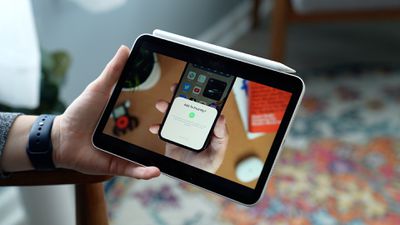
ipad mini 8
Though there's ‌Apple Pencil‌ support, Apple has not, unfortunately, designed a little Magic Keyboard for the ‌iPad mini‌ so there's no Apple-created keyboard option. You can probably find a third-party keyboard, but it's definitely disappointing not to have a mini Apple keyboard to work with.

The ‌iPad mini‌ is available with a cellular connection and it supports 5G, just like the iPhones. It's worth noting that it only supports sub-6Hz 5G connections and not the super fast mmWave connectivity, but that's still so rare that it's unlikely anyone is going to miss mmWave capabilities on the ‌iPad mini‌ at this point in time.

ipad mini 9
All in all, there's not a lot to complain about with the ‌iPad mini‌. If you're looking for a smaller sized tablet to complement an ‌iPhone‌, it's a solid choice because it's lightweight, easy to carry around in a bag, and still offers a lot more screen space than an ‌iPhone‌. It's arguably the most innovative and exciting product to come out in September.

At $499, the ‌iPad mini‌ is pricier than the ‌iPad‌ 9, but Apple has packed a lot of technology into a small enclosure with this tablet. It's similar in design to the ‌iPad Air‌, which is priced at $599, but with the A15 chip it's even more powerful.
Related Roundups: Apple Studio Display, iPad mini
Buyer's Guide: iPad Mini (Neutral)
Related Forum: iPad

Popular Stories

iOS 26

iOS 26.4 and iOS 27 Features Revealed in New Leak

Friday December 12, 2025 10:56 am PST by
Macworld's Filipe Espósito today revealed a handful of features that Apple is allegedly planning for iOS 26.4, iOS 27, and even iOS 28. The report said the features are referenced within the code for a leaked internal build of iOS 26 that is not meant to be seen by the public. However, it appears that Espósito and/or his sources managed to gain access to it, providing us with a sneak peek...
iOS 26

iOS 26.2 Coming Soon With These 8 New Features on Your iPhone

Thursday December 11, 2025 8:49 am PST by
Apple seeded the second iOS 26.2 Release Candidate to developers earlier this week, meaning the update will be released to the general public very soon. Apple confirmed iOS 26.2 would be released in December, but it did not provide a specific date. We expect the update to be released by early next week. iOS 26.2 includes a handful of new features and changes on the iPhone, such as a new...
iOS 26

Apple Releases iOS 26.2 With Alarms for Reminders, Lock Screen Changes, Enhanced Safety Alerts and More

Friday December 12, 2025 10:10 am PST by
Apple today released iOS 26.2, the second major update to the iOS 26 operating system that came out in September, iOS 26.2 comes a little over a month after iOS 26.1 launched. ‌iOS 26‌.2 is compatible with the ‌iPhone‌ 11 series and later, as well as the second-generation ‌iPhone‌ SE. The new software can be downloaded on eligible iPhones over-the-air by going to Settings >...
AirPods Pro Firmware Feature

Apple Releases New Firmware for AirPods Pro 2 and AirPods Pro 3

Thursday December 11, 2025 11:28 am PST by
Apple today released new firmware designed for the AirPods Pro 3 and the prior-generation AirPods Pro 2. The AirPods Pro 3 firmware is 8B30, up from 8B25, while the AirPods Pro 2 firmware is 8B28, up from 8B21. There's no word on what's include in the updated firmware, but the AirPods Pro 2 and AirPods Pro 3 are getting expanded support for Live Translation in the European Union in iOS...
macOS Tahoe 26 Thumb

Apple Releases macOS Tahoe 26.2 With Edge Light

Friday December 12, 2025 10:08 am PST by
Apple today released macOS Tahoe 26.2, the second major update to the macOS Tahoe operating system that came out in September. macOS Tahoe 26.2 comes five weeks after Apple released macOS Tahoe 26.1. Mac users can download the macOS Tahoe update by using the Software Update section of System Settings. macOS Tahoe 26.2 includes Edge Light, a feature that illuminates your face with soft...
AirTag 2 Mock Feature

Apple AirTag 2: Four New Features Found in iOS 26 Code

Thursday December 11, 2025 10:31 am PST by
The AirTag 2 will include a handful of new features that will improve tracking capabilities, according to a new report from Macworld. The site says that it was able to access an internal build of iOS 26, which includes references to multiple unreleased products. Here's what's supposedly coming: An improved pairing process, though no details were provided. AirTag pairing is already...
ipados 26 1 slide over

Apple Releases iPadOS 26.2 With Multitasking Improvements

Friday December 12, 2025 10:09 am PST by
Apple today released iPadOS 26.2, the second major update to the iPadOS 26 operating system released in September. iPadOS 26.2 comes a month after iPadOS 26.1. The new software can be downloaded on eligible iPads over-the-air by going to Settings > General > Software Update. iPadOS 26.2 continues with the multitasking improvements that were added with iPadOS 26.1. You can now drag and...
bug security vulnerability issue fix larry

Update Now: iOS 26.2 Fixes 20+ Security Vulnerabilities

Friday December 12, 2025 11:11 am PST by
Apple today released iOS 26.2, iPadOS 26.2, and macOS 26.2, all of which introduce new features, bug fixes, and security improvements. Apple says that the updates address over 20 vulnerabilities, including two bugs that are known to have been actively exploited. There are a pair of WebKit vulnerabilities that could allow maliciously crafted web content to execute code or cause memory...

Top Rated Comments

macduke Avatar
55 months ago
You jelly?
Score: 21 Votes (Like | Disagree)
ebika Avatar
55 months ago
Jelly scrolling is annoying, but far more annoying is iPadOS 15. Did Apple fire all their UX people? iOS 15 is nice. iPadOS has baffling usability and layout choices. Why are all the icons on the springboard squished into the center, especially when we're making a choice with the mini to have already constrained screen size.
Score: 12 Votes (Like | Disagree)
mygoldens Avatar
55 months ago
I have one and I think it is fantastic. It’s a small tablet with a LOT of POWER. I am not returning mine, jelly or no jelly.
Score: 10 Votes (Like | Disagree)
KPOM Avatar
55 months ago

11-page thread re: people returning their Mini 6:

https://forums.macrumors.com/threads/returning-my-ipad-mini-6.2313495/

Doh.
There seem to be two main themes in that thread. 1) A lot of people who didn't consider the iPad mini and have the iPad Pro or Air before decided to try it and decided they don't like the smaller screen (especially those used to the iPad Pro's superior screen). 2) iPad mini 5 owners didn't see as big an improvement as they were expecting.

I had the iPad mini 4 and 5, and IMO the 6 is a big improvement overall (USB-C, Apple Pencil 2 support. I haven't noticed the scrolling "issue."
Score: 10 Votes (Like | Disagree)
decypher44 Avatar
55 months ago
Seems to be one glaring omission. Come to think of it, all the “YouTube Influencers/Reviewers” omitted it, too.

Makes one wonder what’s most important by a reviewer: the actual testing and review, or the presentation? From the looks of things, more attention seems to be spent on production.
Score: 10 Votes (Like | Disagree)
Moonlight Avatar
55 months ago
I read the comments here and other places on MR and wonder why most of you are here. You obviously either hate Apple currently or have always hated them. Back in 2002 this was a site filled with people that loved Apple and when Apple made a mistake or had a problem product, the discourse was civil and constructive. Now it is a cesspool. It is such a shame.
Score: 9 Votes (Like | Disagree)