Skip to Content

Affinity Creative Apps Gain Memory Optimization Update Making Some Tasks Up to 10 Times Quicker

Serif today announced across-the-board updates for its popular suite of Affinity creative apps, including Affinity Photo, Affinity Designer, and the Apple award-winning Affinity Publisher for Mac, all of which were among the first professional creative suites to be optimized for Apple silicon.
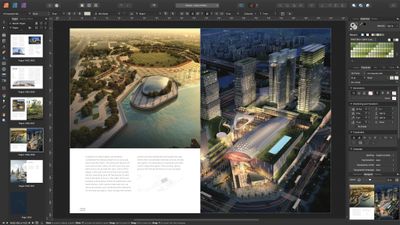
110 affinity publisher pages
For Affinity Publisher, a total rewrite of memory management now enables instant loading times for very large documents, even those with thousands of pages and many gigabytes' worth of linked images. These rewrites have also allowed for smooth live editing and fast scroll, pan and zoom across the whole document.

"We've been excited to see the scale of some of the projects our customers are creating in Affinity Publisher, and knew we could do better to ensure the app remained fast when pushed to the limits," said Ashley Hewson, Managing Director of Affinity developer Serif. "We completely reimagined our memory-handling architecture and the result is that there's really no limit to the size of document you can work on while maintaining that stunning performance."

This performance improvement also extends to Affinity Designer, where the benefit will be most felt by users who import PDF files generated in a CAD app or similar that include hundreds of thousands of objects. Even with less-complex projects, though, everything should feel a lot smoother and snappier, according to the developers.
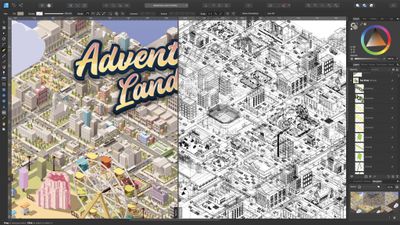
110 affinity designer outline view
Elsewhere, Affinity Photo has received "extensive" performance tweaks, so users can expect greater efficiency when blending layers together, while retaining a non-destructive workflow. This version also introduces some options to ensure editing speed remains slick even after building up a complex stack of hundreds of pixel and vector layers, and filter effects, while still maintaining the full layer stack.

Lastly, IDML import in Affinity Publisher is said to be up to four times faster, text flow speeds have nearly doubled, a series of other smaller tweaks and stability improvements have been made to the Affinity suite for version 1.10.

The update is available across all Affinity apps on macOS, Windows and iPad from today and is free to existing users. All Affinity apps are currently available to purchase individually for $60 each on the Affinity website, no subscriptions required.

Popular Stories

imac video apple feature

Apple Unveils Two New Products

Monday March 2, 2026 7:49 am PST by
Apple today introduced two new devices, including the iPhone 17e and an updated iPad Air. iPhone 17e features the same overall design as the iPhone 16e, but it gains Apple's A19 chip, MagSafe for magnetic wireless charging and magnetic accessories, Apple's second-generation C1X modem for faster 5G, and a doubled 256GB of base storage. In the U.S., the iPhone 17e starts at $599, just like the ...
Apple iPhone 17e feature

Apple Announces iPhone 17e With A19 Chip, MagSafe, and More

Monday March 2, 2026 6:07 am PST by
Apple today announced the iPhone 17e, featuring the A19 chip, MagSafe connectivity, faster charging, and more. The iPhone 17e contains the A19 chip introduced in iPhone 17. It features a 6-core GPU and a 4-core GPU. Apple pointed out that this makes it up to 2x faster than the iPhone 11. The new 16-core Neural Engine is optimized for large generative models. The iPhone 17e also contains...
iPad Air M4 Chip 1

Apple Unveils iPad Air With M4 Chip, Increased RAM, Wi-Fi 7, and More

Monday March 2, 2026 6:05 am PST by
Apple today introduced a new iPad Air, with key upgrades including Apple's M4 chip for faster performance, an increased 12GB of RAM, Apple's N1 wireless networking chip with Wi-Fi 7 support, and Apple's custom C1X modem in cellular models. The new iPad Air has the same overall design as the previous-generation model, which is equipped with the M3 chip, 8GB of RAM, and Wi-Fi 6E support....

Top Rated Comments

60 months ago
I use Affinity Photo every day for work, and the other apps in the suite often. Incredible set of software, these guys deserve all the credit in the world for putting a dent in the Adobe machine.

The universe would rejoice if they released a Premiere or After Effects-style studio.
Score: 23 Votes (Like | Disagree)
60 months ago

Is this update referring to v1.9 or a newer version?

The link to the announcement is broken.
It is 1.10, our site taking a bit longer to deploy than planned - should be live in a couple of minutes!
Score: 10 Votes (Like | Disagree)
Eddy Munn Avatar
60 months ago
We use Affinity Designer—it's such solid software.
Score: 6 Votes (Like | Disagree)
60 months ago

I had to use Affinity in a past project, and it's extremely confusing if you're used to Adobe. Everything works just differently enough to cause hick-ups all the times and you totally lose focus. The absolutely worst thing is how shift, cmd and alt do something totally different when resizing things. If you're used to Affinity, it may be nice, but it's certainly not a drop-in replacement for Adobe CC as some claim here (and it's also missing some features).
I disagree. I worked with Adobe Software all my life and swiching to Affinity was painless because the basic works the same way, even some shortcuts, but others features are actually better implemented and more practical, you just have to learn. Complaning that one software isn't a exact copy of another is just ridiculous, Adobe softwares have many qualities but good UX isn't one of them.
Score: 6 Votes (Like | Disagree)
Schnegg Avatar
60 months ago
Big fan of Designer here, it's so fast and intuitive. Kudos!

I'm still not as fluent in Photo as I was in PS, but that's because I try to do everything in Designer 🙂
Score: 5 Votes (Like | Disagree)
Apple Knowledge Navigator Avatar
60 months ago
Meanwhile, Adobe doesn’t know the meaning of optimisation.
Score: 4 Votes (Like | Disagree)