macOS Monterey Automatically Resizes Windows Moved to a Secondary Display

Apple announced macOS Monterey this week, and one small but convenient feature that went unmentioned during the WWDC keynote is automatic window resizing.
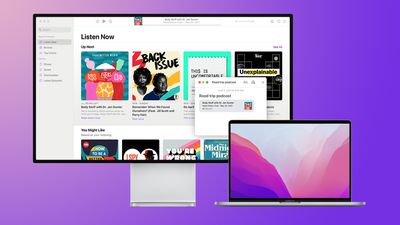
Auto Resize in Monterey Feature 2
As explained on the macOS Monterey features page, windows now automatically resize when they are moved from a Mac's built-in display to a secondary display, including an external monitor, another Mac, or an iPad using Sidecar.

This feature should prove to be particularly useful when moving windows between a smaller MacBook display and a larger external monitor.

Another new window management feature in macOS Monterey is the option to display the menu bar at all times when an app is in full-screen mode, making it easy to view an app's various menus and other glanceable information at any time.

macOS Monterey is available now in beta for developers, with a public release likely to occur at some point between September and November.

Related Forum: macOS Monterey

Popular Stories

M3 iPad Air

Apple's Next Two Products Are Coming Soon

Thursday February 12, 2026 11:17 am PST by
Apple plans to release an iPhone 17e and an iPad Air with an M4 chip "in the coming weeks," according to the latest word from Bloomberg's Mark Gurman. "Apple retail employees say that inventory of the iPhone 16e has basically dried out and the iPad Air is seeing shortages as well," said Gurman. "I've been expecting new versions of both (iPhone 17e and M4 iPad Air) in the coming weeks."...

Apple Sales Coach App

Apple Launching New 'Sales Coach' App

Friday February 13, 2026 2:01 pm PST by
Apple plans to launch a rebranded "Sales Coach" app on the iPhone and iPad later this month, according to a source familiar with the matter. "Sales Coach" will arrive as an update to Apple's existing "SEED" app, and it will continue to provide sales tips and training resources to Apple Store and Apple Authorized Reseller employees around the world. For example, there are articles and videos...
m5 macbook pro deal

Why You Shouldn't Buy the Next MacBook Pro

Tuesday February 10, 2026 4:27 pm PST by
Apple is planning to launch new MacBook Pro models as soon as early March, but if you can, this is one generation you should skip because there's something much better in the works. We're waiting on 14-inch and 16-inch MacBook Pro models with M5 Pro and M5 Max chips, with few changes other than the processor upgrade. There won't be any tweaks to the design or the display, but later this...
Coffee Burgundy and Purple iPhone 18 Pro Mock

Five iPhone 18 Pro Features Revealed in New Report

Friday February 13, 2026 8:43 am PST by
While the iPhone 18 Pro and iPhone 18 Pro Max are still seven months away, an analyst has revealed five new features the devices will allegedly have. Rumored color options for the iPhone 18 Pro models In a research note with investment firm GF Securities on Thursday, analyst Jeff Pu outlined the following upgrades for the iPhone 18 Pro models: Smaller Dynamic Island: It has been rumored...
macbook air prime day 2025

M5 MacBook Air: Release Date, Features, and Performance Predictions

Wednesday February 11, 2026 3:36 am PST by
The MacBook Air is Apple's most popular laptop – a thin, fanless machine that wields quiet power thanks to the efficiency of Apple silicon. While the M4 model isn't exactly old, attention is already turning to its successor. Apple doesn't telegraph new product launches ahead of time, but we can draw a surprisingly clear picture of what to expect by looking at Apple's silicon roadmap,...

Top Rated Comments

ruka.snow Avatar
61 months ago
Menu bar on in full screen is going to be great. It is annoying having to slide back to a normal desktop to see the time or push the cursor up to the top.
Score: 11 Votes (Like | Disagree)
fwmireault Avatar
61 months ago
Wow so Apple can improve the UI with external displays on macOS? Incredible! They should talk with the iPadOS team about that!
Score: 7 Votes (Like | Disagree)
thekaiju Avatar
61 months ago
Will we be allowed to pin the dock to one monitor instead of having it jump around when we hover the pointer at the bottom of the screen?
Score: 7 Votes (Like | Disagree)
61 months ago
I just want applications to open on the same monitor I select them. I don't understand why that's too much to ask. If I have three monitors, and I click the icon to open an app on the far right monitor, I don't want it opening on the far left monitor. And I'm not talking about applications that were already open. I understand why they wouldn't move from monitor to monitor.
Score: 5 Votes (Like | Disagree)
JosephAW Avatar
61 months ago
How many secondary displays can I use on my M1 Mac? :rolleyes:
Score: 3 Votes (Like | Disagree)
nvmls Avatar
61 months ago
Maybe this time they'll fix Safari's white space below the loading bar when its full screen on different displays? Hopefully they will in Monterey now that they are changing it's UI. Minor glitches like these remain unsolved for years.


Attachment Image
Score: 3 Votes (Like | Disagree)