iOS 15: Redesigned Apple TV Siri Remote in Control Center
Apple alongside the second-generation Apple TV 4K debuted a redesigned version of the Siri Remote, which is now available to customers with new Apple TV orders and as a $60 standalone replacement for the original Siri Remote. In lockstep with the hardware change, iOS 15 also includes a redesigned Apple TV Siri Remote interface in the Control Center.
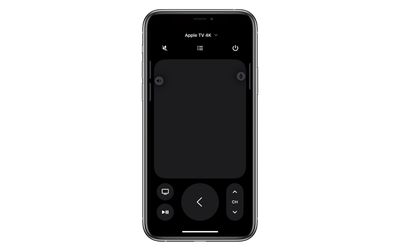
In iOS 14, the current Remote UI takes cues from the previous-generation Siri Remote, with Menu, Siri, Play/Pause and Home buttons below a large gesture pad, mirroring the glass touch surface.
Likewise, the new UI in many ways resembles the redesigned new-generation Siri Remote, and now includes Back, Mute, Power, and channel buttons, while the iPhone's physical Side/Power button becomes the Siri button.
Despite these welcome changes in the iOS 15 beta, there are still some bugs that Apple needs to iron out to get the new Siri Remote working consistently, so it may not be wise to update to the iOS 15 public beta as soon as it becomes available in July just to start using it. iOS 15 will be officially released in the fall.
Popular Stories
MacRumors contributor Aaron Perris has uncovered an image file from Apple for an unreleased Apple TV 4K, suggesting that a new model will finally be released soon. The image is specifically for an "Apple TV 4K (4th generation)" model.
Apple TV 4K (4th generation) image (on a gradient)
The image reveals that the Apple TV will have the same external design as the current model, with all of its...
Apple today announced a new subscription initiative that turns paid iCloud+ subscriptions into a broader services bundle in more than 100 countries.
In select countries, Apple says every paid iCloud+ plan, including the cheapest 50GB tier, now includes Apple TV and Apple Arcade "at no additional cost," while family sharing extends the storage, TV and Arcade access to up to five people....
The next iPad mini, HomePod mini, and Apple TV 4K models have all leaked, just a few weeks before the devices are expected to be announced. Specifically, MacRumors contributor Aaron Perris discovered a few of Apple's official images of the devices, confirming their existence and some new features that are planned.
The most notable iPad mini details revealed in today's leak include an A20 Pro ...