Apple Launches Service for Transferring iCloud Photos and Videos to Google Photos - MacRumors
Skip to Content

Apple Launches Service for Transferring iCloud Photos and Videos to Google Photos

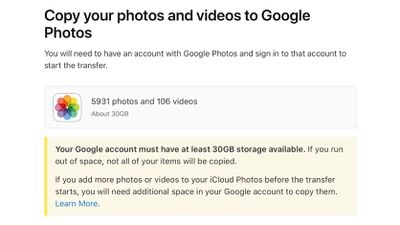
Apple this week introduced a new service that's designed to make it quick and easy for iCloud users to transfer their stored photos and videos to Google Photos.
apple transfer google photos 1
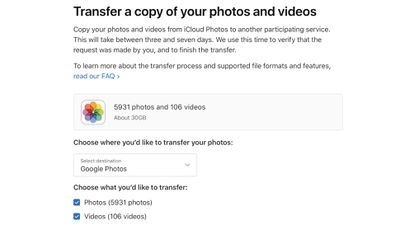
As outlined in an Apple support document, you can go to Apple's privacy website and sign in to see the "Transfer a copy of your data" option. If you select this and go through all the steps, Apple will transfer your ‌iCloud‌ photos and videos to Google ‌Photos‌.

Transferring photos and videos from iCloud Photos does not remove the content you have stored with Apple, but it provides a backup method and stores a copy of the content on Google ‌Photos‌.

apple transfer google 2
The transfer process takes between three and seven days, with Apple verifying that the request was made by you. To do the transfer, you must have two-factor authentication turned on for your Apple ID account and you must have a Google ‌Photos‌ account with enough storage to complete the transfer.

Smart Albums, Live Photos, photo stream content, some metadata, and some RAW photos are not able to be transferred, but formats including .jpg, .png, .webp, .gif, some RAW files, .mpg, .mod, .mmv, .tod, .wmv, .asf, .avi, .divx, .mov, .m4v, .3gp, .3g2, .mp4, .m2t, .m2ts, .mts, and .mkv are compatible.

Only the most recent edit of a photo is transferred rather than the original version, and duplicates appear as just one photo. Images are transferred in their albums whenever possible, but videos are transferred separately.

Apple's transfer service is available to customers in Australia, Canada, the European Union, Iceland, Liechtenstein, New Zealand, Norway, Switzerland, the United Kingdom, and the United States at this time.


Top Rated Comments

cmaier Avatar
67 months ago

Great, now they want my google user and password.
Why not just give me the option to download everything?
Who says Apple gets your Google id and password? Don’t you just authenticate with Google and Apple gets a token that you have successfully authenticated?
Score: 41 Votes (Like | Disagree)
67 months ago
What about moving photos from Google Photos to iCloud?
Score: 26 Votes (Like | Disagree)
67 months ago
If I wanted Google to have all my photos, I'd already be using their service.

Nice of Apple to provide an option for moving between platforms.

Not that I think it's anything to do with being nice, more likely a defensive maneuver to help against any monopolistic accusations.
Score: 24 Votes (Like | Disagree)
67 months ago
Ah yes, perfect for when Google cancels the service at a random point in time
Score: 21 Votes (Like | Disagree)
67 months ago
This seems like a win for privacy.
Score: 13 Votes (Like | Disagree)
67 months ago

Great, now they want my google user and password.
Why not just give me the option to download everything?
If you have a large photo library (tens of thousands) in iCloud, I've found the best way to download them all is by signing in to the Apple ID website --> go to Manage Your Data & Privacy --> click on Request a copy of your data --> scroll down to the bottom of the page and select iCloud Photos. Then just follow the instructions.

It may take a day or two for Apple to prepare the download, but you'll get every photo / video you've uploaded to iCloud from every device you've signed in and turned on iCloud Photos, including everything in your shared albums and from your photo stream (pre iCloud photo).

You'll get notified via e-mail when everything's ready for download.

This works pretty well (and much more complete than downloading directly from iCloud Photos) if you want to backup to a local drive for redundancy.
Score: 9 Votes (Like | Disagree)