Apple Shares Manual on How to Lock Down Devices When Personal Safety is at Risk - MacRumors
Skip to Content

Apple Shares Manual on How to Lock Down Devices When Personal Safety is at Risk

Apple recently shared a manual [PDF] that outlines the steps that one should take to protect their devices and their data when personal safety is at risk. This is designed for people who need to protect themselves from being tracked by a former loved one, a stalker, or another malicious person.
findpeoplefindmy
There are a lot of location sharing and data sharing tools that are available in iOS, and those who aren't as familiar with how those services work will find detailed instructions on protecting their location, data, and more.

If you're concerned that someone is accessing information you did not share from your Apple device, this guide will also help you identify risks, and walk you through the steps to help make the technology you rely on as private and secure as you want it to be.

The document instructs users to update their software to the latest version of iOS, restore the device to factory settings, and protect a device with a passcode, passwords, Touch ID, and Face ID. It has steps for protecting an Apple ID with two-factor authentication and details on how to use built-in privacy tools to prevent apps from accessing data.

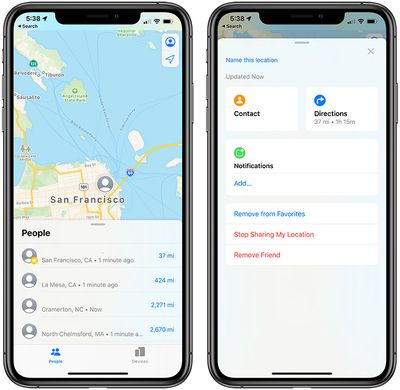
There are also walkthroughs on making sure location information isn't shared with people that it shouldn't be in the Find My app, and ensuring that iCloud data, photos, calendars, and more are protected and not shared.


The document includes steps on deleting unknown third-party apps and unknown configuration profiles that may be used maliciously for tracking purposes.

It wraps up with several checklists on how to determine if anyone else has access to a device or account, how to to stop sharing with people previously shared with, and how to make sure no one else can see a device's location.

Popular Stories

Four iPhone 18 Pro Colors Mock Feature

iPhone 18 Pro Launching Later This Year With These 10 New Features

Tuesday May 26, 2026 6:32 am PDT by
While the iPhone 18 Pro and iPhone 18 Pro Max are not launching until September, there are already plenty of rumors about the devices. It was initially reported that the iPhone 18 Pro models would have fully under-screen Face ID, with only a front camera visible in the top-left corner of the screen. However, the latest rumors indicate that only one Face ID component will be moved under the...
apple wallet drivers license feature iPhone 15 pro

Apple Just Expanded iPhone Driver's License Feature to Arkansas

Wednesday May 27, 2026 9:41 am PDT by
In select U.S. states, residents can add their driver's license or state ID to the Apple Wallet app on the iPhone and Apple Watch, and then use it to display proof of identity or age at select airports and businesses, and in select apps. Starting today, the feature is available in Arkansas, which is the 14th state to offer it. However, it may take some time to roll out to all users. To...
Apple Watch Blood Glucose Monitoring Feature 2

Apple Watch for Diabetes: The Latest on Apple's Plans for Non-Invasive Blood Sugar Monitoring

Tuesday May 26, 2026 9:30 am PDT by
For many years now, it has been rumored that the Apple Watch will eventually gain non-invasive blood sugar monitoring capabilities, which would enable millions of people with diabetes to track their blood glucose levels without needing to prick their skin with a needle or wear a dedicated continuous glucose monitor. According to Bloomberg's Mark Gurman, Apple recently shifted oversight of...

Top Rated Comments

iObama Avatar
71 months ago
This is very, VERY cool. I hate to heap too much praise on a $1t corporation in the year 2020, but this will absolutely save lives and help people get free from abusive situations.

Proud to be an Apple fanboy today :)
Score: 11 Votes (Like | Disagree)
71 months ago
This is really useful. I'm especially into this

It wraps up with several checklists on how to determine if anyone else has access to a device or account, how to to stop sharing with people previously shared with, and how to make sure no one else can see a device's location.

Score: 9 Votes (Like | Disagree)
Jefe's MacAir Avatar
71 months ago
This is great.

Score: 7 Votes (Like | Disagree)
johnmarki Avatar
71 months ago
The more privacy info, tutorials, and OS updates Apple wants to roll out, the better.
Score: 6 Votes (Like | Disagree)
alexandr Avatar
71 months ago
sharing your activity with apple watch may inform your stalker how much and how fast you are running away.
Score: 6 Votes (Like | Disagree)
iamgalt Avatar
71 months ago
"Apple is only doing this to put more strain on small businesses and are only looking to protect their interests."

-Mark Z.
Score: 5 Votes (Like | Disagree)