Video Demos Performance Differences Between 8GB and 16GB Apple M1 MacBook Pro - MacRumors
Skip to Content

Video Demos Performance Differences Between 8GB and 16GB Apple M1 MacBook Pro

All of the M1 Mac models use the same ‌M1‌ chip, so the upgrade options are limited to SSD storage space and RAM. We haven't seen many comparisons that demonstrate the difference between a machine with 8GB RAM and the upgraded 16GB RAM option, but Max Tech today shared a video highlighting the performance between an 8GB MacBook Pro and a 16GB ‌MacBook Pro‌.


The video includes a series of benchmark tests, ranging from Geekbench and Cinebench to RAW exporting tests. Geekbench and Cinebench benchmarks didn't demonstrate a difference in performance between the 8GB and 16GB models, but other tests designed to maximize RAM usage did show some differences.

A Max Tech Xcode benchmark that mimics compiling code saw the 16GB model score 122 compared to the 136 scored by the 8GB model, with the lower score being better.
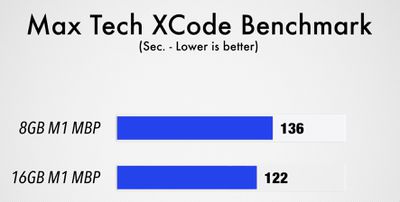
max tech xcode benchmark m1 macbook
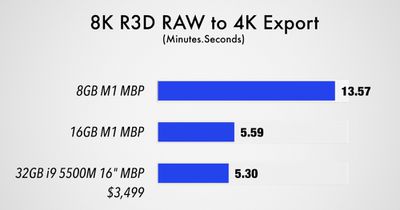
The biggest difference was seen in an 8K RAW R3D to 4K export, which took the 8GB ‌MacBook Pro‌ 13 minutes and 57 seconds to complete, while the 16GB ‌MacBook Pro‌ was able to complete it in 5 minutes and 59 seconds, a time on par with the 2019 16-inch Core i9 ‌MacBook Pro‌ with 32GB RAM.

8k raw to 4k export m1 macbook
Small differences were also seen in a 4K export test and a Lightroom Classic RAW export test, but the results were quite close, coming down to 17 seconds in the Lightroom test. The 16GB model even beat out a $2,300 iMac.
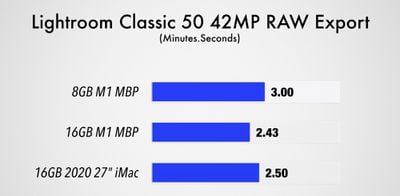
m1 macbook pro lightroom classic
Notably, during these benchmarking performance tests, Max Tech saw low performance temperatures that didn't often require the fans to kick in, which was a huge difference when comparing the ‌M1‌ ‌MacBook Pro‌ models to Intel ‌MacBook Pro‌ models.

Max Tech's video is worth watching in full for those who are trying to decide between a machine with 8GB RAM and a machine with 16GB RAM. There appear to be some minor performance differences when it comes to benchmarks, especially with system intensive tasks, but in day to day usage, the 8GB model holds up well and most people may not need the 16GB upgrade.

Related Roundups: MacBook Air, Mac mini
Related Forums: MacBook Pro, MacBook Air, Mac mini

Popular Stories

Mac mini vs Studio Feature Sans Text 1

Mac Mini and Mac Studio Facing Extreme Shipping Delays Amid Severe RAM Shortage

Monday April 6, 2026 7:12 am PDT by
Apple's online store in the U.S. is currently showing delivery estimates of up to 4-5 months for many Mac mini and Mac Studio configurations with upgraded amounts of RAM. The delays are occurring amid a severe global memory chip shortage driven by surging demand from companies building AI servers that require large amounts of RAM. For example, a Mac mini with an M4 Pro chip and 64GB of RAM...
Mac mini vs Studio Feature Sans Text 1

Apple Stops Accepting Orders for Some Mac Mini and Mac Studio Models

Saturday April 11, 2026 7:35 am PDT by
As noted by 9to5Mac, some Mac mini and Mac Studio configurations are now completely out of stock on Apple's online store in the U.S. as of this writing. Mac mini configurations with an upgraded 32GB or 64GB of RAM and Mac Studio configurations with an upgraded 128GB or 256GB of RAM are listed as "currently unavailable" on the storefront, meaning they can no longer be ordered at all. Other ...
perplexity personal computer

Perplexity Launches Personal Computer for Mac, Turning a Mac mini Into an Always-On AI Agent

Thursday April 16, 2026 1:03 pm PDT by
Perplexity today launched Personal Computer, an expansion of Perplexity Computer that integrates with local files and apps on a Mac. Personal Computer was announced in March and was available on a waitlist basis, but it is officially rolling out today for Max subscribers. Perplexity Computer came out earlier this year, and it's an all-in-one "digital worker" able to create and execute entire ...

Top Rated Comments

LeadingHeat Avatar
71 months ago
This is exactly what I was looking for, thank you MR! Was debating on getting the 16GB Mac mini but it may be good enough with just 8GB!

Second thought, might as well get the 16GB for future proofing.

But then what if I don’t actually need it and it’s a waste? Here we go again
Score: 38 Votes (Like | Disagree)
Populus Avatar
71 months ago
Beware of the swap disk space!

In most of the benchmarks performed on 8GB M1 machines, if Activity Monitor is shown, the swap space usage is always between 2,5GB and 4GB or even more. In my 10 years of being a mac user, I’ve never seen such big swap space being used unless I’m stressing my machine heavily, and that usage may be aging your SSD.


I have my choice clear, 16GB, even if it’s just for future-proofing my purchase.
Score: 33 Votes (Like | Disagree)
71 months ago

You buy this today tomorrow they will release new one then another new one ,goes on and on .This all waste of money and trap from Apple
I Just get top of the line current 13”2.3 GHz i7,32 Gb,1 Tb that’s it i also have 16”2.4 GHz i9,32 Gb,2 tb
Both works well and i can do whatever i wanna do with them
Plus I have loaded 2013 Mac Pro desktop
All this will let me do my job for next 5 years or more
Why should i sale my Macs to get this M1 ?
You can’t win this Apple win :) they want u to spend all your money lol
What a ridiculous post. The same can be said with Dell, HP, Lenovo and Microsoft. Your trolling isn't helpful here.
Score: 29 Votes (Like | Disagree)
coolbreeze Avatar
71 months ago
The base Air w/8gig is an absolute monster for the price.

Zero regrets here. It's amazing.

And I didn't want to "future proof" (lol) a rev.A machine...wanted the lowest possibly entry price and will of course buy the M3x or whatever in 2 or so years. I think I'm going to offload my Thinkpads....that's how good this machine is.
Score: 26 Votes (Like | Disagree)
mikethebigo Avatar
71 months ago
I really think this is a bad video, or at least a misleading one. He never really looks at swap space, and he doesn't go over fast app switching, which is a far more common use case than the intense CPU benchmarks he uses. Beware, when your M1 Mac is using swap, there is a brief bit of lag and "pop in" when you go back to programs you haven't used in a while. I exchanged for a 16 GB model and that problem disappeared. It's not a huge deal, but I hate when active programs are doing a bunch of swapping.
Score: 25 Votes (Like | Disagree)
71 months ago

This is exactly what I was looking for, thank you MR! Was debating on getting the 16GB Mac mini but it may be good enough with just 8GB!

Second thought, might as well get the 16GB for future proofing.

But then what if I don’t actually need it and it’s a waste? Here we go again
Future proof a $700 device? Just buy a new one in few years :)

edit: wow, this is a popular post. Haha
Score: 23 Votes (Like | Disagree)