Apple TV YouTube App Rolling Out 4K Support
One of the new tvOS 14 features highlighted by Apple was support for watching 4K videos in the YouTube app, but when tvOS 14 launched, Apple TV 4K users quickly noticed that support wasn't available.
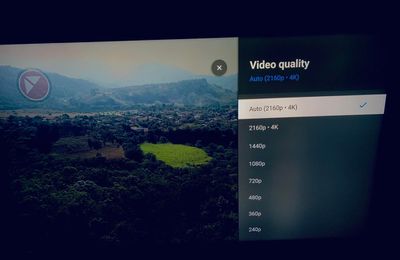
That appears to be changing, as there are reports on Reddit (via FlatpanelsHD) that support for 4K YouTube videos is starting to roll out. Multiple users have reported seeing 4K playback options in the YouTube app on tvOS 14, tvOS 14.0.1, and tvOS 14.2.
4K support has not yet rolled out to all users, however, as in our tests, we were not able to access 4K YouTube content and continued to have a 1080p limitation. While 4K content appears to be available, those with access are still not able to enable HDR, and 4K videos are limited to 30 frames per second.
It's unclear if the lack of HDR is temporary or a limitation on the 4K Apple TV, and it's also not known when 4K content will be available for all. It seems to be rolling out though, so there may not be too much longer to wait. YouTube in September said that Apple TV 4K would support 4K YouTube playback "soon."
Popular Stories
Just two days before Apple's "Welcome home" experience in New York, Bloomberg's Mark Gurman has leaked several details about the new products set to be unveiled, including an all-new smart home hub, a HomePod mini 2, and a new Apple TV 4K.
Here is an all-in-one summary of the details shared by Gurman:Apple's home hub with a touch-enabled display will be named HomeView, seemingly confirming a ...
Apple today announced the fourth-generation Apple TV 4K, with key features including an A19 chip, Siri AI support, an updated Siri Remote that has Find My support with Precision Finding, built in far-field microphones, support for surround sound with four HomePods in front and rear pairs, and more.
The A19 chip in the new Apple TV 4K delivers up to 50% faster CPU performance and up to twice...
Apple plans to introduce a series of new smart home products on Tuesday, October 13, according to Bloomberg's Mark Gurman.
Apple reportedly plans to debut its long-awaited smart home hub device, a new HomePod mini, and a new Apple TV on the date. The new HomePod mini and Apple TV are set to retain their existing designs, but tout faster chips to support Siri AI. The new HomePod mini will...