What's New in iOS 14 Beta 6: Spatial Audio Settings, Maps Splash Screen and More - MacRumors
Skip to Content

What's New in iOS 14 Beta 6: Spatial Audio Settings, Maps Splash Screen and More

Apple's WWDC 2026 Keynote: Follow along with our live blog.

Apple today seeded the sixth betas of iOS 14 and iPadOS 14 to developers for testing purposes, updating and refining some of the features that are included in the software.

As the beta testing period goes on, changes get much smaller and less notable. The sixth beta has some minor tweaks and feature additions, but there are no real major changes in the update. We've listed all of what's new in the sixth beta of iOS 14 below.

- Time Picker Design - The time picker interface, available in the Clock app when setting an alarm and other places in iOS, has seen a slight design tweak that adds an orange box around the time to make it more obvious that it can be interacted with to change the time.
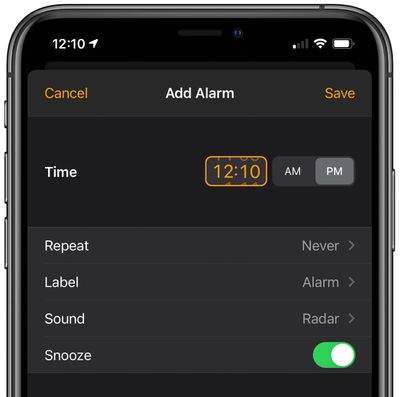
ios14timepicker
- Spatial Audio - Spatial Audio, the feature that brings surround sound to the AirPods Pro, isn't implemented as of yet, but Apple appears to be gearing up to add the feature to iOS 14 and the AirPods Pro. In today's beta, there's a new Spatial Audio toggle available in the Accessibility section of the Settings app. Choose AirPods and then at the bottom of the screen, there's a "Follow iPhone" toggle. Follow iPhone makes audio for supported movies and TV shows sound like it's coming from the phone instead of following head movement. There's also new code and internal messaging related to the spatial audio feature. Though this toggle is available, Spatial Audio is not yet functional.
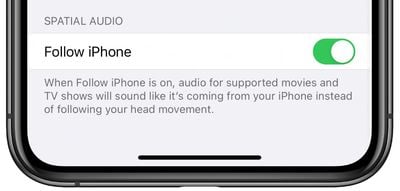
spatialaudioios14
- Maps Splash Screen - There's a new splash screen for the Maps app that lets you know about new features that include cycling directions, curated guides, and support for speed cameras.
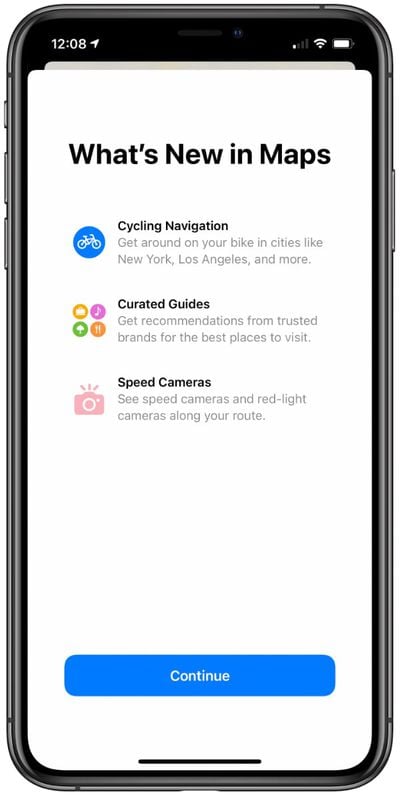
ios14mapssplashscreen
Know of any other changes in ‌iOS 14‌ beta 6 that we didn't list here? Let us know in the comments and we'll add them.

Related Forum: iOS 14

Popular Stories

Aston Martin CarPlay Ultra Screen

Apple Says CarPlay Ultra is Coming to These Vehicle Brands

Thursday May 21, 2026 11:53 am PDT by
Last year, Apple launched CarPlay Ultra, the long-awaited next-generation version of its CarPlay software system for vehicles. Nearly a year later, CarPlay Ultra is still limited to Aston Martin's latest luxury vehicles, but that should change fairly soon. In May 2025, Apple said many other vehicle brands planned to offer CarPlay Ultra, including Hyundai, Kia, and Genesis. CarPlay Ultra...
ios 26 iphone 16 pro lock screen notifications feature 1

iOS 27 Notifications Will Slide in From Left Side of Your iPhone's Screen

Friday June 5, 2026 7:24 am PDT by
Bloomberg's Mark Gurman today revealed another iOS 27 change: notifications will slide in from the left side of the screen instead of from the top. In addition, accessing Notification Center on iOS 27 will require swiping down on the top-left corner of the screen. If you swipe down on the Dynamic Island area, a new "Search or Ask" interface tied to the revamped Siri will appear, instead of...
WWDC26 Mock Feature 2

Will Apple Launch New Hardware at WWDC Next Week?

Friday June 5, 2026 7:56 am PDT by
Apple has several hardware releases in the pipeline, but will we see any of them unveiled at this year's Worldwide Developers Conference? WWDC is primarily a software event where new versions of iOS, iPadOS, macOS, watchOS, tvOS, and visionOS take center stage, but it's not unusual for Apple to introduce new hardware during the developer conference. Take WWDC 2017, for example, where Apple...

Top Rated Comments

zorinlynx Avatar
76 months ago
Any speculation on what was wrong with the old time picker UI and why they felt the need to change it?

The old one feels more intuitive and easier to use.
Score: 19 Votes (Like | Disagree)
Krazy_Peanut Avatar
76 months ago
I hate how you have to add time now. I keep fu**ing it up when setting the time within calendar. It really isn’t that user friendly at all.
Score: 13 Votes (Like | Disagree)
AngerDanger Avatar
76 months ago

The time picker interface … has seen a slight design tweak that adds an orange box around the time
Be still my beating heart!
Score: 10 Votes (Like | Disagree)
SkimPappa Avatar
76 months ago

You could not have possibly redesigned the app in a more less user-friendly or intuitive way. I am dead serious. It is probably the worst example of user interface design I’ve ever seen as a 34 year old. They need to fire whoever has been designing their UI lately IMO, because most of it has been awful or questionable.
I hate using the alarm clock now.
Score: 9 Votes (Like | Disagree)
jrodri7 Avatar
76 months ago

So what features do you guys think will be cut ahead of release and pushed off to a later iOS 14.X update? Seems to happen every year now. I think Spatial Audio might be delayed.

I wonder if they are going to allow us to change our default mail and internet browser apps during the Beta.

Edit: Also I believe that "time picker" design was implemented prior to Beta 6.
The orange box around the time picker box is what changed in beta 6. It was not there in beta 5.
Score: 8 Votes (Like | Disagree)
76 months ago

That spatial audio function sounds really weird. Why would I want the sound to appear like it's coming from my phone instead of playing directly into my skull as usual?
I think Spatial audio with movies is just a stepping stone until they release Apple AR glasses, when positioning audio relative to your environment will be a key feature for suspension of belief.
Score: 7 Votes (Like | Disagree)