

Skip to Content

SoundSource 5 Brings a Streamlined Interface and More to the Powerful Mac Audio Control Utility

Longtime Mac developer Rogue Amoeba today announced the launch of SoundSource 5, the next-generation version of its software utility that gives you much greater control over audio on your Mac.
soundsource 5
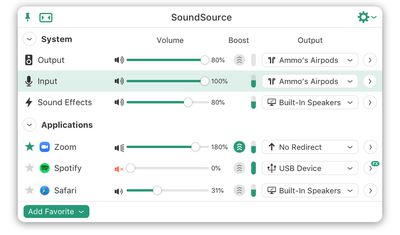
For those unfamiliar with SoundSource, it lives right in the menu bar and gives you quick access to volume levels and input/output devices, as well as the ability to adjust volume levels and output devices on a per-app basis. Audio effects like equalizers can also be applied on a per-app basis.

SoundSource 5 brings a revamped interface with a streamlined main window that can optionally be made even slimmer with a Compact view, and there's a new menu bar icon that displays a rough gauge of the current volume level of your default output device.

With per-app audio controls, SoundSource 5 now automatically manages the apps displayed in the list, adding them whenever they are producing audio and removing them when they stop. Favorited apps will remain in the list permanently.

The new update also adds support for multiple menu meters, letting you optionally see activity for default input and output devices, as well as active apps. The meters also provide one-click access for quickly muting any of the sources.

soundsource 5 eq
Updates for audio effects include an optimized Magic Boost that uses less CPU to provide richer sound, a simplified default view for the pinnable 10-band equalizer, and more.

SoundSource 5 is available as a free full-featured trial, which degrades the quality of its audio adjustments after 20 minutes per launch. A full license is normally priced at $39, but there's a discounted $29 rate available through the end of the month. Owners of SoundSource 4 can upgrade for $19, or a complimentary upgrade if you purchased SoundSource 4 on or after May 1.

For those currently running the macOS Big Sur beta, it's important to note that SoundSource 5 is not yet compatible with the upcoming version of macOS. An update for SoundSource will be available prior to the public launch of Big Sur. SoundSource 5 is fully compatible macOS Catalina, Mojave, and High Sierra.


Popular Stories

MacBook Neo Feature Pastel 1

First MacBook Neo Benchmarks Are In: Here's How It Compares to the M1 MacBook Air

Thursday March 5, 2026 4:07 pm PST by
Benchmarks for the new MacBook Neo surfaced today, and unsurprisingly, CPU performance is almost identical to the iPhone 16 Pro. The MacBook Neo uses the same 6-core A18 Pro chip that was first introduced in the iPhone 16 Pro, but it has one fewer GPU core. The MacBook Neo earned a single-core score of 3461 and a multi-core score of 8668, along with a Metal score of 31286. Here's how the...

imac video apple feature

Apple Unveils Seven New Products

Friday March 6, 2026 11:48 am PST by
Apple this week unveiled seven products, including an iPhone 17e, an iPad Air with the M4 chip, updated MacBook Air and MacBook Pro models, a new Studio Display, a higher-end Studio Display XDR, and an all-new MacBook Neo that starts at just $599. iPhone 17e features the same overall design as the iPhone 16e, but it gains Apple's A19 chip, MagSafe for magnetic wireless charging and magnetic...
Apple MacBook Pro M4 hero

Apple Planning 'MacBook Ultra' With Touchscreen and Higher Price

Sunday March 8, 2026 8:05 am PDT by
Apple is planning to launch an all-new "MacBook Ultra" model this year, featuring an OLED display, touchscreen, and a higher price point, Bloomberg's Mark Gurman reports. Gurman revealed the information in his latest "Power On" newsletter. While Apple has been widely expected to launch new M6-series MacBook Pro models with OLED displays, touchscreen functionality, and a new, thinner design...

Top Rated Comments

WildCowboy Avatar
73 months ago

Paid press release?
For the umpteenth time, we don't do paid articles.

Mac stuff tends to get overlooked in the age of the iPhone, so sometimes we like to give a little extra love to the Mac ecosystem and our roots. There's not much more to it than that.
Score: 14 Votes (Like | Disagree)
WildCowboy Avatar
73 months ago

The simple fix for this is to put one sentence at the top of each of these things saying exactly that. Then you won't have to defend yourself for the umpteenth+1 time.
That isn't terribly feasible, disrupting each article from the start with a sort of reverse disclosure. On the relatively infrequent occasions where we've received something associated with an article, such as a product for review (reviews are about the only area where this happens), we disclose that at the bottom of the article. If there's no disclosure, it should be safely assumed there's no compensation.

The assumptions by readers of unethical behavior on our part really confuse me.
Score: 8 Votes (Like | Disagree)
73 months ago
I really find Rogue Amoeba's lineup confusing. Sound Source, Loopback and Audio Hijack seem to overlap somewhat, yet have very different UIs. I wish there was some clearer messaging which app is for whom, or some kind of feature matrix.
Score: 8 Votes (Like | Disagree)
73 months ago
Rogue Amoeba is an OG indie Mac developer, and I appreciate the updates I find here.
Score: 3 Votes (Like | Disagree)
73 months ago
Paid or not it's not bad i had used eqMac before but it's buggy this does work, would like to get other peoples experience
Score: 2 Votes (Like | Disagree)
73 months ago
Crazy that this isn't already built in, especially with Big Sur since they could easily add some more volume sliders in the new Control Center. One of the things i missed going from Windows to macOS
Score: 2 Votes (Like | Disagree)









































