

Spotify Now Lets Premium Users Hide Songs They Dislike Within Playlists - MacRumors
Skip to Content

Spotify Now Lets Premium Users Hide Songs They Dislike Within Playlists

by

Spotify today rolled out a new feature that lets its Premium users hide songs that they don't want to hear within a playlist. Spotify said this feature is rolling out to users on both the iOS and Android versions of the app (via The Verge).
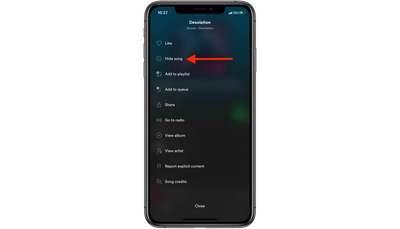
spotify hide song
With the new feature, Premium subscribers can go into any playlist on Spotify, select a song, and choose "hide song" from the context menu. Afterwards, when listening through the playlist, the hidden song will always be automatically skipped.

If you change your mind, you can un-hide songs as well. Spotify is hoping that this small update lets subscribers slightly customize its curated playlists, which can sometimes still offer tracks that they dislike.

Spotify has been rolling out a few updates over the past few weeks. Most recently it began supporting Siri voice controls on the Apple Watch, and last month it introduced a new home screen UI meant to guide users to their favorite content with more ease.


Tag: Spotify

Top Rated Comments

69Mustang Avatar
81 months ago

Funny. On my iPhone, none of my Playlists ever have songs I don’t want to listen to. I only put songs on there that I want on that playlist. I thought that was the point.
This is about playlist curated by others. That's the point. ;)
Score: 14 Votes (Like | Disagree)
81 months ago
Hide artist would be nice too. There is too much garbage music in some otherwise good playlists.
Score: 7 Votes (Like | Disagree)
roland.g Avatar
81 months ago
Funny. On my iPhone, none of my Playlists ever have songs I don’t want to listen to. I only put songs on there that I want on that playlist. I thought that was the point.
Score: 4 Votes (Like | Disagree)
fel10 Avatar
81 months ago
Now, bring us lyrics.
Score: 4 Votes (Like | Disagree)
Wando64 Avatar
81 months ago

Not going back to Spotify until they offer lossless compression. Their tracks sound so flat. Using Tidal and good-old-fashioned CDs right now.
Have you selected the high quality setting available to premium users?
i can’t say I have noticed any problem in the sound quality. (I am a musician)
Score: 2 Votes (Like | Disagree)
81 months ago
I wish my Apple Music would actually feature at least one song I'd like to hold on to in the New Music playlist each week, but this seldom happens. Sure, it does feature artists I listen to, but the songs are usually not my cup of tea.
Score: 2 Votes (Like | Disagree)

Popular Stories

iphone 16 teal

'Siri AI' Lawsuit Update: Apple to Pay Owners of These iPhone Models

Thursday July 9, 2026 7:08 am PDT by
In May, Apple agreed to pay $250 million to settle a U.S. class action lawsuit over Siri AI's delayed launch, and eligible iPhone users could receive up to a $95 payout. This week, the California court overseeing the case held a hearing regarding preliminary approval of the settlement, but the judge has not yet issued a ruling. It will likely be at least a few more months before eligible...
Apple TV Thumb 3

Everything Coming in the 2026 Apple TV 4K

Wednesday July 8, 2026 4:51 pm PDT by
The Apple TV 4K hasn't been updated since 2022, and it's due for a refresh. An update is planned for 2026, but Apple is likely going to wait to launch it after Siri AI launches in iOS 27. Design Apple TV design updates don't happen often, and that's not changing. The next Apple TV is going to have the same squircle shape as the current model, and it'll continue to be made from a black...
apple wallet drivers license feature iPhone 15 pro

Apple Says iPhone Driver's Licenses Will Expand to These 6 U.S. States

Thursday July 9, 2026 7:29 am PDT by
In select U.S. states, residents can add their driver's license or state ID to the Apple Wallet app on the iPhone and Apple Watch, and then use it to display proof of identity or age at select airports and businesses, and in select apps. To set up the feature, open the Wallet app on the iPhone and tap on the plus sign in the top-right corner. Next, tap on Driver's License and ID Cards,...








































