

Skip to Content

iOS Vulnerability Prevents VPNs From Encrypting All Traffic

A vulnerability affecting iOS 13.3.1 and later prevents virtual private networks (VPNs) from encrypting all traffic, allowing some internet connections to bypass encryption, potentially exposing users' data and IP addresses.
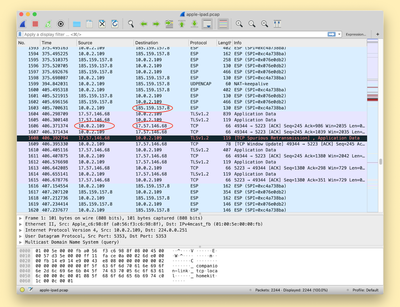
ios device network ip wireshark

A screenshot from ProtonVPN demonstrating exposed connections to Apple's servers that should be protected by the VPN

Details on the vulnerability were shared today by Bleeping Computer after it was discovered by ProtonVPN. The vulnerability is caused because iOS isn't terminating all existing connections when a user connects to a VPN, allowing them to reconnect to destination servers once the VPN tunnel has been established.

Connections made after connecting to a VPN on an iOS are not affected by this bug, but all previously established connections are not secure. This could potentially lead to a user who believes they are protected accidentally exposing IP an address and therefore, an approximate location.

Apple's Push Notifications are cited as an example of a process using connections on Apple's servers that aren't closed automatically when connecting to a VPN, but it can affect any app or service running on a user's device.

VPNs cannot work around the issue because iOS does not allow VPN apps to kill existing network connections, so this is a fix that will need to be implemented by Apple. Apple is aware of the vulnerability and is looking into options to mitigate it.

Until fixed, VPN users can connect to a VPN server, turn on Airplane Mode and then turn off Airplane Mode to kill all existing connections. The mitigation isn't entirely reliable, however, so iPhone and iPad owners who rely on VPNs should be careful until Apple puts out a fix.


Popular Stories

MacBook Neo Feature Pastel 1

First MacBook Neo Benchmarks Are In: Here's How It Compares to the M1 MacBook Air

Thursday March 5, 2026 4:07 pm PST by
Benchmarks for the new MacBook Neo surfaced today, and unsurprisingly, CPU performance is almost identical to the iPhone 16 Pro. The MacBook Neo uses the same 6-core A18 Pro chip that was first introduced in the iPhone 16 Pro, but it has one fewer GPU core. The MacBook Neo earned a single-core score of 3461 and a multi-core score of 8668, along with a Metal score of 31286. Here's how the...
MacBook Neo Feature Pastel 1

Apple Announces $599 'MacBook Neo' With A18 Pro Chip

Wednesday March 4, 2026 6:15 am PST by
Apple today announced the "MacBook Neo," an all-new kind of low-cost Mac featuring the A18 Pro chip for $599. The MacBook Neo is the first Mac to be powered by an iPhone chip; the A18 Pro debuted in 2024's iPhone 16 Pro models. Apple says it is up to 50% faster for everyday tasks than the bestselling PC with the latest shipping Intel Core Ultra 5, up to 3x faster for on-device AI workloads,...
Multicolored Low Cost A18 Pro MacBook Feature

Apple Accidentally Leaks 'MacBook Neo'

Tuesday March 3, 2026 7:00 am PST by
Apple appears to have prematurely revealed the name of its rumored lower-cost MacBook model, which is expected to be announced this Wednesday. A regulatory document for a "MacBook Neo" (Model A3404) has appeared on Apple's website. Unfortunately, there are no further details or images available yet. While the PDF file does not contain the "MacBook Neo" name, it briefly appeared in a link...

Top Rated Comments

Will Tisdale 🎗 Avatar
78 months ago

This is 100% fake and not a bug. All VPNs, such as those on the desktop, do this by default unless specifically configured, as to not interrupt ongoing downloads, or worse, cause UDP-based services to silently fail.
I don’t think so.
iOS used to handle this correctly, then stopped.
Not tearing down existing connections completely undermines the point of a VPN.
Score: 11 Votes (Like | Disagree)
Will Tisdale 🎗 Avatar
78 months ago

Nope. I have two full tunnels on two different clients (Cisco Anyconnect, and Pulse Secure)
Well, I can tell you that Anyconnect will tear down any active connections, assuming it’s configured correctly. My work VPN certainly does.

TCP is designed to retry after being torn down. It’s no biggie.

The fact is, this is an iOS bug, which was introduced recently.
Score: 5 Votes (Like | Disagree)
78 months ago
This is 100% fake and not a bug. All VPNs, such as those on the desktop, do this by default unless specifically configured, as to not interrupt ongoing downloads, or worse, cause UDP-based services to silently fail. Windows built-in VPN client has this exact same behavior.
Score: 3 Votes (Like | Disagree)
Westside guy Avatar
78 months ago
I’m sometimes stunned by the upvotes people get for posting incorrect information.

If a VPN is configured to send all network traffic through the VPN when it’s running - which is typically what‘s done - then all traffic should be routing through it from the moment it’s enabled. Not just connections to new end points established afterward - all traffic.

Even if a VPN is configured to just carry traffic to a few specific end points (such as the OpenVPN tunnel to our servers, which I’m relying on heavily right now due to the stay at home order currently in place here in Washington): if you’re already connected to one of those end points before establishing the tunnel, you would expect all further traffic to go through the tunnel. The idea that you wouldn’t is ludicrous.
Score: 3 Votes (Like | Disagree)
Will Tisdale 🎗 Avatar
78 months ago

I feel like we need more info here.

As others have said, it would be problematic to silently kill existing connections when connecting to a VPN. That's certainly not the behavior I would expect. I suppose it depends on whether you use a VPN to add certain networks (such as your corporate office), or to globally route all your traffic (such as for privacy reasons). In the former case, I don't want my non-office connections to be reset.

If MacRumors is reporting this right and VPN apps cannot reset connections, that makes me wonder what changed here. Did iOS previously indeed terminate any open socket when connecting?
I feel that people need to learn about the expected behaviour of VPNs before commenting.
There’s actually two types on iOS. Split vpn and full tunnel. Split allows some stuff to be routed elsewhere. Full tunnel tunnels everything.
Score: 3 Votes (Like | Disagree)
Square-Eyes Avatar
78 months ago
I got caught out by the fact that if you tether a device to your phone it will bypass the phone’s VPN 😡🤦‍♂️
Score: 2 Votes (Like | Disagree)















